

XD_it
Associate III
January 11, 2024
Solved

TouchGFX text translations typed text ID

  • January 11, 2024
  • 1 reply
  • 2770 views

Im trying to use the TouchGFX designer "text & translations" as a database of sorts.

I've tried to use the function getText(text id) from the Reference but i'm not able to locate the text ID. The code below is from the TouchGFX framework.

const touchgfx::Unicode::UnicodeChar* touchgfx::Texts::getText(TypedTextId id) const
{
 return &currentLanguagePtr[currentLanguageIndices[id]];
}

Searching through the project files for the TouchGFX Designer text ID returns the texts.xml file with IDs but that is more of an internal framework thing.

I simply want to do the following.

setLanguage(GB);
Text_GB = getText(Save);

setLanguage(DE);
Text_DE = getText(Save);

//Text_GB would be Save
//Text_DE would be Speichern

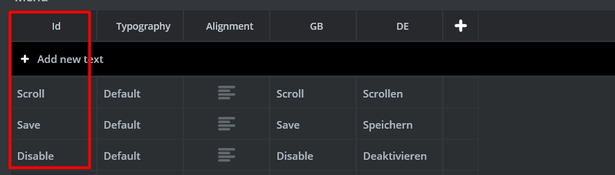
Below is an image from the designer with the IDs.
AlX1TDf


How would i go about doing this within the TouchGFX framework?
Any help is appreciated!

Best answer by Mohammad MORADI ESFAHANIASL

Oh I thought you already have the rest of the code, and you needed that specific function. 
If you want to get the text of the specified TextID, I suggest you to use this method instead:

const Unicode::UnicodeChar * textOfID = touchgfx::TypedText(T_SAVE).getText();


Let me know if you have more questions

1 reply

ST Employee
January 12, 2024

Hello @XD_it 

Have you added "#include <texts/TextKeysAndLanguages.hpp>" to your project? You need this header to access the text IDs. But, keep that in mind that ids start with a capital T as prefix to the IDs you set. So, for instance, Save would be T_SAVE and you can see it in the included header. 
And it is also worth mentioning that you need to use the touchgfx::Text namespace to access getText() and setLanguage() (But, I assume you already know this).

I hope this helps you, good luck!

Mohammad MORADIST Software Developer | TouchGFX
XD_it
XD_itAuthor
Associate III
January 12, 2024

Hi @Mohammad MORADI ESFAHANIASL 

Thanks for the info!
I just tried your suggestion but i'm unsure how to proceed.

getText(); is a part of the Texts class but what object should i use to access the getText function?

Unicode::UnicodeChar* Text = touchgfx::Texts::OBJECT.getText(T_SAVE);

I shouldn't have to create a local "copy object" to access the text since it is already instantiated somewhere in the framework?
Maybe i have the wrong understanding?

ST Employee
January 12, 2024

Oh I thought you already have the rest of the code, and you needed that specific function. 
If you want to get the text of the specified TextID, I suggest you to use this method instead:

const Unicode::UnicodeChar * textOfID = touchgfx::TypedText(T_SAVE).getText();


Let me know if you have more questions

Mohammad MORADIST Software Developer | TouchGFX