


MM..1
Super User
November 16, 2020
Solved

TouchGFX list items limited to 7. Howto extend?

  • November 16, 2020
  • 4 replies
  • 1204 views

I use on screen scrolllist and in base.hpp have

touchgfx::DrawableListItems<MenuItem, 7> scrollList1ListItems;

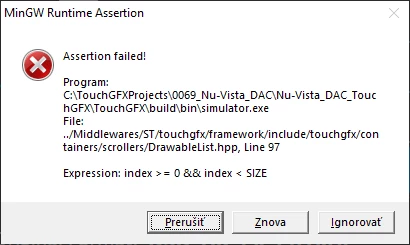
Where number 7 i cant change and when menu have 8 or more lines app crash.

I make more diagnostic and locate, that TouchGFX can show and scroll by touch or in simu mouse any number of items, but when my user function try call method to customcontainer app crash.

This is function for move cursor down:

void Screen4View::curdown()
{ 
	scrollList1ListItems[cursorpos].selit(0); 
	if (cursorpos < scrollList1.getNumberOfItems()-1) 
 {
 cursorpos++;
 }
	else cursorpos=0;
 //here crash
	scrollList1ListItems[cursorpos].selit(1);
	scrollList1.animateToItem(cursorpos,14); 
scrollList1.invalidate();
}

crash on marked line when cursorpos > 6

Help.0693W000005BV9aQAG.png
This topic has been closed for replies.
Best answer by MM..1

I solve it add bool protected sel and use

void Screen4View::curdown()
{
	sel=false;
	scrollList1.itemChanged(cursorpos);
	if (cursorpos < scrollList1.getNumberOfItems()-1)
		{
		cursorpos++;
		}
	else cursorpos=0;
	sel=true;
	scrollList1.itemChanged(cursorpos);
	scrollList1.animateToItem(cursorpos,14);
scrollList1.invalidate();
}

then call selit in Screen4View::scrollList1UpdateItem

TouchGFX use on runtime only limited count of containers based on size list/container + 2 for my screen 7.

4 replies

MM..1
MM..1Author
Super User
November 16, 2020

@Martin KJELDSEN​  i mean this is similar question as unreplied here https://community.st.com/s/question/0D50X0000Amj9wt/scroll-list-addremove

Designer generate non editable base code and screen need in setup part add elements to array scrollList1ListItems. But i dont know how. Please example.

MM..1
MM..1AuthorBest answer
Super User
November 16, 2020

I solve it add bool protected sel and use

void Screen4View::curdown()
{
	sel=false;
	scrollList1.itemChanged(cursorpos);
	if (cursorpos < scrollList1.getNumberOfItems()-1)
		{
		cursorpos++;
		}
	else cursorpos=0;
	sel=true;
	scrollList1.itemChanged(cursorpos);
	scrollList1.animateToItem(cursorpos,14);
scrollList1.invalidate();
}

then call selit in Screen4View::scrollList1UpdateItem

TouchGFX use on runtime only limited count of containers based on size list/container + 2 for my screen 7.

Martin KJELDSEN
Principal III
November 17, 2020

Hi @MM..1​ ,

I'll look into this. You're probably right.

/Martin

Martin KJELDSEN
Principal III
November 17, 2020

Actually - "7" is just the number of visible elements in the list =) It does not make sense to update something that cannot be seen.

Try reducing the size of your list view and see that the generated code changes. And the list view has callbacks for when you're scrolling a new item into view (from top or bottom) so you can place an item at the bottom if that item is about to be scrolled into view. It's an optimization. I think you'll be able to find it in the documentation support.touchgfx.com