

Associate
August 8, 2023
Solved

TouchGFX Lined Output on RGB Display

  • August 8, 2023
  • 17 replies
  • 10123 views

Hello,

My TouchGFX application is outputting a static image in the GUI wrongly and I am unsure where the error stems from.

Board: STM32H747I-DISCO

Display: Innolux G057VCE-TH1   (640wx480h RGB666)

Without TGFX, I am able to output a chosen static image array correctly, and when it is on external memory. Thus, I believe my configuration for the LTDC and FMC is correct. When using TGFX, I set up breakpoints for the LTDC FIFO underrun interrupt handler, and it was never triggered. 

In TGFX Designer, whether I have the orientation as portrait or landscape, and fill it with the image filling the screen, the output is the same.

This project was initially generated from TouchGFX Designer for the discovery board, and I gradually modified it to accommodate this display. An important change was commenting out DSI and old display controller calls (this new screen does not have a controller, it just uses parallel RGB).

When I am debugging, the program does not run into any infinite-while-loop error handlers.

I inspected the generated cpp array of the color bars image and they seem to be fine.

What I notice from the image is that vertical lines are now drawn horizontally and at a slight angle downwards. Instead of gray, yellow, cyan, green, purple, red, blue from left to right, it is now drawing that progression of colors line by line downwards. This is why I suspect that the problem lies in some orientation configuration affecting how the TGFX engine draws pixels to the framebuffer.
This topic has been closed for replies.
Best answer by StephenG

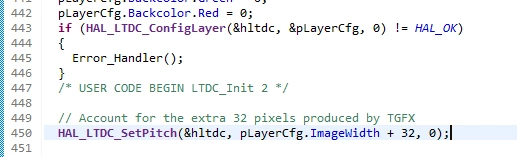
Yes, putting this after the LTDC init functions corrects the image. I still do not know why TGFX adds the 32 pixels of bogus at the end of each line.


StephenG_0-1691606764024.png


17 replies

Graduate II
August 8, 2023

Hello

How you have set the display dimensions and color depth when you create project with TGFX designer ? This setting must match your display layout.

Changing horizontal or vertical orientation doesnt help you, problem is 'deeper'. With working configuration you can select any of those and picture is show right (I mean picture is not distorded).

Br J.T

StephenGAuthor
Associate
August 8, 2023

The project was created for the DISCO board, so those settings were not the same. I updated the LTDC and TGFX settings in CubeMX, and those changes are reflected in what Designer shows. Not shown in the screenshots is that the LTDC GPIO speed are all set to very high.

StephenG_0-1691517407730.png

StephenG_2-1691517472161.png


StephenG_1-1691517442722.png


StephenGAuthor
Associate
August 8, 2023

Designer showing the right display dimensions:

StephenG_3-1691517590848.png


Graduate II
August 8, 2023

OK. When you do test with setting external image to framebuffer, was it 'real' image or just framebuffer filled with some constant value ? I mean can you really know based on this test that LTDC parameters are correct for your display.

BR J.T

StephenGAuthor
Associate
August 8, 2023

It was me filling the framebuffer location with a constant value. Then I should know that the LTDC can grab data from this area and output what's known to be there.

When I involve TGFX, this will generate the data that ends up in the framebuffer. The LTDC behavior shouldn't be changed with the use of TGFX

The image below was me using the generated image cpp file from Designer as a static framebuffer.

StephenG_0-1691518921902.png


Graduate II
August 8, 2023

OK. Maybe I would repeat manual framebuffer test and try draw vertical line there to make sure it works also and once more confirm that it is TGFX side problem.

I suppose you have allready check the data in framebuffer that its really 24 bit and color bars are set correctly there by tgfx ?

Br J.T

StephenGAuthor
Associate
August 8, 2023

I have already tested the manual framebuffer plenty of times.

However, in the IDE I am not able to inspect memory contents, they are all question marks. When I did not involve the FreeRTOS and TGFX, I was able to inspect memory. So what I know is that the image files generated have the correct data, the LTDC is able to take whatever is in the framebuffer and put it out to the display if the data is correct, but what's left is I don't know the data being put there in real-time.


I was able to inspect the leftover memory contents of the TGFX framebuffer location the next time I used a manual framebuffer location, and it appears that there are the same, correct contents. This may be suggesting that the TGFX engine output may be correct.

Manual framebuffer and data:

StephenG_1-1691521795950.png


TGFX framebuffer location:

StephenG_0-1691521773729.png


Graduate II
August 9, 2023

Hello

Yes I make just some notice based on the steps on the bottom of the screen (20) and 640 / 20 = 32. So one line simply too long on the framebuffer.

Could it be some involved to LTDC settings and TGFX is trying to compensate something ?

BR J.t

Graduate II
August 9, 2023

Do you find HAL_LTDC_SetPitch - call on LTDC initialization, what it looks like ? Put there this 672

StephenGAuthorBest answer
Associate
August 9, 2023

Yes, putting this after the LTDC init functions corrects the image. I still do not know why TGFX adds the 32 pixels of bogus at the end of each line.


StephenG_0-1691606764024.png


EmbDev
Senior
November 8, 2023

Exactly the same issue here with TouchGFX 4.22.1, using a STM32F469 MCU with a 480x800 display over RGB interface using RGB 888 format.
Somehow after each line there are 32 bytes with garbage data in the framebuffer. Good to have a solution for now, thanks @StephenG.

Can anyone from ST comment on this, it looks like a bug but might also be some configuration error? I really would like to know the exact cause of this issue.

EmbDev
Senior
November 8, 2023

Looking a bit further into this issues I found the actual cause.
Just like the topic starter I am using an example generated TouchGFX application for a Discovery board.
This example used DSI and now I am converting it into using RGB.

For some reason when using DSI, the width passed to the TouchGFXGeneratedHal is the screen width + 32.
So in the file target/TouchGFXHAL.hpp in the constructer this +32 was added.


TouchGFXHAL(touchgfx::DMA_Interface& dma, touchgfx::LCD& display, touchgfx::TouchController& tc, uint16_t width, uint16_t height)
 : TouchGFXGeneratedHAL(dma, display, tc, width + 32, height)
 {
 }


This causes the 32 extra garbage bytes in the framebuffer when switching to the RGB interface.

To get the images to show properly on the display I also had to change the Layout Rotation from 90 to 0 in the TouchGFX designer:

config -> Default Image Configuration -> Layout Rotation.