Wrend.1
Associate III
September 20, 2020
Solved

[TouchGFX]How to use the Trigger "Hardware button is clicked"

  • September 20, 2020
  • 1 reply
  • 2661 views

I want to use the Interaction function "Hardware button is clicked" ​.

Can it work in PC simulation? Like i press 'w' on the keyboard of PC,and it call a function.

Is there an example program for it.
This topic has been closed for replies.
Best answer by MM..1

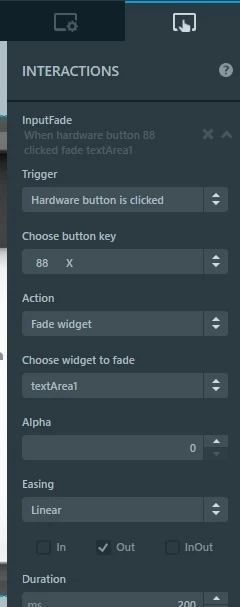
Simply as on image and in code you can call it in model example down

0693W000004GVPPQA4.jpg 

if ((HAL_GPIO_ReadPin(SW3_GPIO_Port, SW3_Pin) == GPIO_PIN_RESET && filter == false) ) // any gpio button check

 {

  filter = true;

  static_cast<FrontendApplication*>(Application::getInstance())->handleKeyEvent(88); // keycode from image send

 }

In simulator you can use key 88 X on pc keyboard

1 reply

MM..1
MM..1Best answer
Chief III
September 20, 2020

Simply as on image and in code you can call it in model example down

0693W000004GVPPQA4.jpg 

if ((HAL_GPIO_ReadPin(SW3_GPIO_Port, SW3_Pin) == GPIO_PIN_RESET && filter == false) ) // any gpio button check

 {

  filter = true;

  static_cast<FrontendApplication*>(Application::getInstance())->handleKeyEvent(88); // keycode from image send

 }

In simulator you can use key 88 X on pc keyboard

Wrend.1
Wrend.1Author
Associate III
September 22, 2020

Thanks,I try it and it works.