


RMasi.19
Associate III
October 10, 2023
Solved

TouchGFX generator, no active the touch

  • October 10, 2023
  • 9 replies
  • 3369 views

I can configurate the touchGFX configurator with the stm32f746, i can open the .part and designer some figures and bottoms, these yes appears in the LCD, i use the hardware stm32f746 discoveryboard. 

But i no can active the function of the touch, have activate the I2C3 with 100khz, standard mode, as examples use the GFX Designer, but i no find put the FT5336  driver, or how i can configurete o call a these file autmatically ? i no understad how active the touch controller,

This topic has been closed for replies.
Best answer by Osman SOYKURT

Hello @RMasi.19 ,

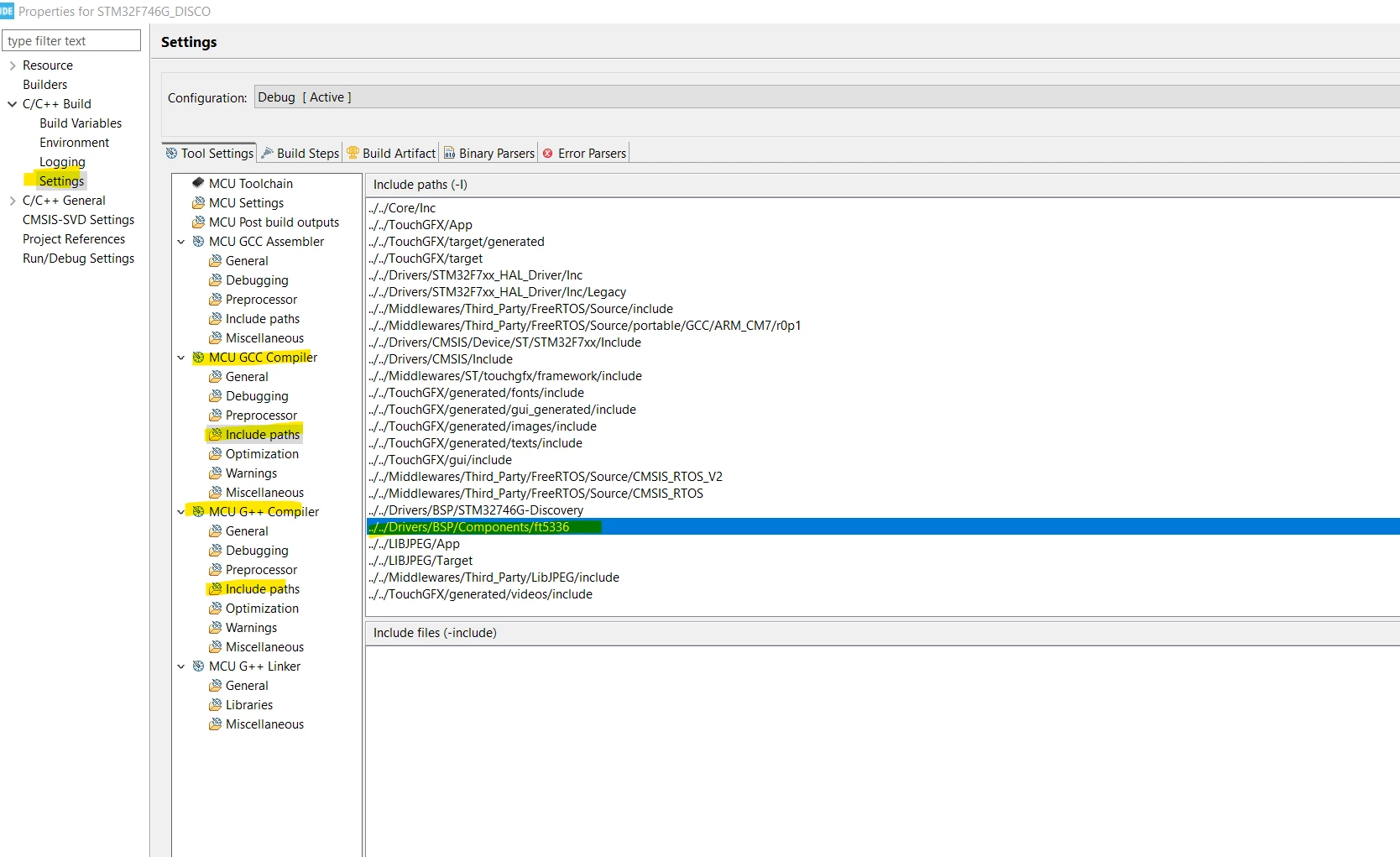
Did you include the path of your ft5336 driver?

OsmanSOYKURT_1-1697011974807.png

9 replies

Osman SOYKURT
ST Technical Moderator
October 10, 2023

Hello @RMasi.19 ,

If you use an STM32F746G-Discovery board, we already provide a TBS that you can use without changing the driver or anything to enable touch screen.

OsmanSOYKURT_1-1696930998079.png

Have you tried it?

ST Software Developer | TouchGFX
RMasi.19
RMasi.19Author
Associate III
October 10, 2023

Hi, yes i have probed the stm32F746 discovery kit, but i want practice with touchGFX generator and take the discoveryboard as if it were my design, i can generate images but the touch no work

Osman SOYKURT
Osman SOYKURTBest answer
ST Technical Moderator
October 11, 2023

Hello @RMasi.19 ,

Did you include the path of your ft5336 driver?

OsmanSOYKURT_1-1697011974807.png

ST Software Developer | TouchGFX
RMasi.19
RMasi.19Author
Associate III
October 12, 2023

Thank you, i can now activate the touch with touchgfx generator, 

i now have two function in Screen1View.cpp, one for a button and other for aa toggle button:


void Screen1View::myPulsador1()

{

if( Pulsador1.getPressedState() ) HAL_GPIO_WritePin(GPIOI, GPIO_PIN_1, GPIO_PIN_SET);

else HAL_GPIO_WritePin(GPIOI, GPIO_PIN_1, GPIO_PIN_RESET);

//HAL_GPIO_TogglePin(GPIOI, GPIO_PIN_1);

}

void Screen1View::myToggleLed2()

{

if(toggleButton1.getState()) HAL_GPIO_WritePin(GPIOI, GPIO_PIN_1, GPIO_PIN_SET);

else HAL_GPIO_WritePin(GPIOI, GPIO_PIN_1, GPIO_PIN_RESET);

}

the function for toggle button work and PI1 is on/off, but function of button no activa the PI1, i know what enter here because when write the function togglePin yes active PI1 on/off. Maybe Pulsador1.getPressedState() no is the correct question, i think what it is the state of the button, some suggestion ?

Osman SOYKURT
ST Technical Moderator
October 17, 2023

Hello @RMasi.19 ,

I don't understand why you need a condition for your button. You just need to declare an interaction with as trigger : "Button is Clicked". Like this :

OsmanSOYKURT_0-1697545287427.png

Then you can code that function in your Screen1View.cpp

void Screen1View::myButtonIsClicked()
{
 HAL_GPIO_WritePin(GPIOI, GPIO_PIN_1, GPIO_PIN_SET);
}


I think it's simpler like that. Could you try that and tell us?

ST Software Developer | TouchGFX
RMasi.19
RMasi.19Author
Associate III
October 31, 2023

ok, thanks, can i now drive the touchGFX generator, configurate the sram external and nor_flash external, but these take two months, driven a discovery_board with touchgfx designer is more simple, but configure a custom board the learning is hard.

Osman SOYKURT
ST Technical Moderator
November 2, 2023

Hello @RMasi.19 ,

Thank you for your feedback. We try to be better with our documentation so we'd like to know which part was difficult for you? 

ST Software Developer | TouchGFX
RMasi.19
RMasi.19Author
Associate III
November 3, 2023

i believe consider a discoveryF746 as a custom board, with external ram mt48lc, eternal flash n25q128a, touch controller ft5336, ,make a video where configure these from the touchgfx generator, creating a project without the discovery setup or BSP functions.