


TouchGFX Double Framebuffer Swapping Logic
I'm a bit confused about the strategy used to determine when to swap buffers when TouchGFX is configured for double frame buffers. As illustrated here, the intent of the double frame buffer is to allow the old frame buffer to be presented if there is a long render time for the next frame.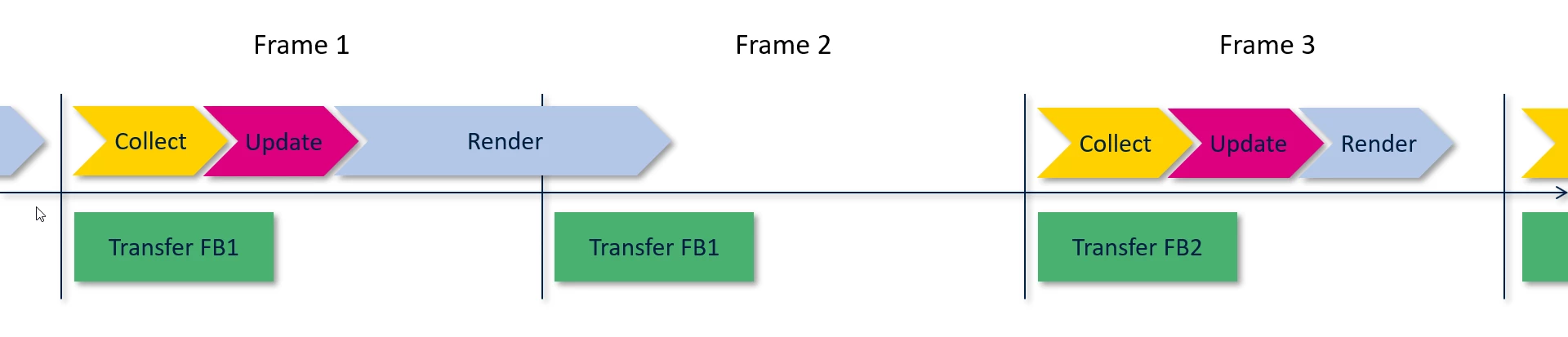 The issue is that I don't see how the TouchGFX implementation enables this. My understanding is that the function HAL::swapFrameBuffers is responsible for switching the pointer to the current frame buffer for the LTDC. Looking at calls to this function, the only one I can find is within the HAL_LTDC_LineEventCallback within TouchGFXGeneratedHAL.cpp.
extern "C"
{
 void HAL_LTDC_LineEventCallback(LTDC_HandleTypeDef *hltdc)
 {
 if (LTDC->LIPCR == lcd_int_active_line)
 {
 //entering active area
 HAL_LTDC_ProgramLineEvent(hltdc, lcd_int_porch_line);
 HAL::getInstance()->vSync();
 OSWrappers::signalVSync();
 // Swap frame buffers immediately instead of waiting for the task to be scheduled in.
 // Note: task will also swap when it wakes up, but that operation is guarded and will not have
 // any effect if already swapped.
 HAL::getInstance()->swapFrameBuffers();
 GPIO::set(GPIO::VSYNC_FREQ);
 }
 else
 {
 //exiting active area
 HAL_LTDC_ProgramLineEvent(hltdc, lcd_int_active_line);
 GPIO::clear(GPIO::VSYNC_FREQ);
 HAL::getInstance()->frontPorchEntered();
 }
 }
}
My understanding is that this callback function, specifically the condition that contains the call to swapFrameBuffers, will be executed every time the LTDC is ready to start drawing a new frame, what if the TouchGFX engine hasn't completed rendering the new frame? Why call that function from the ISR, and not from the TouchGFX engine when the frame is done rendering? What am I missing about how this works?
To give some more context, I'm implementing manual 180 deg rotation using the method stated here, so I am anticipating some long render times and lost frames. I am seeing artifacts and shifts on some of the frames currently that I would expect to be removed by a double frame buffer.