ITena.1
Associate
September 8, 2020
Solved

Touchgfx display is not displaying anything

  • September 8, 2020
  • 25 replies
  • 6655 views

Hello,

I am working on a project with stm32f769i-eval and touch gfx designer(4.13.0) .

I select my board as application template then I try both using a blank template or any of the examples that are provided.

After generating the code, I try to run the project on my target and even though it doesn't fail my screen is not displaying anything. (If I run on the simulator it works perfectly).

What should I do?

Thx,

Irene

This topic has been closed for replies.
Best answer by Romain DIELEMAN

It is because I actually received the same question earlier today and am working on it right now :grinning_face_with_sweat: There seems to be an issue with the application template available in TouchGFX Designer and the latest revision of the display (the A03) where the board goes to hard fault when the touch panel is initialized.

We are still investigating but in the meantime here is a workaround:

  • replace the STM32TouchController.cpp and hpp files in the TouchGFX/target folder of your project by the files I shared
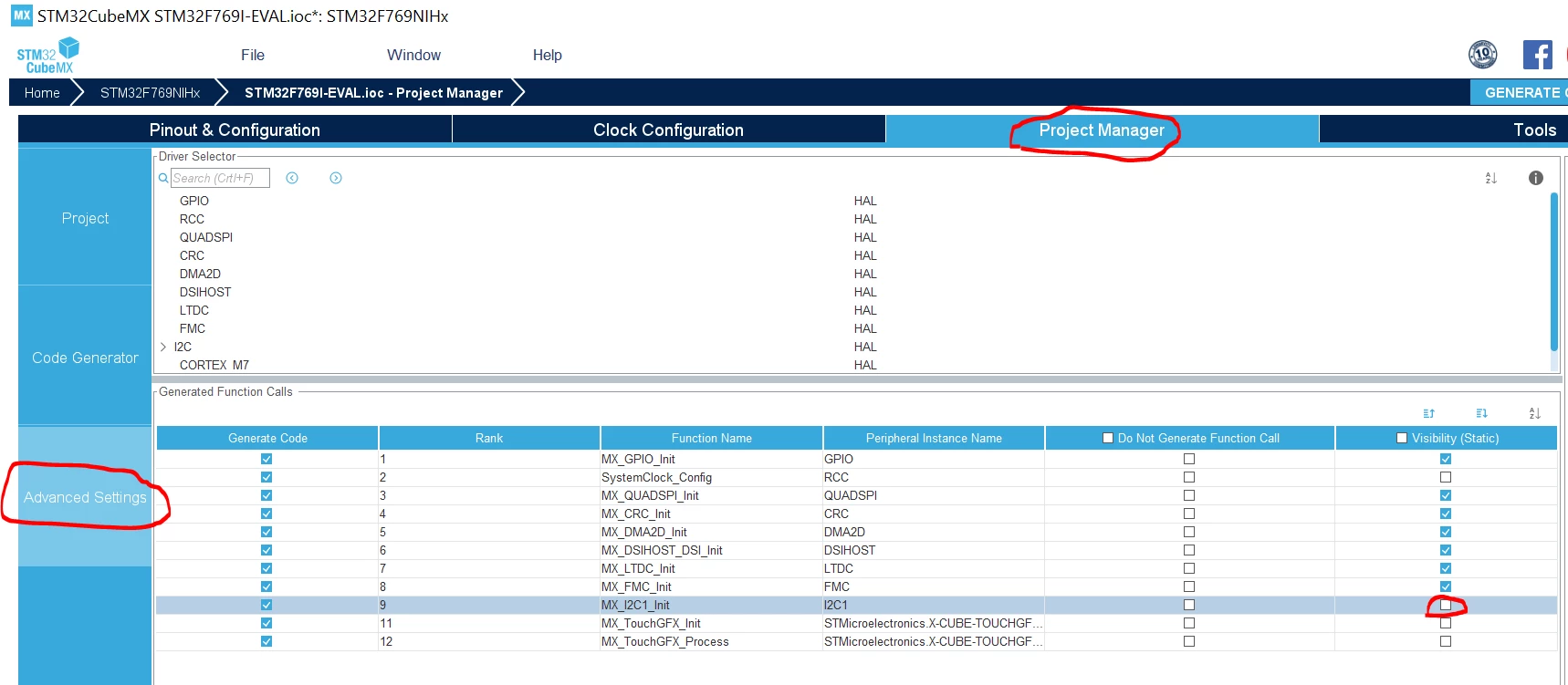
  • open the ioc file in STM32CubeMX and go uncheck the box like in the screenshot to remove the "static" property of the MX_I2C1_Init() function.

0693W00000BZmneQAD.png 

/Romain

25 replies

Alexandre RENOUX
Visitor II
September 8, 2020

Hello,

Try to use an IDE like CubeIDE, IAR or Keil and debug to see if it hangs somewhere.

/Alexandre

ITena.1
ITena.1Author
Associate
September 9, 2020

Hello,

Thanks for your answer.

Looks like I get a Memory Management Fault here

  virtual void backPorchExited()

  {

    swapFrameBuffers();

    tick();

  }

No source available for touchgfx::HAL::tick() at 0x8008bc4

I tried to run the same project with another board stm32f779i-eval and I get no errors and display is working properly.

Do you have any idea what could it be?

Thanks,

Irene

Alexandre RENOUX
Visitor II
September 9, 2020

If by simply running the application template of F769-EVAL board with just a box and a button, the display does not show anything, maybe your board is faulty.

You confirm you haven't changed anything to the Application Template ? What UI are you using to test your board ?

Could you provide all the steps ? This way we can try to reproduce it on our side ?

/Alexandre

ITena.1
ITena.1Author
Associate
September 10, 2020

Good morning,

Right now, I'm just trying to make the display run so I'm just creating a new project using the application template F769i-EVAL with a white box in TouchGFXDesigner.

I'm generating the code and then "Run Target", no error appears but the screen is not displaying anything.

I haven't changed anything from the Application Template.

Thanks,

Irene

Alexandre RENOUX
Visitor II
September 10, 2020

Hello,

We are currently investigating. I will come back to you when I have more information.

/Alexandre

ITena.1
ITena.1Author
Associate
September 15, 2020
Good morning, Do you have any updates? I still haven't managed to make the screen work. Thanks. Regards, Irene Tena El jue., 10 sept. 2020 a las 13:34, ST Community () escribió:
Alexandre RENOUX
Visitor II
September 16, 2020

Sorry I can't provide you any update right now.

Due to certain circumstances I cannot have access to this board so I asked one of my colleague.

I will tell you any update that comes up.

/Alexandre

ITena.1
ITena.1Author
Associate
October 5, 2020

Yes, the jumper is set at the right position.

When AT is flashed only blue LED is permanently ON.

Board REV is MB1219 - Rev.B, and the display one is MB1166 -Rev.A.

Thanks,

Irene

Romain DIELEMAN
ST Employee
October 5, 2020

This is a very weird issue, especially since you have met it on multiple boards. Can you confirm again that you are creating a project from Designer with the right application template with any UI template (or just a box/button) and just pressing "run on target" from Designer. Do you have the latest version of STM32CubeProgrammer?

After "succesfully " running on target, could you press the reset button on the board to see if anything is displayed?

/Romain

ITena.1
ITena.1Author
Associate
October 6, 2020

Exactly, I'm creating the project from Touch GFX Designer with STM32F769I-EVAL application template and trying with different UI templates and even with just a basic box.

STM32CubeProgrammer version is 2.5.0.

I've already pressed the reset button but still nothing is displayed.

Thanks,

Irene

TJoha.1
Visitor II
June 1, 2021

Hello!

I appear to be having the same problem. Are there any updates on this?

kind regards

Tim

TJoha.1
Visitor II
June 1, 2021

Update: When flashing an AT to target from within TouchGFX Designer the LCD Backlight is lit in addition to the blue LED being on.

Romain DIELEMAN
ST Employee
June 1, 2021

Hi,

What revision of the display and the board do you have ?

/Romain

TJoha.1
Visitor II
June 1, 2021

The Board should be MB1219 J Release B-03 and the display MB1166-A03.

This is the information on the product delivery paper. I hope that is what you wanted.

If you need more information please ask.

I´m happy about your fast reply :)

regards

Tim

TJoha.1
Visitor II
June 1, 2021

The workaround is working for me. Thank you very much.

Good luck further investigating!

Regards,

Tim

Romain DIELEMAN
ST Employee
June 1, 2021

thanks ;) Good luck with your project

MGünt.1
Visitor II
November 12, 2021

*edited*