
Associate III
October 31, 2024
Solved

TouchGFX display int16_t value

  • October 31, 2024
  • 4 replies
  • 2991 views

Dear all!

I 'm handle a project using ST7735 with flatform is TouchGFX, in Set2 is ADC value from POT( from -85 to -55) i debug and monitor on Keil C, the value is correct, When i display it to Screen the value is "-?5", i don't how to fix it, please share me why and how to fix.

    This topic has been closed for replies.
    Best answer by ferro

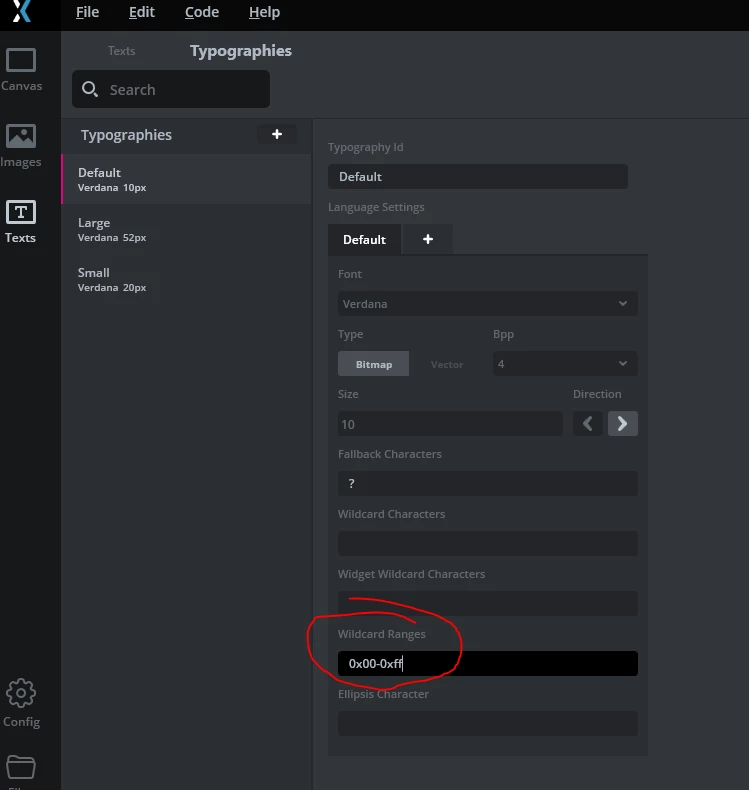
    Hi @khanhcong861989 . Force including of characters from the font with '0x00-0xff'

    [Texts > Typographies > Default]

    ferro_0-1730400888792.png


    4 replies

    ferro
    ferroBest answer
    Lead
    October 31, 2024

    Hi @khanhcong861989 . Force including of characters from the font with '0x00-0xff'

    [Texts > Typographies > Default]

    ferro_0-1730400888792.png


    ferro
    Lead
    October 31, 2024

    And update the battery text area


    void Screen1View::setvaluetoscreen( int BAT_Val, int16_t pressure, int16_t set2, bool pump1_sta,bool valve1_sta,int16_t temp_pressure)
    {
     Unicode::snprintf ( textArea7Buffer, TEXTAREA8_SIZE, "%d", BAT_Val);
     textArea7.invalidate ();
    }


    ferro_0-1730402448502.png


    Associate III
    November 1, 2024

    many thank @ferro issue was fixed, i can display set2. 1 more. may i add new fonts to touchGFX, how can i do it

    ferro
    Lead
    November 1, 2024

    @khanhcong861989glad to hear.


    "may i add new fonts"

    Yes you can. With GfxDesigner closed, copy font to ./assets/fonts and it will be in the list of available fonts of GfxDesigner.
