


DSwea.1
Associate III
December 28, 2021
Question

TouchGFX Designer Feature Request

  • December 28, 2021
  • 5 replies
  • 2231 views

The custom containers feature is obviously a very useful, and I might add, indispensable tool. However, it's application is somewhat hampered by the inability to see the name of the underlying component once the component is added to a screen, and then renamed.

In the example below, I've added a component named "NumberBox". Initially, the object is named "numberBox1", so there's still a connection to the underlying component name. But, in order to reflect its function, I've renamed it "flowDisp." Once this is done, the connection to the component is entirely lost: when the component is selected, the name "NumberBox" does not appear in the properties panel, so there is no way to determine what the underlying component is:
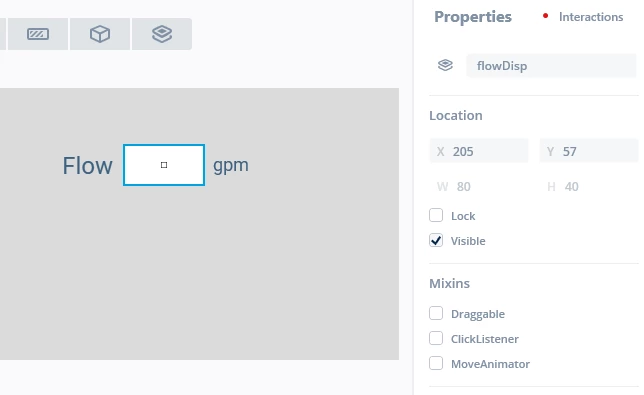
0693W00000HpvSRQAZ.pngIt would seem to be a simple task to add the name of the original component to the properties panel. Otherwise, how is one to know what the object actually is? (If I've missed something here, and there is actually a way to make the determination, I apologize for taking up time and space in the forum).

This topic has been closed for replies.

5 replies

wired
Senior II
December 28, 2021

From the looks of your screen, you named the Container flowDisp, not the NumberBox. See the icon next to your name in the Properties tab? It is the icon for a custom container.

wired
Senior II
December 28, 2021

I think I misunderstood what you are trying to do. Looking at it again, it seems that you want to know which original custom container your renamed custom container on a screen was derived from. I guess it could be confusing if you had many custom containers that looked identical. Mine are very distinct.

I don't believe there is a way to see in the Designer the original container name. I agree that it it could be useful in some cases.

DSwea.1
DSwea.1Author
Associate III
December 28, 2021

Yes. For all objects/widgets except containers, there is a one-to-one correspondence between the icon and the widget. The container icon, instead, represents the entire class of containers. If you have two or more containers with identical or very similar appearances, a not uncommon situation, you can't distinguish them without opening the container view.

wired
Senior II
December 29, 2021

DSwea.1, FYI I was looking at submitted ideas and I believe your request has been submitted as an idea here.

AndrewM
Associate III
January 4, 2022

@DSwea.1​  @wired​ Yep, it was me who put that feature request. Although it's more of a regression than a new feature as I mentioned in my post. In older versions (definitely in 4.12.3) you could see the type of the Custom Container when you select the data member but in 4.18 you can't. Presumably it shouldn't be too hard to bring the feature back. :beaming_face_with_smiling_eyes::crossed_fingers: