


afergan
Associate II
February 14, 2023
Solved

TouchGFX Designer Default Canvas Buffer Size 0

  • February 14, 2023
  • 3 replies
  • 2645 views

In TouchGFX 4.20 designer my pages mostly have default 7200 canvas buffer size but some pages default canvas buffer size seems 0 like below;
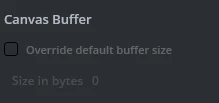
0693W00000YAfsWQAT.pngIf I do not add a canvas size to these pages manually, this causes errors. Why does this happen on some pages and not on others?

Thanks.

This topic has been closed for replies.
Best answer by Yoann KLEIN

Hello @afergan​,

This parameter is set to 7200 when you add a widget that requires canvas rendering, such as a circle or a line. Otherwise, no Canvas Buffer is necessary and the size will be set to 0.

So, if you want this parameter to be set, you can either modify it manually or add a shape in your screen.

Hope that answers the question.

/Yoann

3 replies

Yoann KLEIN
Yoann KLEINBest answer
ST Employee
February 15, 2023

Hello @afergan​,

This parameter is set to 7200 when you add a widget that requires canvas rendering, such as a circle or a line. Otherwise, no Canvas Buffer is necessary and the size will be set to 0.

So, if you want this parameter to be set, you can either modify it manually or add a shape in your screen.

Hope that answers the question.

/Yoann

Yoann KLEINST Software Developer | TouchGFX
afergan
aferganAuthor
Associate II
February 15, 2023

Hi @yoann KLEIN​ ,


Thanks for the information. I think I get this errors because I only crate pages borders on designer and fill inside dynamically in my code. So if I'm going to add circles or lines dynamically, I need to adjust the buffers of these pages.


Thanks.

Yoann KLEIN
ST Employee
February 15, 2023

Hello,

Yes, if you add widgets that require canvas buffer dynamically from your code, you also need to allow some space for these widget to be drawn.

You are welcome :)

/Yoann

Yoann KLEINST Software Developer | TouchGFX