

Visitor II
Apr 27, 2025 2:02 PM UTC
Question

TouchGFX Designer - 4.25.0 the widget size cannot be modified

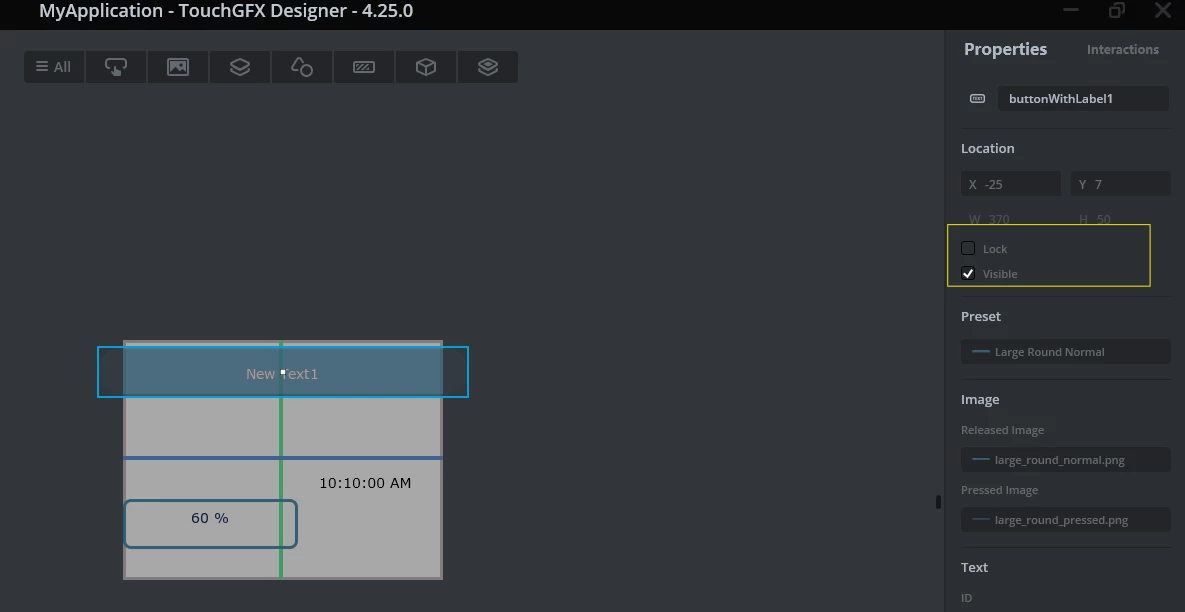
My TouchGFX Designer project is work, but I can't find how to modify the size of the widget in the properties taskbar,no Auto-size item,  include Button, textProgress, etc. Could you help check this case? thanks.1.png
This topic has been closed for replies.

1 reply

Osman SOYKURT
ST Technical Moderator
Apr 28, 2025 9:29 AM UTC

Hello @Jack_Jiang ,

The Button widget and the textProgress widget are indeed linked to your asset size. You can not change the size of the widget in TouchGFX Designer -  what you need to do is to provide assets with the correct sizes and link them to your widget.

You can also use the FlexButton Widget to set size as you want and use an image of your choice (with a different size from your widget) but note that it will be not fit as you expect. But it could be an option if you really need it. To do so, change the Visual Element as bellow:

OsmanSOYKURT_0-1745832450006.png


ST Software Developer | TouchGFX