TouchGFX: Create Project via CubeMX Issue
Hello,
I am trying to prepare myself for a custom board design and I want to understand how to create a project via CubeMX, similar to how embryonic does in the YouTube video below.
https://www.youtube.com/watch?v=SRQD8JMeg_k&t=2030s
To try and do this, I am using the STM32H7B3I-EVAL board. I create a project in CubeMX (selecting the STM32H7B3I-EVAL board) with the TouchGFX 4.20.0 software package added. Once the project is generated, I open the project in CubeIDE and open the application template and create a very basic screen (blue background with the text "I have configured this correctly", just to prove the concept). I then made the code changes made in the video into the CubeIDE files that he does.
However, I have not been able to get this to work. The screen is just black.
This may be a longer debugging process, but first I want to sanity check myself:
1) If I want to use the TouchGFX Designer to make my display on a custom board, is the best practice to make the project in CubeMX/CubeIDE, then open the TouchGFX application template and create the display to do what I want.
OR
Is the better approach to create the project in TouxhGFX, then adjust the CubeMX parameters for pin configuration?
2) Based on the steps I've described initially, what information should I provide to try and diagnose this problem?
I apologize if this is a broad question, but I am unsure where to focus my concern.
Any help would be greatly appreciated!
EDIT: Because I fear this may be too vague, I would like to explain the steps I have done to try and diagnose the problem:
1) First, I followed the steps in the video to the best of my abilities. Since the STM32H7B3I-EVAL uses a different display than the one in his video, there are certain parameters I had to change (display resolution, pixel format, SDRAM addresses, etc.). But I have enabled:
- FMC (modified to my board's SDRAM)
- DMA2D (Unchanged)
- LTDC (modified to my board's display)
- CRC (Unchanged)
- TouchGFX Software Pack Inclusion (modified to my board's display)
2) I added the MX_TouchGFX_Process() into the TouchGFX task to enter the TouchGFX generated task
3) I included all the BSP files for the evaluation board and included them in the include paths
4) Compared all TouchGFX files produced to compare to a working project I have (one that was first created via TouchGFX and selecting my evauation board, then changing the pin configuration and main code via CubeMX/IDE.
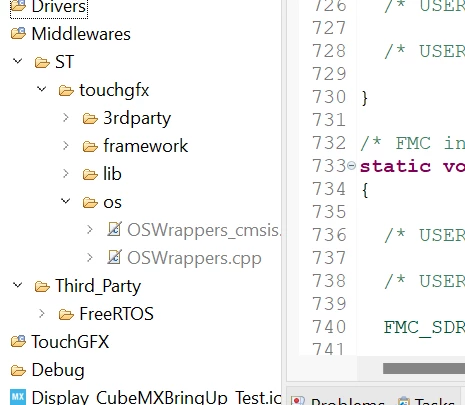
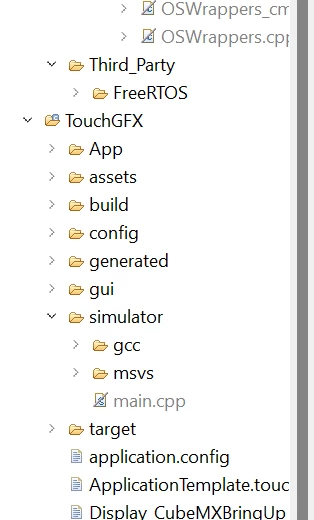
From doing this, all the noticeable files were the same. The only discernable difference is in the Middleware directory, there are is a .cpp and .hpp file (OSWrappers) that are excluded from the build. Additionally, in the TouchGFX > Simulator, the main.cpp is excluded from the build. I'm unsure if those matter though...