

Associate II
October 4, 2024
Solved

TouchGFX and RVT121HVLNWC00-B display selection

  • October 4, 2024
  • 1 reply
  • 817 views

I am currently experiencing issues with the TouchGFX tool, as there is no option to select the RVT121HVLNWC00-B (STM32H757X) controller. Could you please provide some details regarding the interfacing of this controller with the display? Actually I'm having STM32H747x demo projects but it doesn't work.

    This topic has been closed for replies.
    Best answer by mƎALLEm

    Hello @sai1  and welcome to the community,

    You didn't tell about the board you are using? is it a custom board (a board you have developed )? or an already board available on the market?

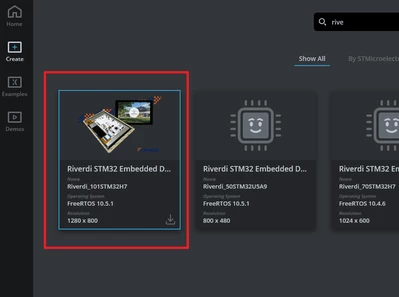
    If you are talking about STM32H757 Reverdi board, according to their site it is using RVT70HSSFWN00 display selectable from TouchGFX designer:

    SofLit_0-1728026728702.png

    But if it's a custom board, there is no selection of the display, you need to start from scratch from CubeMx tool: configuration of the MCU, the LCD, the external memories and add TouchGFX middelware. Refer to TouchGFX Documentation

    1 reply

    mƎALLEm
    mƎALLEmBest answer
    ST Technical Moderator
    October 4, 2024

    Hello @sai1  and welcome to the community,

    You didn't tell about the board you are using? is it a custom board (a board you have developed )? or an already board available on the market?

    If you are talking about STM32H757 Reverdi board, according to their site it is using RVT70HSSFWN00 display selectable from TouchGFX designer:

    SofLit_0-1728026728702.png

    But if it's a custom board, there is no selection of the display, you need to start from scratch from CubeMx tool: configuration of the MCU, the LCD, the external memories and add TouchGFX middelware. Refer to TouchGFX Documentation

    To give better visibility on the answered topics, please click "Best answer" on the reply which solved your issue or answered your question.