


Jnevi.1
Associate III
October 26, 2023
Question

TouchGFX 4.22.1 TextKeysAndLanguages.hpp and others are missing

  • October 26, 2023
  • 3 replies
  • 4063 views

Hi,

i'm using cubemx and updated from touchgfx 4.21.2 to 4.22.1 and also installed the newest touchgfx designer.

After regeneration of the project certain files like TextKeysAndLanguages.hpp are missing. So all my texts are missing.
i can see it in my git that these files were deleted
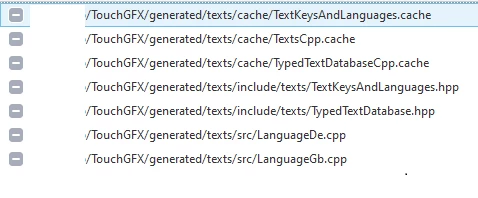
Jnevi1_0-1698304992151.png

Also <fonts/ApplicationFontProvider.hpp> is missing and generates build errors

In TouchGFX designer i see all my texts and this is my text config (which i did not change after updating from the last version)
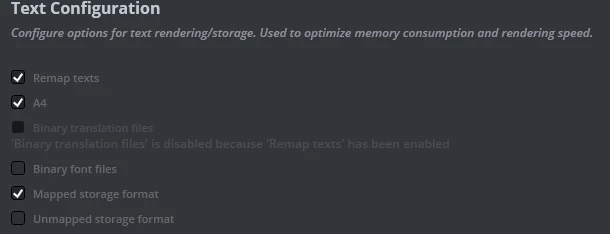
Jnevi1_1-1698305434942.png

Any idea what might be the error?

Regards

This topic has been closed for replies.

3 replies

ST Employee
October 31, 2023

Hello @Jnevi.1 ,

All the text and different typographies are stored in a xml file under "assets -> texts" in TouchGFX project directory. The files that are deleted can be recreated by just regenerating your project from the TouchGFX Designer not the CubeMX. Updating the version of TouchGFX should not alter your assets and gui folders.

I hope this helps you, don't hesitate to ask more questions.

Mohammad MORADIST Software Developer | TouchGFX
Jnevi.1
Jnevi.1Author
Associate III
October 31, 2023

Hi,

sorry for not making this clear: the error happens after regenerating with touchgfx 4.22.1

i update my cubemx...regeneration is fine.
i update touchgfx via cubeMX which gives me some errors(don't know if it is important)

Jnevi1_0-1698757056490.png

i open my touchgfx project in designer 4.22.1 and regenrate *booom* files are deleted and not regenerated

ST Employee
October 31, 2023

Okay, it sounds pretty weird that CubeMX faces some problems.

Is it possible to try installing the new version (TouchGFX 4.22.1) manually from CubeMX -> Help -> Manage Embedded Software Packages, then under the STMicroelectronics tab, X-CUBE-TOUCHGFX section ?
After installing, open your project, then go to Software Packs -> Select Components and make sure the version 4.22.1 is selected.
And of course make sure you have a backup before applying these changes.

Good luck

Mohammad MORADIST Software Developer | TouchGFX
Jnevi.1
Jnevi.1Author
Associate III
October 31, 2023

Jnevi1_0-1698765834391.png

ok, the version was selected. But i did not notice the settings for touchgfx   itself (resolution, pixel mode etc) were not set. After setting these again the files are generated.

But now i face this problem
https://community.st.com/t5/stm32-mcus-touch-gfx-and-gui/linker-error-after-upgrading-to-touchgfx-4-21-4/td-p/54197


compiling TouchGFXGeneratedHAL.cpp...
linking...
flamcento\flamcento.axf: Error: L6216E: Cannot use base/limit symbols for non-contiguous section .ARM.exidx
Finished: 0 information, 0 warning and 2 error messages.
ST Employee
November 3, 2023

I tried to replicate the process of updating a project from old version of TouchGFX to 4.22.1, and I didn't face any issues.
Can you send us your project, or at least a part of it that fails to see why issue is happening? 
If it's not, please mention the version of the CubeMX you're using, the board or MCU, and the compiler.

Thanks

Mohammad MORADIST Software Developer | TouchGFX
Jnevi.1
Jnevi.1Author
Associate III
November 8, 2023

will send you an PM