Associate III
November 3, 2023
Solved

TOUCHGFX 4.22.1 missing file in IAR

  • November 3, 2023
  • 1 reply
  • 2220 views

I used TOUCHGFX 4.22.1 to generate code and used IAR 9.40.1 to open the project. When build the project, it shows missing the the file 'Middlewares/Third_Party/FreeRTOS/Source/portable/IAR/ARM_CM4F/port.c' , 

Could you provide a patch to fix it ? Thanks for your help.

 

@Osman SOYKURT 

This topic has been closed for replies.
Best answer by Osman SOYKURT

Hello @Kenwang ,

You're missing 2 steps.
By default, our TBS already provide generated code for STM32CubeIDE toolchain.
What you need to do is after step 4 :

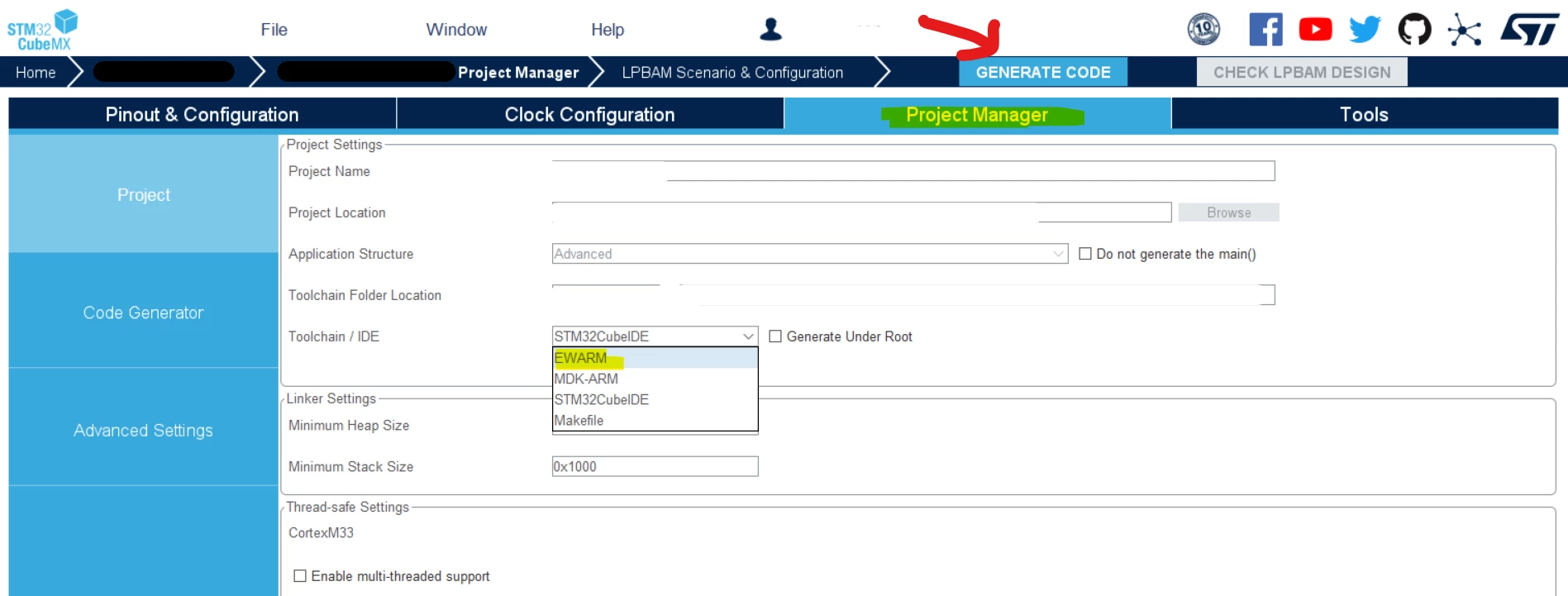
4.1) Open the ioc file with STM32CubeMX - go to "project manager" menu and select EWARM toolchain - and press generate code

OsmanSOYKURT_0-1699435490136.png

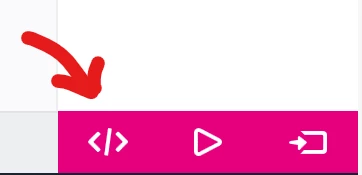
4.2) go to your project under TouchGFX Designer and press generate code 

OsmanSOYKURT_1-1699435642420.png

Then you can go to your step 5 :

5- Open your project under IAR


Let me know if that helps.

1 reply

Osman SOYKURT
ST Technical Moderator
November 7, 2023

Hello @Kenwang ,

I've tried it on my side and I can't reproduce this issue. I'm using the same IAR 9.40.1 as you.
Could you provide me more details concerning your project? Like which board are you using? Which STM32CubeMX version?
Also, does your error happens because the file is not there at all, or is it because it isn't included in the IAR project ?

ST Software Developer | TouchGFX
KenwangAuthor
Associate III
November 8, 2023

Hi @Osman SOYKURT 

Thanks for your reply.

My steps are as follows

1. Launch TouchGFX software

2. Choice STM32H747I DISCO

3. add a box object in project

4. generate code

5. using IAR 9.40.1 to open the project

6. choice convert project formate to fit IAR version

7. build CM4 image, it will success.

8 build CM7 image, iAR will show it miss port.c file

details are in this video 4.22.1 bug in IAR 

Osman SOYKURT
Osman SOYKURTBest answer
ST Technical Moderator
November 8, 2023

Hello @Kenwang ,

You're missing 2 steps.
By default, our TBS already provide generated code for STM32CubeIDE toolchain.
What you need to do is after step 4 :

4.1) Open the ioc file with STM32CubeMX - go to "project manager" menu and select EWARM toolchain - and press generate code

OsmanSOYKURT_0-1699435490136.png

4.2) go to your project under TouchGFX Designer and press generate code 

OsmanSOYKURT_1-1699435642420.png

Then you can go to your step 5 :

5- Open your project under IAR


Let me know if that helps.

ST Software Developer | TouchGFX