


TouchArea of FlexButton
Hi all,
I am facing an issue with TouchGFX Gui. It seems that the view area of a Flex Button is not the same as its touch area. Maybe anyone have an idea what is going wrong or could give a hint for further evaluation.
I am using TouchGFX 4.18.0 Gui on an STM32F745 platform or I run the Simulator on Windows. But the issue apppears on both platforms.
I have a screen with a full size Button in the background (green marked). In the Front (top level) I have a container with 4 Flexbuttons (blue with black border) and a little space between them (yellow)
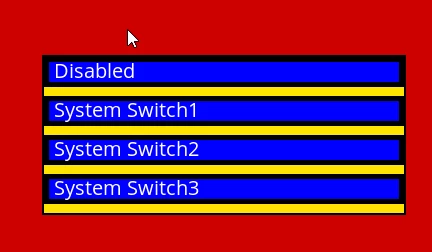
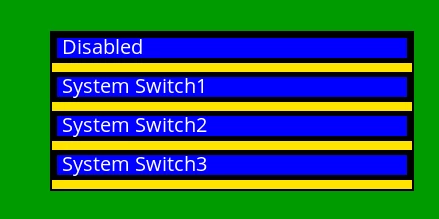 In Generell it works. Please watch the mouse pointer in the follwoing pictures, for the Click/Touchpoint.
When I push the backgound Button, the button turns red, as expected.
 When I push one of the front buttons the corresponding button turns red, as expected.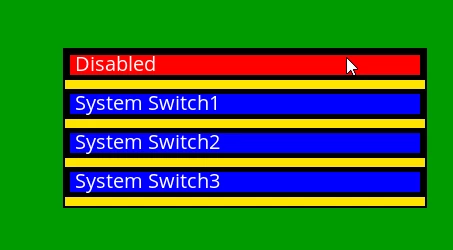
But there are areas inside the front button, were the background button is pressed instead of the front buttons. Watch the touch point in the next image. I pushed the Front button, but the backgound button is hit, for any reason.
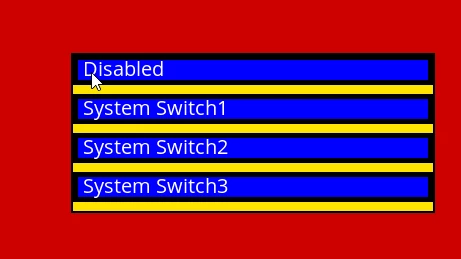 But there is also an area outside the front button that hit the front button instead of the backgound button.
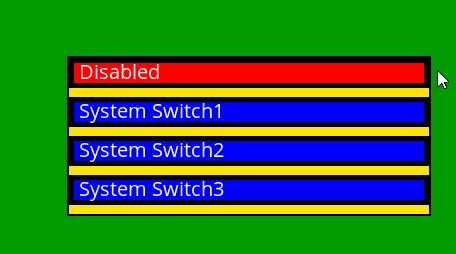
But it is not symetric. Do I push the backgound button on the other side of the front button with the same distance, it works as expected.
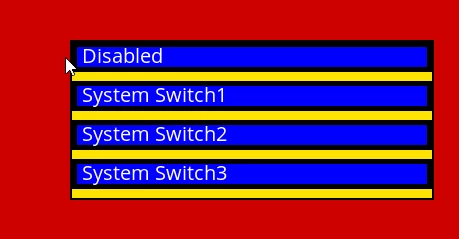
It seems to me that the front button touch area looks like the red marked areas in the next image. Strangely enough, this area is different for the first button than for the others. 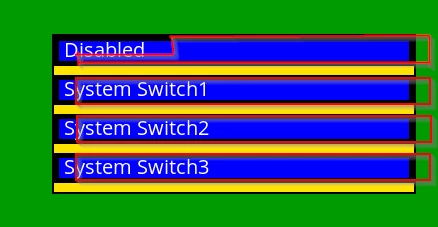 Thank in advance for your support.