ADębs.1
Senior
May 26, 2021
Solved

Touch GFX, STM32F746G-DISCO, STM32CubeIDE

  • May 26, 2021
  • 6 replies
  • 1074 views

I have a screen and two different backgrounds. I have a Toggle button. How to change the background with this button?

Andrzej

This topic has been closed for replies.
Best answer by Romain DIELEMAN

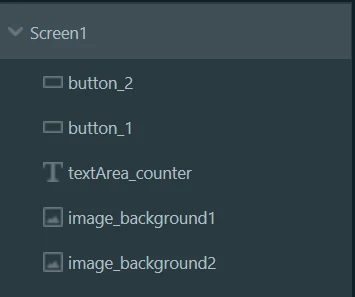
You can use the same trick of turning the buttons or counter invisible when you switch backgrounds. What you have to be careful about is in which order you have put the widgets in: as long as you put the text "above" in the tree then your text will be displayed above the background (dont forget to use the invalidate() function)

0693W00000APzIzQAL.png 

/Romain

6 replies

Romain DIELEMAN
ST Employee
May 27, 2021

Hi,

What widget are you using for the background ? Are they images or just plain boxes ?

The easiest solution would be to add the two backgrounds on top of each other and just set one of them to invisible (go to the widget settings tab and uncheck the "Visible" box for one of the two background). Go to the "Interactions" tab in TouchGFX Designer and create an interaction with as trigger "Button is clicked" and as action either "Execute C++ code" or "call new virtual function", depending on what you prefer, and set the logic through code with something like this for example.

if( background_1.isVisible() ) // check if the first background is visible. If yes, make it invisible
{
 background_1.setVisible(false);
 background_2.setVisible(true); // turn the other background visible
}
else //do the opposite
{
 background_1.setVisible(true);
 background_2.setVisible(false); 
}
 
 background_1.invalidate();
 background_2.invaldiate();

Have a look at the UI templates available in TouchGFX Designer and the documentation to understand how to work with the different widgets and the TouchGFX functionalities.

/Romain

ADębs.1
ADębs.1Author
Senior
May 27, 2021

Thanks for the hint. I will check. I am sending two images that I want to replace.

On one background, I want to set the time with the buttons. I want to display the counting on the second background.

0693W00000APxDsQAL.png0693W00000APxCVQA1.pngCan I program it to display in the same field after switching background?

Andrzej

Romain DIELEMAN
Romain DIELEMANBest answer
ST Employee
May 27, 2021

You can use the same trick of turning the buttons or counter invisible when you switch backgrounds. What you have to be careful about is in which order you have put the widgets in: as long as you put the text "above" in the tree then your text will be displayed above the background (dont forget to use the invalidate() function)

0693W00000APzIzQAL.png 

/Romain

ADębs.1
ADębs.1Author
Senior
May 28, 2021

Hi

I did as you advised. What I did works. I have to add a little more. However,

I have a problem. It does not send the variables sec and min to main.c. Instead, it sends the start.

Why?

greetings

Andrzej

ADębs.1
ADębs.1Author
Senior
May 27, 2021

Thank you. I will try.

Andrzej