Mk.31
Associate II
February 12, 2021
Solved

Touch GFX Dynamic graph sensor values representing graphically?

  • February 12, 2021
  • 1 reply
  • 1550 views

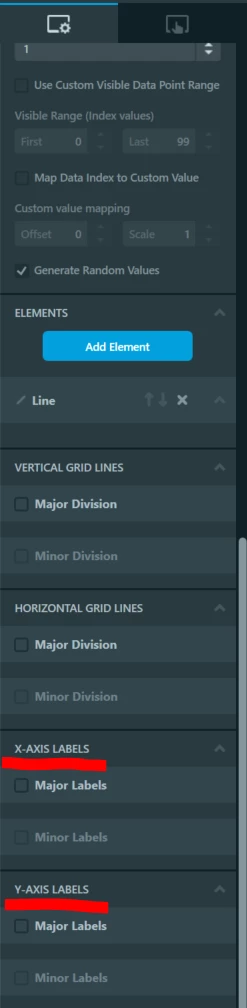
I'm using Dynamicgrapgh widget in TouchGFX to represent the sensor values graphically, i want to display the X and Y axis labels. I'm unable to get the labels on display UI even though i have enables Horizontal and vertical axis labels. Also how to write a function to update the sensor values on graph. Suggest me a solution

This topic has been closed for replies.
Best answer by Romain DIELEMAN

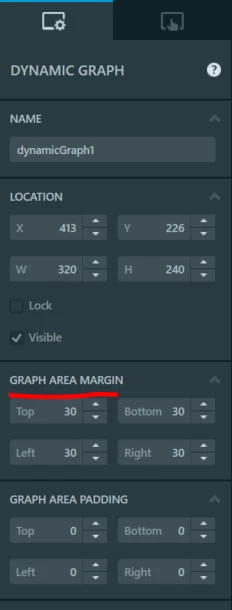
Could you share a screenshot of your graph configuration in TouchGFX Designer ? In the right tab there is an option to set the text for the label, you also have to set the "Graph area margin" section.

0693W000008FybTQAS.png0693W000008FyiyQAC.png 

/Romain

1 reply

Romain DIELEMAN
ST Employee
February 12, 2021

Hi,

Could you share screenshots of your issue ? It will help us visualize what you are trying to do.

Concerning the graph, have you looked at the UI template "Dynamic Graph Example" ? What you need to do is replace the random values generated by the values from your sensor. This video guide from Jesper may help you understand how to work with it.

/Romain

Mk.31
Mk.31Author
Associate II
February 12, 2021

HI Romain

I have gone through that UI template, i tried the same way. Only thing x and Y axis labels are not displaying.

 0693W000008FxfZQAS.jpg 

Thank You

/Megh

Romain DIELEMAN
Romain DIELEMANBest answer
ST Employee
February 12, 2021

Could you share a screenshot of your graph configuration in TouchGFX Designer ? In the right tab there is an option to set the text for the label, you also have to set the "Graph area margin" section.

0693W000008FybTQAS.png0693W000008FyiyQAC.png 

/Romain