


OLync.1
Associate III
May 30, 2022
Question

The gauge widget needle does not display correctly on TouchGFX 4.19.1

  • May 30, 2022
  • 3 replies
  • 8527 views

I'm using TouchGFX 4.19.1. My speedometer gauge worked fine originally, for a 390x390 display. I need it to work on a 480x480 display so scaled up the background image and needle image and resized the gauge widget. Now I struggle to centre the needle, and the actual image (in simulator and on target) differs from what TouchGFX displays. Changes to the needle rotation centre are not reflected in the simulator/target. This must be related to the relationship between image and widget sizes. Attached is a snip of the simulator (LHS) versus the TouchGFX image (RHS). Has anyone else experienced this?
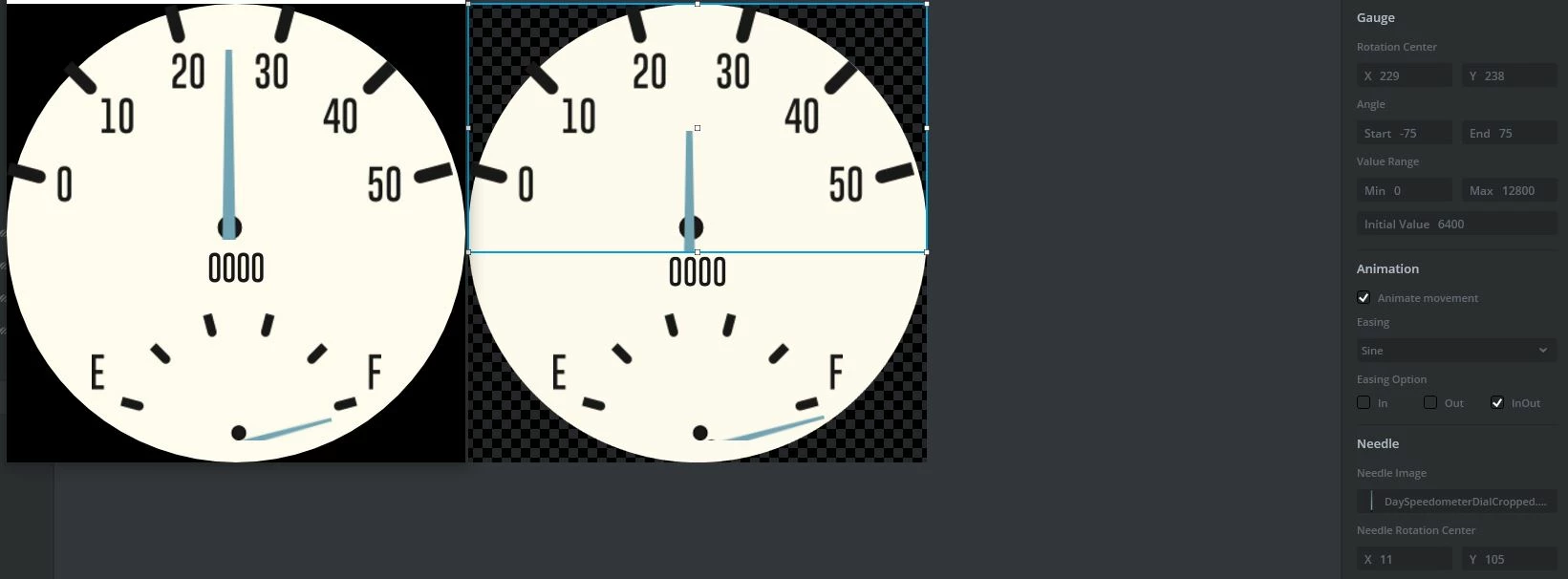
0693W00000NqsuJQAR.jpgGauge widget size is 480 x 260. Needle and background images supplied. 

This topic has been closed for replies.

3 replies

Yoann KLEIN
ST Employee
May 31, 2022

Hello @OLync.1​ ,

Could you please share your whole project or at least the UI ?

To do that, you can create a new TouchGFX project, and then click on Edit > Import GUI.

0693W00000Nquc2QAB.png 

That could be very helpful to try to reproduce the issue.

Thanks,

/Yoann

Yoann KLEINST Software Developer | TouchGFX
OLync.1
OLync.1Author
Associate III
May 31, 2022

TouchGFX UI project attached

Yoann KLEIN
ST Employee
May 31, 2022

Hello,

Your issue come from these functions, located in RunningScreenView.cpp :

0693W00000Nqvl0QAB.pngI don't know what you are trying to do with that, but it apparently shifts your gauge background and needle, and then those widgets look misplaced on the display. After commenting these lines, both the needle and the gauge were displayed on simulator exactly like in the TouchGFXDesigner Canvas menu.

I also added a new screen to the project to check if everything worked fine if you add a default gauge to your project, which is the case, and I corrected the positioning of the needles in the Running Screen.

I will share the updated project back.

Let me know if that solved your issue,

/Yoann

Yoann KLEINST Software Developer | TouchGFX
OLync.1
OLync.1Author
Associate III
May 31, 2022

Thanks @Yoann KLEIN​ , that fixed it - I have inherited the project and did not notice that code. I have a follow up question regarding the needle rendering algorithm:

When Nearest Neighbor is chosen the moving needle has ragged edges. However when Bilinear Interpolation is chosen the moving needle has clean lines but there are occasional flickers of white in some pixels the gauge black background. Is there any way to remove these?

OLync.1
OLync.1Author
Associate III
June 2, 2022

Here's an example of the problem - the white dot to the left of the "50". This occurs intermittently as the gauge needle moves.

Yoann KLEIN
ST Employee
June 2, 2022

Hello,

That's related to performance issues.

If you want to get better graphics with this kind of animations, you could try to use a more powerful MCU.

I ran the Gauge Demo from TouchGFX 4.19.1 on a STM32F769I discovery board, and everything worked fine.

/Yoann

Yoann KLEINST Software Developer | TouchGFX
OLync.1
OLync.1Author
Associate III
June 2, 2022
I have been using non-optimised debug builds so will try a release build but I presume the TouchGfx library remains the same and so I shouldn't expect any change in graphics performance?