


TextArea inside a Container--what shows in Designer is not the same on the target or simulator
I see this same behavior in TouchGFX version 4.13 as well as version 4.14.
I am using a large text area and am attempting to utilize a Container to reduce the invalidated screen area to increase performance of other items being animated on the screen.
Here is my text area. I placed a box of a different color than the background in the container behind text to show the container rectangle:
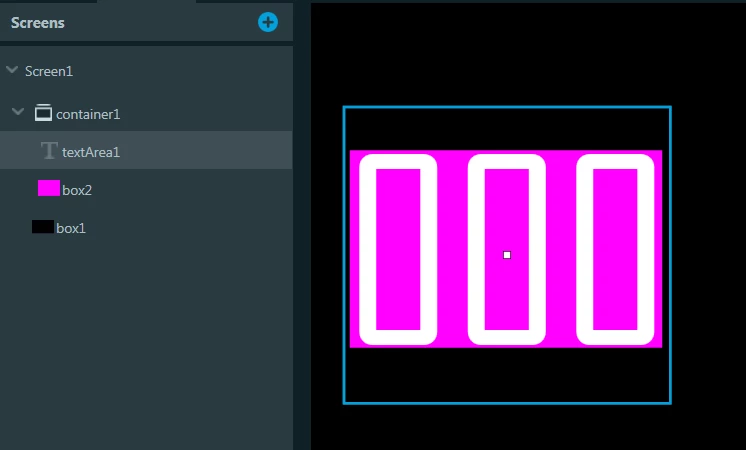
The blue outline is the area of the text area.
The idea here is to "reveal"only the part of the text area that I want invalidated when it changes.
However, as you can see in the screenshot of the simulator below, the text is clipped.
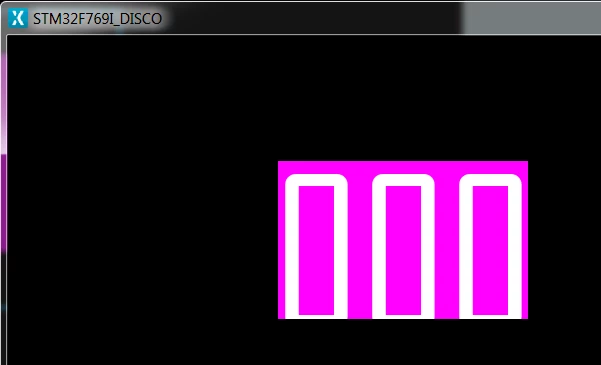
It looks as if the text area is shifted down in the container when the program is run on the simulator.
Why is this and is there anything I can do to prevent it?