Associate III
January 3, 2025
Solved

Text with "Ññáéíóú" in touchgfx

  • January 3, 2025
  • 6 replies
  • 2522 views

Hello to all ,

I am wanting to display a text that changes over time what it says, this works fine but for some reason the letters with tilde or the Ñ does not appear.
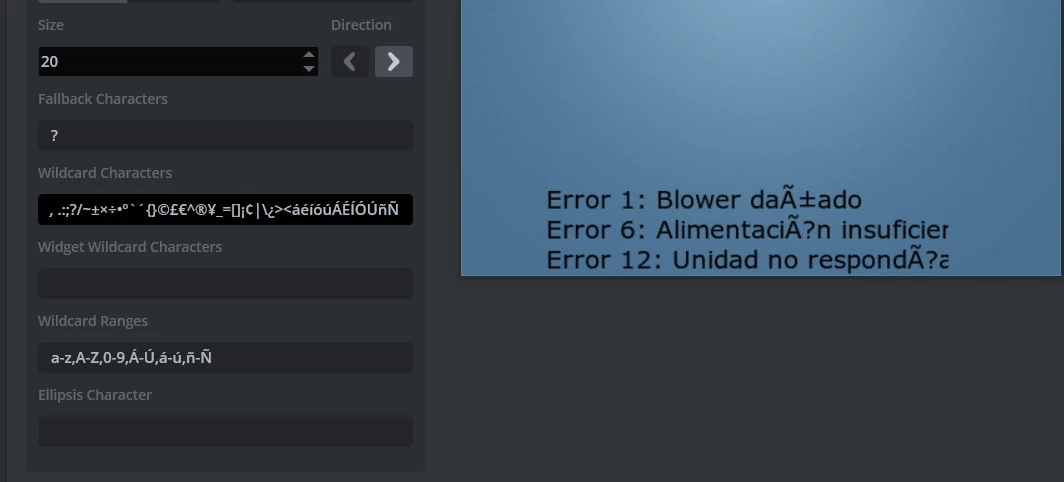
I put a picture of how I set the typography and how it is shown badly written in the simulation.

in “wildcard characters” I added áéíóúÁÉÍÓÚñÑ and in “wildcard ragne” I put ,Á-Ú,á-ú,ñ-Ñ but it did not work.

why does this problem occur?


Error 1: Blower dañado

Error 6: Alimentación insuficiente (it was cut off by the scrollablecontainer, it doesn't matter)

Error 12: Unidad no respondía
Maximiliano_0-1735924663511.png


    This topic has been closed for replies.
    Best answer by ferro

    Hi @Maximiliano 

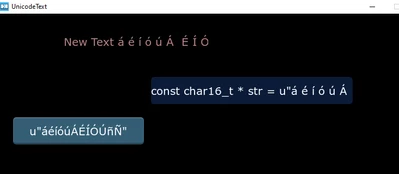
    Prefix the string with 'u'

     Unicode::snprintf(texto_errorBuffer, TEXTO_ERROR_SIZE, "%s", u"Ñá");
     texto_error.invalidate()

    I attached example project.

    ferro_0-1735940036912.png


    6 replies

    MM..1
    Super User
    January 3, 2025

    Maybe this helps you Solved: "Tildes" don't appear in wildcard texts. - STMicroelectronics Community

    understand Unicode UTF mix. And good practice is show version in your question...

    Plus i test your in static and wildcard from designer , then it works ok . What is your code where fail???

    MM1_0-1735929689390.png


    Associate III
    January 3, 2025

    Hello @MM..1  thank you for replying.

    the fault is in the buffered text.
    I also tried putting directly a ñ or a letter with tilde and it fails too.

    I don't know if I understood correctly, but is your capture of a text without buffer?


     Unicode::snprintf(texto_errorBuffer, TEXTO_ERROR_SIZE, "%s", "Ñá");
     texto_error.invalidate();


    Un ejemplo del uso que le estoy dando es:


    const char* errors[] = {
     "Error 1: Blower dañado",
     "Error 2: Ventilador no gira",
     "Error 3: Sobrecalentamiento detectado",
     "Error 4: Cortocircuito en el sistema",
     "Error 5: Falla en el sensor de temperatura",
     "Error 6: Alimentación insuficiente",
     "Error 7: Comunicación interrumpida",
     "Error 8: Batería descargada",
     "Error 9: Temperatura fuera de rango",
     "Error 10: Fallo en la conexión de red",
     "Error 11: Memoria insuficiente",
     "Error 12: Unidad no respondía"
    	};
    
    	// Cambiar el tamaño del arreglo a uno adecuado para el mensaje de error
    	char errorBuffer[512]; 
    
    	// Buffer de tipo Unicode::UnicodeChar para la cadena final
    	Unicode::UnicodeChar finalErrorBuffer[512]; 
    
    
     // Inicializar el buffer de errores como vacío
     errorBuffer[0] = '\0';
    
    	int error_code1 = 1; // Error 1
    	int error_code2 = 6; // Error 6
    	int error_code3 = 12; // Error 12
    
    
     // Copiar el primer error
     strncpy(errorBuffer, errors[error_code1 - 1], sizeof(errorBuffer) - 1);
     strncat(errorBuffer, "\n", sizeof(errorBuffer) - strlen(errorBuffer) - 1); // Añadir salto de línea
    
     // Copiar el segundo error
     strncat(errorBuffer, errors[error_code2 - 1], sizeof(errorBuffer) - strlen(errorBuffer) - 1);
     strncat(errorBuffer, "\n", sizeof(errorBuffer) - strlen(errorBuffer) - 1);
    
     // Copiar el tercer error
     strncat(errorBuffer, errors[error_code3 - 1], sizeof(errorBuffer) - strlen(errorBuffer) - 1);
     strncat(errorBuffer, "\n", sizeof(errorBuffer) - strlen(errorBuffer) - 1);


     // Convertir el contenido de errorBuffer (char) a finalErrorBuffer (Unicode::UnicodeChar)
     Unicode::strncpy(finalErrorBuffer, errorBuffer, sizeof(finalErrorBuffer) / sizeof(Unicode::UnicodeChar));
    
    
     Unicode::snprintf(texto_errorBuffer, TEXTO_ERROR_SIZE, "%s", finalErrorBuffer);
     texto_error.invalidate();


    MM..1
    Super User
    January 3, 2025

    Strings in your source files is in UTF8 , then cant be used directly... why you dont read solution?