Associate II
Jul 8, 2024 7:04 AM UTC
Solved

Text Area alignment change

How to change the alignment of textarea from the default style set in touchgfx designer?


In touchgfx designer(Version:4.21.3) I have set to Left alignment. I use this textarea for multiple purposes, for few I need to set to Left alignment and for few I need to set to Right alignment. I tried using ' textArea.setTextAlignment(TEXT_ALIGNMENT_RIGHT);'  but it says set alignment is not a member.

 

This topic has been closed for replies.
ferro
ferroBest answer
Lead
Jul 8, 2024 1:42 PM UTC

Hi @BhavyaSri 

I use TextAreaWithOneWildcard


// T_ALIGN_LEFT, T_ALIGN_CENTER, T_ALIGN_RIGHT Ids text is "<>" with different alignment
// T_TEXT_MULTIALIGN holds the text to dispaly and alignment does not matter

TextAreaWithOneWildcard::setTypedText ( touchgfx::TypedText ( T_ALIGN_CENTER ) ); 
TextAreaWithOneWildcard::setWildcard ( touchgfx::TypedText ( T_TEXT_MULTIALIGN ).getText () );
TextAreaWithOneWildcard::invalidate ();


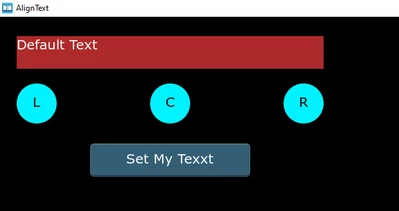
Example:

ferro_0-1720463890528.png


14 replies

GaetanGodart
ST Employee
Jul 8, 2024 1:19 PM UTC

Hello @BhavyaSri ,


I have not seen a method called "setTextAlignment' in the textArea API. 

You could try the method resizeToCurrentTextWithAlignment().
I think you should set the alignment directly from Designer instead of code.


If this comment solves your problem, I invite you to select it as "best answer".


Regards,

Gaetan GodartSoftware engineer at ST (TouchGFX)
BhavyaSriAuthor
Associate II
Jul 8, 2024 1:27 PM UTC

Thanks for your reply!


I cannot use from designer as I use Same textarea for multiple applications. Some of them need it to be right justified and some of them need it to be Left Justified. I have default set it as Left justified in designer, however for some cases I want to change that to Right justified via code.


Regards,

Bhavya

ferro
ferroBest answer
Lead
Jul 8, 2024 1:42 PM UTC

Hi @BhavyaSri 

I use TextAreaWithOneWildcard


// T_ALIGN_LEFT, T_ALIGN_CENTER, T_ALIGN_RIGHT Ids text is "<>" with different alignment
// T_TEXT_MULTIALIGN holds the text to dispaly and alignment does not matter

TextAreaWithOneWildcard::setTypedText ( touchgfx::TypedText ( T_ALIGN_CENTER ) ); 
TextAreaWithOneWildcard::setWildcard ( touchgfx::TypedText ( T_TEXT_MULTIALIGN ).getText () );
TextAreaWithOneWildcard::invalidate ();


Example:

ferro_0-1720463890528.png


ferro
Lead
Jul 8, 2024 2:56 PM UTC

@BhavyaSri 

Attached is Gfx project with extension .pdf - rename it to .zip. Forum does not allow me to attach file with .zip. Strange as I see .zip files shared here.

ferro_0-1720450432559.png


ferro
Lead
Jul 8, 2024 2:58 PM UTC

Hi @GaetanGodart

Do you know why my .zip file attachments are refused by forum ? Thanks.


ferro_1-1720450675466.png


GaetanGodart
ST Employee
Jul 8, 2024 3:37 PM UTC

Hello @ferro ,


The ".zip" extension is not supported. Most people use the ".7z" extension to share their files.


Regards,

Gaetan GodartSoftware engineer at ST (TouchGFX)
BhavyaSriAuthor
Associate II
Jul 8, 2024 3:04 PM UTC

Hi @ferro ,

I'm not able to see .pdf also. I'm able to see only image.

Also, just to add more details to my query:

1. I used textArea1 text field and enabled it as WildCard Buffer is designer.

2. I use 'Unicode::strncpy(textArea1Buffer,textfieldval, TEXTAREA1_SIZE);' in code and this 'textfieldval' will be changed based on microcontroller output.

Please let me know if additional details are required.

ferro
Lead
Jul 8, 2024 3:43 PM UTC
BhavyaSriAuthor
Associate II
Jul 8, 2024 4:06 PM UTC

Thanks for the solution @ferro and Thanks for the suggestions @GaetanGodart  . I have found the solution for left, right alignments(I need only left, right alignment).

Solution: 

1. I have declared in Texts section as 'T_ALIGN_LEFT',' T_ALIGN_RIGHT' Ids text is "<>" with different alignment in designer.

2. Where ever, I wanted to set to Right Alignment, I'm writing code as 

  • textArea1.setTypedText(touchgfx::TypedText (T_ALIGN_RIGHT));
  • Unicode::strncpy(textArea1Buffer,textfieldval,TEXTAREA1_SIZE);
  • textArea1.setWildcard(textArea1Buffer);
  • textArea1.invalidate();

3. And using this code to set it back to Left alignment whereever required:

  • textArea1.setTypedText(touchgfx::TypedText (T_ALIGN_LEFT));
  • textArea1.invalidate();
NGune.1
Associate III
Nov 27, 2024 3:42 PM UTC

Hi,

To be a reference for the others, can you please be more clear about how it is resolved?

I define my text areas in the code (since, in the beginning it is unknown that how many text areas will be needed). 

In the .hpp I have:

 touchgfx::TextAreaWithOneWildcard Line[100][10];

 in the View.cpp, I have something like:

Line[i][j].setPosition(50+(j)*90, (i*24+5), 90, 24);
Line[i][j].setColor(touchgfx::Color::getColorFromRGB(255, 255, 255));
Line[i][j].setLinespacing(0);

snprintf(swap, 10, "%lu",aTemp[i][j]);
Unicode::strncpy(dst, swap, 10);
Unicode::snprintf(TextBuffer[i][j], 10, dst);

Line[i][j].setWildcard(TextBuffer[i][j]);
Line[i][j].setTypedText(touchgfx::TypedText(T_RESOURCEID1));
Line[i][j].setTypedText( touchgfx::TypedText(T_ALIGN_CENTER));
EditorContainer.add(Line[i][j]);
Line[i][j].invalidate();


It doesn't compile and gives error for the line that has this T_ALIGN_CENTER. it says:

'T_ALIGN_CENTER' was not declared in this scope

What am I doing wrong?

Thanks

ferro
Lead
Nov 27, 2024 3:54 PM UTC

Hi,

1. missing

#include <texts/TextKeysAndLanguages.hpp>

2. or ALIGN_CENTER is missing in Text view:

ferro_0-1732722768127.png


If not then past here compiler error screenshot please

NGune.1
Associate III
Nov 27, 2024 4:05 PM UTC

Hi Ferro,

Number 2 was missing. 

I added a new group, "ResourceID2" and made it center_aligned in the Designer. And then i my code wrote:

Line[i][j].setTypedText(touchgfx::TypedText(T_RESOURCEID2));

Everything with this ResourceId2 is now centered.

Thank you.