

Angle
Associate III
December 30, 2022
Question

STM32H7 while(1) not executed

  • December 30, 2022
  • 8 replies
  • 1926 views

Hi , may I know why when I put my code under while(1), it doesn't execute my code?
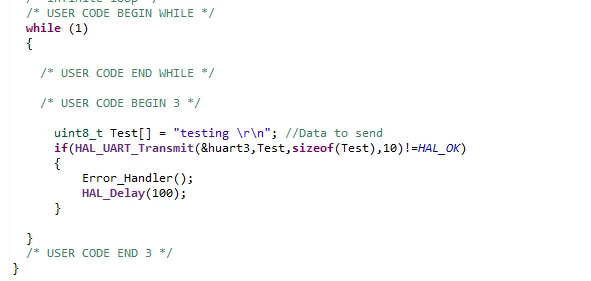
0693W00000Y76snQAB.png

This topic has been closed for replies.

8 replies

gbm
Super User
December 30, 2022

Look for the reason before the code which is not executed. Use the debugger to catch the problem.

My STM32 stuff on github - compact USB device stack and more: https://github.com/gbm-ii/gbmUSBdevice
ST Technical Moderator
December 30, 2022

Hello @Angle​ 

Could you please provide more details about the product name

Also provide more details on the issue: which MX version are you using? at which level exactly the error is faced?

I suggest to s start with an example using UART.

To give better visibility on the answered topics, please click on "Best answer" on the reply which solved your issue or answered your question.Best regards,FBL
Angle
AngleAuthor
Associate III
December 30, 2022

Hi, my using the STM32H750XBH-DK touchgfx.

I also don't know why it doesn't execute my code when I put it in while(1) in user begin 3. I think there is no problem with my code since I also try to executed by putting my code at user begin 2 and it working.

0693W00000Y77A8QAJ.png 

This is one is when I put my code in in user begin 2, my code can be executed but I need to add the while(1) since I need to use the loop. I can read the data display

0693W00000Y7790QAB.png 

Tesla DeLorean
Guru
December 30, 2022

Doesn't get there due to already having transferred to task started by the scheduler?

​

P​erhaps stop in the debugger and see what code it IS executing..

Tips, Buy me a coffee, or three.. PayPal Venmo (See Profile) Up vote any posts that you find helpful, it shows what's working..
AScha.3
Super User
December 30, 2022

--- and if you put code in "normal" intended position :

0693W00000Y77MJQAZ.png

If you feel a post has answered your question, please click on " Best Answer ".
gbm
Super User
December 30, 2022

So, you skipped few "minor details" from your problem description. The processor never enters the loop, you are starting the operating system scheduler before the loop and the processor is "stuck" in the operating system and the tasks run by it. By definition it should never return from OS start routine.

Can you see the comment "We should never get there as control is now taken by the scheduler"?

My STM32 stuff on github - compact USB device stack and more: https://github.com/gbm-ii/gbmUSBdevice
Karl Yamashita
Principal
December 30, 2022

You can't use the while loop in main.c as the code never reaches it because the scheduler takes over.

Instead you'll have to use the default task or create a new task in FreeRTOS. But if you use the default task then call some Polling functions in a different file. In main.c you should find a function called StartDefaultTask

/* USER CODE BEGIN Header_StartDefaultTask */
/**
 * @brief Function implementing the defaultTask thread.
 * @param argument: Not used
 * @retval None
 */
/* USER CODE END Header_StartDefaultTask */
void StartDefaultTask(void *argument)
{
 /* USER CODE BEGIN 5 */
 /* Infinite loop */
	PollingInit();
 for(;;)
 {
	 PollingRoutine();
 osDelay(0);
 }
 /* USER CODE END 5 */
}

I'm calling PollingInit() that is function that has initializing tasks. This is only called once. Then the PollingRouting() is in the for(;;) loop. So the PollingRoutine is where you'll do you own tasks outside of the TouchGFX tasks.

If a reply has proven helpful, click on Accept as Solution so that it'll show at top of the post.CAN Jammer an open source CAN bus hacking toolCANableV3 Open Source
