


LMese.1
Associate
January 27, 2020
Question

STM32F769I Discovery + TouchGFX 4.13 weird graphics issue

  • January 27, 2020
  • 23 replies
  • 6153 views

Hello,

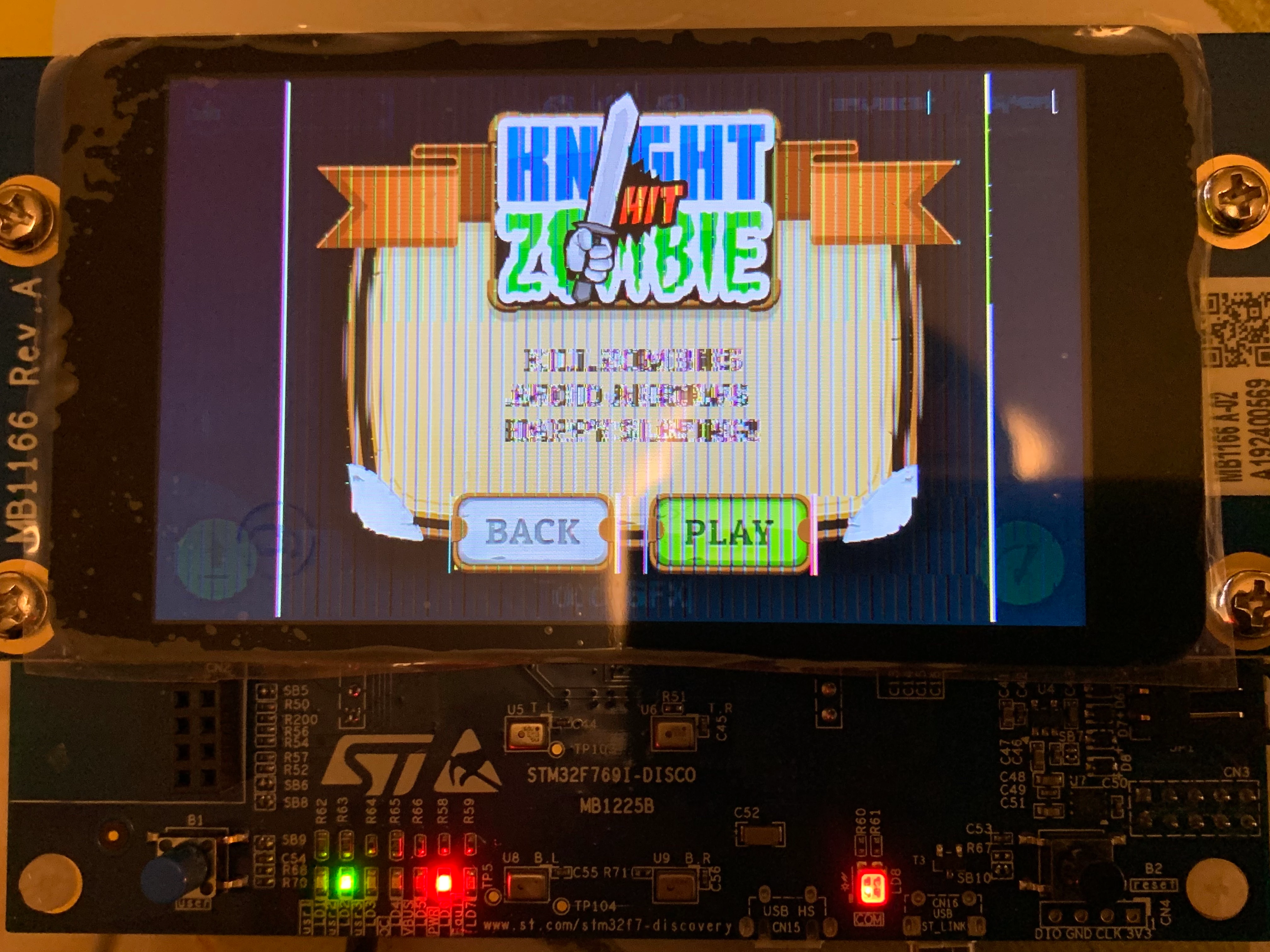
ALL TouchGFX examples and demos from TouchGFX Designer 4.13 templates have this graphics issue. The issue is quite randomic. For example, I compile, build and flash the demo, it runs ok, but after I un-plug and plug again the board it looks like the following. But not always, about twice on 3-4 attempts. Sometimes it starts ok. Pressing reset button sometimes helps and sometimes not. Please help. I'd like to use TouchGFX for our project, it is a very impressive product, but this strange issue is blocking. Thank you.

P.S. That's not a HW problem, other LTDC demos, including emWin, work just fine.
0690X00000BwdgBQAR.jpg

This topic has been closed for replies.

23 replies

Martin KJELDSEN
Principal III
January 28, 2020

Hi,

When you say "ALL TouchGFX Examples..." Do you mean running on the same board? E.g. it may be a board configuration issue. The applications themselves don't know how to exhibit this behavior, but hardware does.

I'll look into it.

/Martin

LMese.1
LMese.1Author
Associate
January 28, 2020

Hi Martin, thank you for reply. Well, when I say "ALL TouchGFX Examples" I mean all templates that TouchGFX Designer provides for STM32F769I-DiSCO board. I select a template and generate the code. After that I do Run on Target and the described issue appears. I do not create any custom project yet, I'm just trying to get working the demo templates from TouchGFX Designer. Well, I also tried to import and build a project from STM32CubeIDE with the same result, since it uses the same .ioc board configuration and the same initialization code from the templates. Yes, I understand that this is timings or configuration issue, but it comes from TouchGFX code, not from mine. So my question is, did you guys see this behaviour and if not, I'd like to notify it to you.

And I repeat, this is not a particular hardware issue since other graphics libs run just fine on the same board.

Martin KJELDSEN
Principal III
January 28, 2020

That's to say - The application template may have an issue. It's not an issue that relates to the TouchGFX Framework/Engine per se. What hardware are you going to run your project on?

/Martin

LMese.1
LMese.1Author
Associate
January 28, 2020

The application template may have an issue, indeed. But since we, developers, have to take the code from these templates for our custom projects, the same issue will have our custom projects. TouchGFX Framework/Engine requires the board has to be configured in a certain mode, ok, but we cannot guess the correct settings in order to get it work, right? =)

Martin KJELDSEN
Principal III
January 28, 2020

I've confirmed the issue with the F769-DISCO template. Thanks.

LMese.1
LMese.1Author
Associate
January 28, 2020

Martin, thank you very much. I hope you will find a fix for this issue asap. Indeed it will be available within the next version, but may I ask you to let me know the solution sooner (perhaps it is just a wrong clocking settings or any other stupid bug) because I have to start my project asap and TouchGFX is the really best product to do it with.

Martin KJELDSEN
Principal III
January 28, 2020

We can release application template updates independently of the TouchGFX version, so if this is a quick fix then it will not take long to upload

/Martin

Michael K
Senior III
January 29, 2020

As per @Martin KJELDSEN​ 's advice, I migrated the project I created with the v3.0.0 template in TouchGFX 1.13.0 to a new project created with the v2.0.1 template.

  1. Backup your old project
  2. Create a new project with the TouchGFX designer using the v2.0.1 f769i template, empty UI
  3. Close TouchGFX designer
  4. Rename the new project's .touchgfx to <whatever>.bak
  5. Copy your old .touchgfx file to the new project directory, rename it to what the new project's file name was
  6. Copy the assets folder from the old to the new project
  7. Open TouchGFX designer, generate code
  8. Copy the gui folder from the old to the new project

The glitches noted in the OP seem to have gone away, however now the screen is corrupted in a different way until the first redraw (right side is fine, black box in teh center, and corruption on the left). I mitigated this by adding a black box overlaid on my screen, and adding a fade interaction that is triggered by an screen entrance. The black box doesn't have visible corruption, and the fade redraws the screen immediately.

I also notice that an issue I was having previously that froze the system when too many elements were on screen is no longer an issue. With the v3.0.0 template I had to double the FreeRTOS stack and heap sizes.

Edit: I should also note that this now requires a downgrade of CubeMX, and CubeIDE projects are no longer natively generated. For my project I plan to continue development with the v3.0.0 template, and then migrate the project using the steps above to remove the graphical issue.

Embedded UI/UX Consulting: cadenza.design
Martin KJELDSEN
Principal III
January 31, 2020

FreeRTOS heap and stack size are important, yes, under penalty of a crash. Also, in cmsis v1 and pure freertos task stack sizes are in words where in cmsis v2 its in bytes (and freertos config heap size is always in bytes). CubeMX doesn't help you realize this.

/Martin

LMese.1
LMese.1Author
Associate
January 29, 2020

@Michael K​, many thanks for the tips, I've managed to run my .touchgfx screens with this method. I also have this left-half screen glitch that could be masked by a faded black box on entering the mainScreen.

However, I'd rather wait for the templates v3.0.0 fixed, because the rest of my project uses CubeMX peripheral configuration, it is very fragile sometimes and I don't like the idea to have a blackbox-like hardware configuration from templates 2.0.1 that could potentially create any sort of conflicts or something like that. I'd prefer to have all the peripherals configured in one place (CubeMX).

LMese.1
LMese.1Author
Associate
March 6, 2020

up

Michael K
Senior III
March 24, 2020

Bump - any updates on a new application template or fix for these graphical issues?

Embedded UI/UX Consulting: cadenza.design
LMese.1
LMese.1Author
Associate
March 25, 2020

Seems that nobody cares about it. STM32F769I Disco doesn't work? Who cares, we will go ahead releasing newer cool DISCO boards and bugged firmware.