


Ash
Associate
June 3, 2019
Question

STM32F429I board - CubeMX - System Workbench integration

  • June 3, 2019
  • 3 replies
  • 2867 views

Hi All , its been almost a week that I'm trying to integrate CubMX for configuration, TouchGFX for Graphics and workbech! no success. I am using STM32F429I board.

What i could manage to do:

  • was able to configure the TouchGFX on CubeMX based on provided videos on the internet and documents. can generate the code and see the touchGFX folder.
  • followed this tutorial

https://www.youtube.com/watch?v=xZ0pPhQCQUY&t=11s

  • excluded all simulator related files and included needed path .

However, I am still facing the following error :
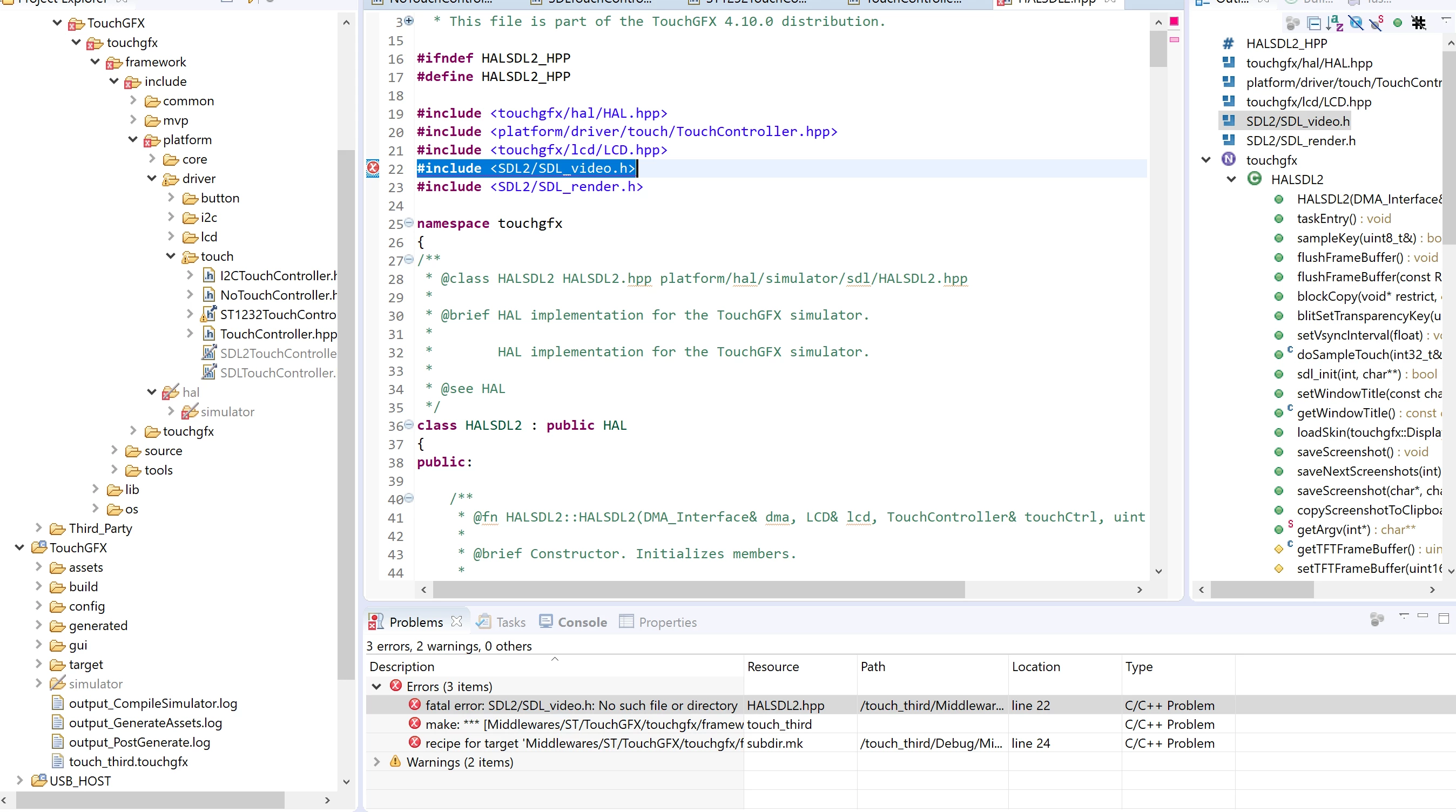
0690X000008i6HxQAI.png

Regardless to the fact that i excluded all simulator related files and folder, I still getting :

"Description Resource Path Location Type

fatal error: SDL2/SDL_video.h: No such file or directory HALSDL2.hpp /touch_third/Middlewares/ST/TouchGFX/touchgfx/framework/include/platform/hal/simulator/sdl2 line 22 C/C++ Problem

"

would really appreciate any guidance.

Thanks

This topic has been closed for replies.

3 replies

Martin KJELDSEN
Principal III
June 3, 2019

Hi @Ash​,

It's difficult to follow the compilation error from the screenshot, but there must be something trying to include SDL2. Maybe do a project wide search for which .cpp files do that and exclude them from build.

/Martin

Ash
AshAuthor
Associate
June 4, 2019

Hi @Martin KJELDSEN​ , Thanks a lot for your response,

I could manage to compile the project by excluding folders as following :

0690X000008i9pdQAA.png

Also, could upload the code and see the image on the display.

Then i followed instruction to fix the touch functionality for this board. i copied necessary driver files from CubMX and added "stm32f429i_discovery_ts.h" in "STM32F4TouchController.cpp".

modified needed lines and faced issue with this part:

BSP_TS_GetState(&state);
 if (state.TouchDetected)
 {
 x = state.x;
 y = state.y;
 return true;
 }

looking at " stm32f429i_discovery_ts.h"

i found this declaration:

typedef struct
{
 uint16_t TouchDetected;
 uint16_t X;
 uint16_t Y;
 uint16_t Z;
}TS_StateTypeDef;

so i change x to X and y to Y. this one solved!

Then i faced an issue with multiple function deceleration " void LCD_Delay(uint32_t Delay)" . it was decelerated in both , "BoardConfiguration.cpp" and "stm32f429i_discovery.c".

by removing the deceleration on one them(doesn't matter which one!) i could manage to upload the code and having the touch functionality too.

Happy by this, i tried to add a simple blink test too.

for what ever reason i could never blink the LED on the board until i removed " osKernelStart();" from the main.cpp . then the LED Blink, have the image on the screen BUT no Touch functionality.

Any suggestion?

Thanks

Ash
AshAuthor
Associate
June 4, 2019

Probably, the issue backs to my RTOS default task schedule implementation.

Thanks

Mon2
Senior III
June 5, 2019

Hello @Ash. From my (fading) memory, believe the issue is that the wizard is truly missing the referenced file.

As a possible work around, create a fresh project but start with the TouchGFX toolchain -> select your same target kit -> create a simple GUI -> compile and test with the simulator. All working ok? If not, report back.

Assuming this is working correctly, navigate to the folders on your PC using the browse code button and Windows file manager. Now go to the top of this project generated by Touchgfx and then search for the above missing file. It should appear inside the SIMULATOR folder.

Next, open up File Manager (new window) and dig down to your non-working project and note that the same file is missing!!

Copy the folder and structure from the good project to the non-working project and compile again.

Please post your results. Hope this works for you.

Mon2
Senior III
June 5, 2019

Hello again @Ash​ . Quickly review the following document we wrote after a lot of R&D on the same kit. The tools are based on the IAR / SW4STM32 compilers (Free):

https://s3.amazonaws.com/axxonshare/my_combo_tutorial.zip

Hope this helps a bit.

Kumar

Ash
AshAuthor
Associate
June 6, 2019

Thanks a lot @Mon2​ , it was helpful.