


Tauqir Hassan
Associate II
March 27, 2019
Question

STM32F429-DISC1 White Screen Error
  • March 27, 2019
  • 7 replies
  • 2355 views

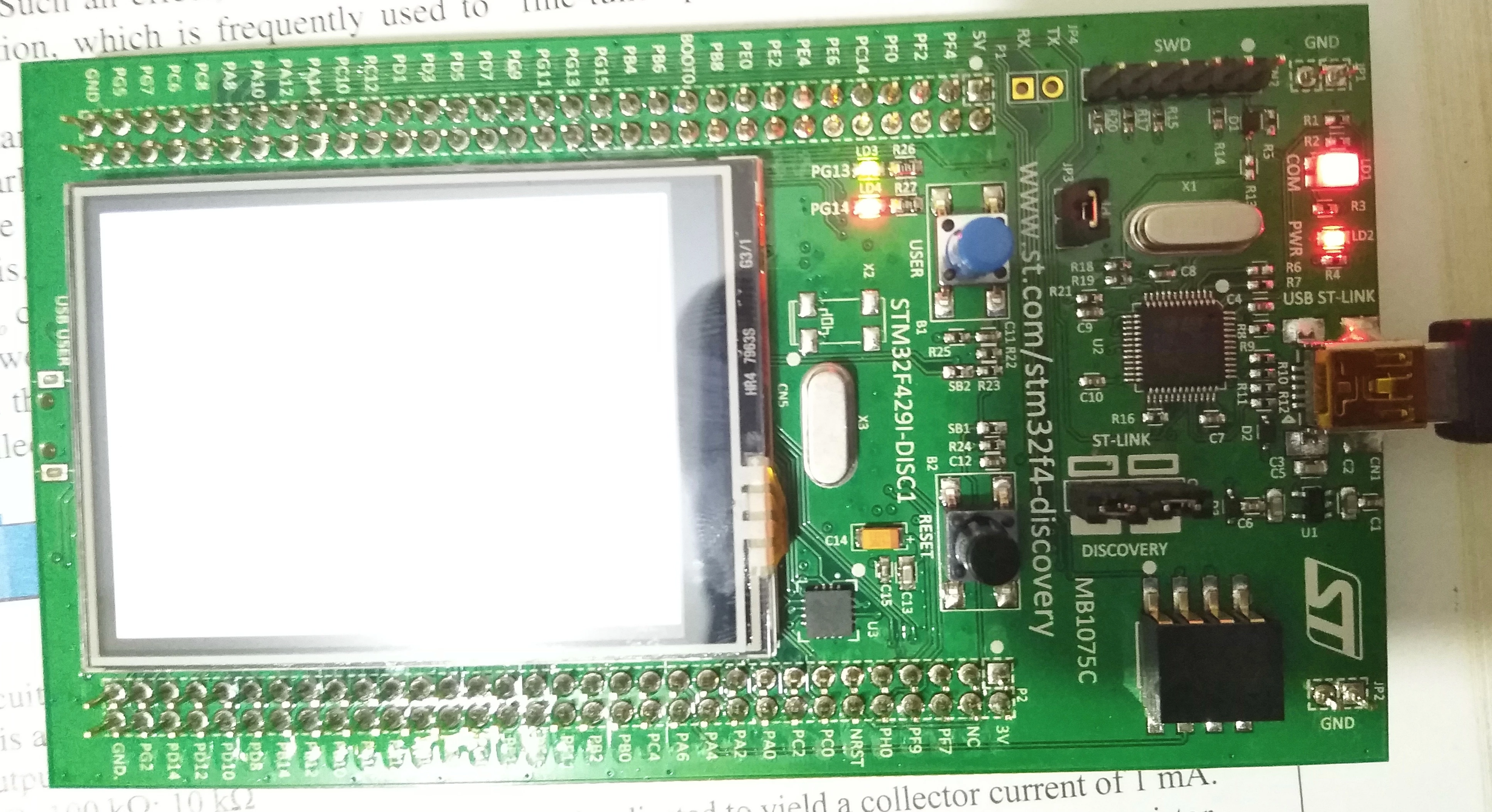
0690X00000895hFQAQ.jpgHello , I just bought STM32F429-DISC1 a few weeks ago.

I did the following :

  • Turned it ON by connecting to my laptop.
  • installed the drivers. 
  • and updated the firmware

Everything worked perfectly fine. 

Then I put it in a box safely because I was busy with other things. Today, after a week or so I connected it again and observed the following things::

1. COM and PWR LEDs are RED (static).

2. The LCD Screen is stuck and completely white.

WHAT I CHECKED/Resolved ::

  • My device is still being detected by the PC as a Flash drive.
  • I then Compiled and Loaded a LED Toggle program to check and it's running without any error.   
  • I tried using a different Cable and PC , but the problem persists.
  • I tried to connect external 5V and 3V Sources,but the problem persists.
  • My firmware and drivers are up to date.

So , I draw the conclusion that the only problem is with the LCD screen. 

Can someone guide me with any solution (As soon as possible) ?

Any help shall be appreciated.

This topic has been closed for replies.

7 replies

Tesla DeLorean
Guru
March 27, 2019

The LED toggle program doesn't configure or set up the screen. You'll need to build an LCD orientated application and download that.

Tips, Buy me a coffee, or three.. PayPal Venmo (See Profile) Up vote any posts that you find helpful, it shows what's working..
Tauqir Hassan
Associate II
March 28, 2019

@Community member​  I appreciate that you gave your suggestion. Although you are right about running a LCD oriented application but the LCD should start up automatically When one connects the device with the PC , as it initially did in my case before the problem occurred.

However I will act upon the suggestion and give you the feedback.

Thanks again !

Tesla DeLorean
Guru
March 28, 2019

>> but the LCD should start up automatically

That's really not how the world works, the backlight comes on because it is just a simple illuminating device. The LCD expects clocks, and sync signals, for a controller that knows nothing about the display it is connected too. All that unique information has to be set up by code you supply.

You had an application on the board that demo'd the display, you erased that code and replaced it with something that did something entirely different.

Tips, Buy me a coffee, or three.. PayPal Venmo (See Profile) Up vote any posts that you find helpful, it shows what's working..
Mon2
Senior III
March 28, 2019

Hello @Tauqir Hassan​ , please drag & drop the attached .hex file to the flash drive letter linked to this kit and then press RESET button or power cycle the kit. Can you see the LCD display?

As noted by Clive, the code or project that you compile must make use of the LCD display.

For more details, see here:

https://community.st.com/s/question/0D50X0000A7Y1xxSQC/stm32f429idisc1-tutorials-with-iar-and-sw4stm32-compilers-with-touchgfx-stm32cubemx

Tauqir Hassan
Associate II
March 28, 2019

@Mon2​  Thanks for your suggestion , I copied the hex file in the flash drive and pressed the reset button but the LCD is still white screened and when I plug out the USB from PC and then plug in again, the HEX file gets deleted automatically. I don't know if that's normal behavior.

Mon2
Senior III
March 28, 2019