johnnyilr
Associate
May 14, 2014
Question

[STemwin] ''hello world'' display in reverse

  • May 14, 2014
  • 6 replies
  • 1413 views
Posted on May 14, 2014 at 10:03

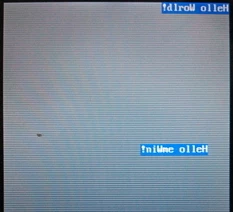
hi,I'm learning how to use STemwin,so my 1st routine''hello world'' doesn't work well.

GUI_DispStringAt(''Hello World!'', 0, 0); shows all words in reverse

at top-right

,but all letters are correct.

 I set 

Config.Orientation =  GUI_MIRROR_X; (

LCD_X_Config in LCDConf_FlexColor_template.c

),

 if I set 

Config.Orientation = 0; all words show still at top-right and each letter is also in reverse.

I am really confused what happened, it seems the coordination (0,0) is set at top-right.  The display controllor is ILI9481,MCU is stm32F407, can somebody help me out?  Thanks in advance.

0690X00000602ujQAA.jpg

#stemwin
This topic has been closed for replies.

6 replies

rigomate2
Associate II
May 15, 2014
Posted on May 15, 2014 at 13:33

Well, I'd try not mirrorring the x orientation for a start.

Don't use GUI_MIRROR_X.


Cheers

johnnyilr
johnnyilrAuthor
Associate
May 16, 2014
Posted on May 16, 2014 at 03:30

Thanks for reply, as I mentioned : if 

I set 

Config.Orientation = 0; all words show still at top-right and all letters are also in reverse.

It's really odd, and that's why I got confused :(

rigomate2
Associate II
May 16, 2014
Posted on May 16, 2014 at 14:26

Oh, my bad!

I'll rethink it then, now that I did actually understand the problem :)

Edit, I assume you drive it, using SPI.

Have a look at the datasheet's page number 80:

http://www.ncsys.co.jp/webshop/GTV350MPZI04%28ILI9481%pdf

________________

Attachments :

www.ncsys.co.jpwebshopGTV350MPZI04_ILI9481_.bmp : https://st--c.eu10.content.force.com/sfc/dist/version/download/?oid=00Db0000000YtG6&ids=0680X000006I1Mz&d=%2Fa%2F0X0000000bm2%2FgvA_juGjwf6cWcQedpVWvzpWH2ljXR9k7gNxS1oDf0c&asPdf=false
dav ABA
Associate
December 26, 2016
Posted on December 26, 2016 at 18:38

hi. i work on emwin hello world.

my lcd controller is ILI9341

my code is

GUI_Init();

/* Activate the use of memory device feature */

WM_SetCreateFlags(WM_CF_MEMDEV);

MainTask();

but not anything is display on lcd.

please help me...

what is wrong ? how can i link emwin to my lcd functions ?

thank you...

ST Technical Moderator
December 26, 2016
Posted on December 26, 2016 at 18:52

Dear

abbasi.davoud

‌,

Are you enabled clock for CRC module ?

The CRC must be enabled before calling GUI_Init, if not STemWin will be not function

this is mentioned in the page 6 of AN4323 to call GUI_Init function prior to use any STemWin function or GUI routines: 'The CRC module (in RCC peripheral clock enable register) should be enabled before using the library.'

Are you following the

emwin

user manual aboutWM_SetCreateFlags (WM_CF_MEMDEV) ? which mentioned :

'The flag WM_CF_MEMDEV is frequently used to enable Memory Devices on all windows. Setting create flags is permitted before GUI_Init() is called. This causes the background window to be also affected by the create flags.

'

Best Regards

Imen

In order to give better visibility on the answered topics, please click on 'Best answer' on the reply which solved your issue or answered your question. Thanks
dav ABA
Associate
December 27, 2016
Posted on December 27, 2016 at 16:33

hi thank you ...i call              __HAL_RCC_CRC_CLK_ENABLE();     in first of codeand i call      WM_SetCreateFlags(WM_CF_MEMDEV); my code is :

HAL_Init(); SystemClock_Config(); __HAL_RCC_GPIOA_CLK_ENABLE(); __HAL_RCC_GPIOB_CLK_ENABLE(); __HAL_RCC_GPIOC_CLK_ENABLE(); __HAL_RCC_GPIOD_CLK_ENABLE(); __HAL_RCC_GPIOE_CLK_ENABLE(); __HAL_RCC_CRC_CLK_ENABLE(); WM_SetCreateFlags(WM_CF_MEMDEV); GUI_Init(); MainTask();

but nothing display on LCD ....what thing should i change for test ?

please help me ....