


JPine.1
Associate II
October 25, 2022
Question

Static Graph logarithmic x-axis

  • October 25, 2022
  • 3 replies
  • 5541 views

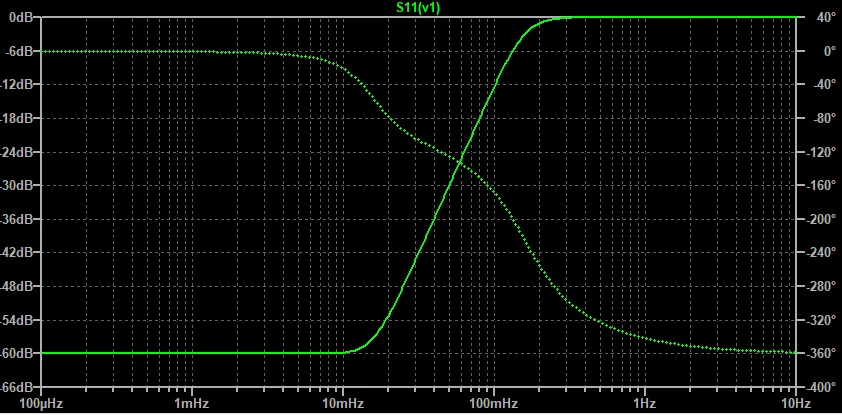
I'm working on an GUI that has mainly a static graph wich plots bode diagrams. So i have been searching on the API of touch gfx ways to make a logspace in x-axis in order to plot frequency but a i didnt find a way to change the linear magnitude of x-axis.I would need something like this:
0693W00000Uoi9MQAR.png 

Is it possible to manipulate x-axis scale?

Thanks in advance

This topic has been closed for replies.

3 replies

Osman SOYKURT
Technical Moderator
October 25, 2022

Hello JPine.1,

Manipulate the x-axis scale is possible in TouchGFX. The function used are :

 // Adjust the X-axis max value
graph.setGraphRangeX();
 
//Adjust the interval of the labels/grid lines on the X-axis
graphMajorXAxisLabel.setInterval(); 
graphMajorXAxisGrid.setInterval();
 

However, the logarithmic based axis is not (yet) natively supported on TouchGFX. This is maybe something we can do in future, I'll suggest it to my colleagues.

/Osman

Osman SOYKURTST Software Developer | TouchGFX
JPine.1
JPine.1Author
Associate II
October 25, 2022

Hello Oskt,

Thank you very much for your fast answer.

Okay, yes implement that would be great because my project is based on bode diagrams, so is one of the pillars a xlog space. Anyway, maybe I could manipulate those axis in lower level functions?

Thanks

Joaquín.

JPine.1
JPine.1Author
Associate II
November 6, 2022

Hello Again, i managed to make a log scale graph adding lines. It works fine. However, i have done a logic to switch between two graphs that already have their points loaded on the widget, and the refresh of the screen is very slow, it takes about 3 seconds to set one graph visible and the other not visible. It's a problem of the widget or my MCU?. I'm using NUCLEO f401RE with 84MHz of clock and 30uS of refresh of the engine. Also im using the partial frame buffer strategy. Here is the logic code for switching graphs:

void Screen1View::Toggle_Mag_Phase()

{

Unicode::UnicodeChar string_aux[3] = {' ','Γ',' '};

static uint8_t type_plot = MAG;

if(type_plot == MAG)

{

string_aux[0]=' ';

string_aux[1]='P';

string_aux[2]=' ';

Unicode::strncpy(buttonMAG_PHBuffer, string_aux, 3);

buttonMAG_PH.setWildcardTextBuffer(buttonMAG_PHBuffer);

buttonMAG_PH.invalidate();

graphMAG.setVisible(false);

graphMAG.invalidate();

//graphPH.setVisible(true);

//graphPH.invalidate();

type_plot = PHASE;

}

else

{

string_aux[0]='|';

string_aux[1]='T';

string_aux[2]='|';

Unicode::strncpy(buttonMAG_PHBuffer, string_aux, 3);

buttonMAG_PH.invalidate();

graphMAG.setVisible(true);

graphMAG.invalidate();

graphPH.setVisible(false);

graphPH.invalidate();

type_plot = MAG;

}

}

And the config of TouchGFX:

0693W00000WHX8PQAX.png

Romain DIELEMAN
ST Employee
November 7, 2022

Hi,

I suppose your graphs take almost the full screen ? If yes then I am not surprised that it would take some time to disappear and be replaced by another. With the partial framebuffer strategy you only update blocks of the screens at a time, so full screen animations can take some time and also show some tearing effects. To speed up your process you can either change the framebuffer strategy or try to play around what you refresh on your display. You need to reduce the size and the amount of things you update at the same time. In the simulator I recommend to use the different features available, like "F2" to show what zones are updated, "F9" to pause the simulator and "F10" to go one tick at the time so that you can see exactly what zones of the display are being refreshed when you go from a graph to another.

Are you working with a dynamic graph or a static graph ? Something you could do with a dynamic graph for example would be to reach the end of the graph and then "clean" the graph (get rid of all the points), switch to the other graph and then display one by one the values of the new graph. Not sure if I am clear or not but what I am trying to say is that I would rather have an animation of the new graph filling up itself point by point rather than just making it appear with all the points already set as this means a full screen update. This still implies a "long" transition (wont take 3s but need to be tested) but at least it will look smooth instead of a freezy/laggy transition.

/Romain

Romain DIELEMAN
ST Employee
November 7, 2022

Can also be done with a static graph actually you just need to clean it before putting the new one as well with the clean() function, no need to wait for the graph to be full like I initially recommended with the dynamic graph.

Maybe share your project or a screenshot of it so that people can have a look or give advice on what things you could improve on it to smoothen the animations.

/Romain