Associate II
Sep 15, 2023 10:31 AM UTC
Question

Slow fade with touchgfx

I'm using touchgfx 4.22 on a stm32h755zi mcu. The touchgfx run on the M7 core. The mcu is running at 480MHz.
The board is an internal board with a 800x480 display connected in parallel to the LTDC interface with a 18bit bus as shown below:
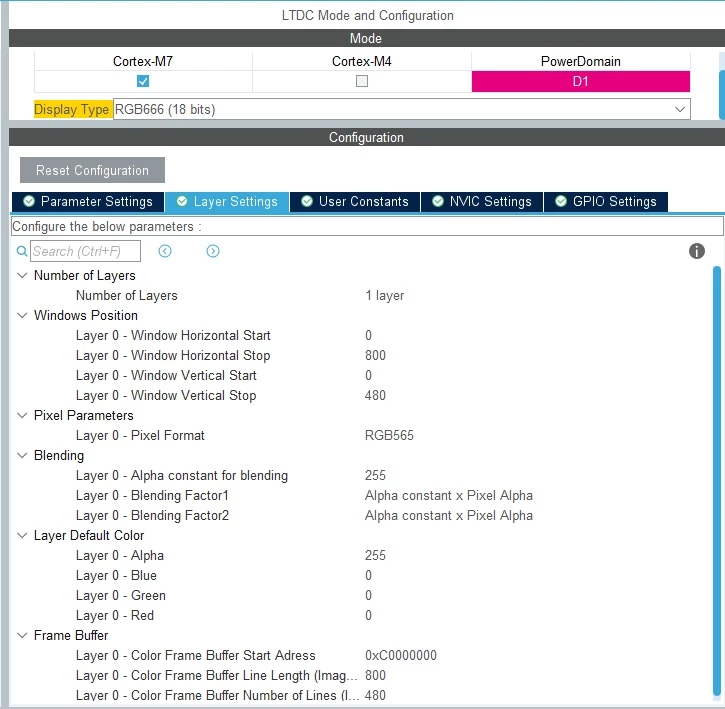
LTDC.jpg

I use an rgb565 buffer in an external psram. Touchgfx settings are as follow:
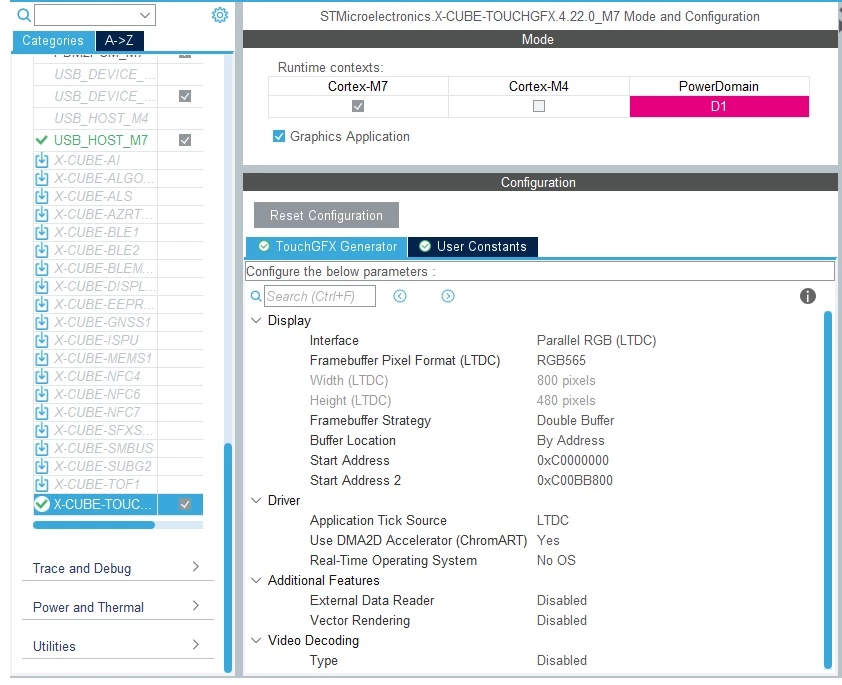
Touchgfx conf.jpg

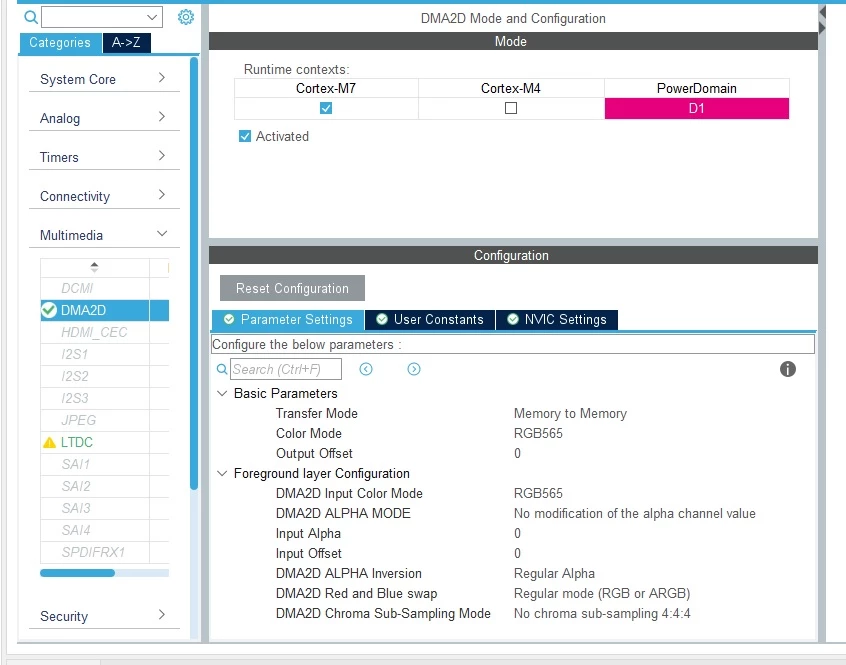
And here the dma2d settings:

DMA2D conf.jpg

I've made a simple screen where there is a fade of a box of 800x480 pixel (all the screen) from gray color to transparent but this fade is very slow. With or without DMA, the result is the same.
Here a video of the fade: https://www.youtube.com/watch?v=OfER5-DQu4M
sorry for the poor video quality; however the screen starts in grey color and after 1 second the box in grey color disappears and another screen is shown. All of this with a fade effect.
And here it is how I made the fade; it's a simple interaction:
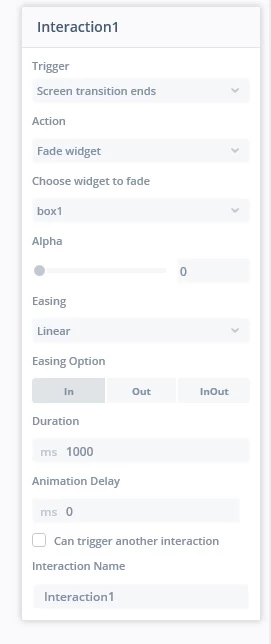
Fade.jpg

As far as I understand the fade duration should be 1s but it is 7-8 seconds. A part the wrong duration, the fade is quite sloppy with or without dma.

What am I doing wrong?

This topic has been closed for replies.

14 replies

sbiAuthor
Associate II
Sep 18, 2023 2:17 PM UTC

Any advice? I still don't understand why my graphic is not accelerated...
Or, do you think that this is the best performance I can achieve with this mcu?

MM..1
Super User
Sep 18, 2023 3:13 PM UTC

Seems you use no OS implementation. Here is your job manage timing and seems not good.

sbiAuthor
Associate II
Sep 19, 2023 7:45 AM UTC

I've choosen LTDC as Application Tick source as described here: https://support.touchgfx.com/docs/development/touchgfx-hal-development/scenarios/scenarios-ltdc-parallel-rgb
and as you can see also in a screenshot in my first post; I mean this:

sbi_1-1695109494233.png

At the end of the documentation, I read this:

sbi_0-1695108688307.png

and looking through the code I see that the isVsyncAvailable() is called everytime LTDC generates an interrupt. The interrupt handler that manages this is: HAL_LTDC_IRQHandler.
So I think it is all managed correctly but I see it is all slow.

Or maybe I've to do some timing management but I don't know how. Do you have any link in the documentation that I can follow?

Thank you

MM..1
Super User
Sep 19, 2023 12:19 PM UTC

LTDC clock in clock config ? In theory you require around 25MHz

Maybe your PLL dont work ok.

sbiAuthor
Associate II
Sep 19, 2023 1:16 PM UTC

Yes it is set at 23MHz at the moment. I measured the dot clock on my tft with an oscilloscope and it is seems perfect and at 23MHz

MM..1
Super User
Sep 19, 2023 5:15 PM UTC

? an external psram you mean OCTOSPI

Try read about LTDC optimise LCD-TFT display controller (LTDC) on STM32 MCUs - Application note

sbiAuthor
Associate II
Sep 20, 2023 8:46 AM UTC

No I don't mean an OCTOSPI but a PSRAM

FMC Configuration.jpg

To be honest, I don't use a PSRAM since it's very difficult to find. However I am using a normal SRAM (a IS61WV102416FBLL-10TLI ) with 2 SN74LVC573APW latches and inverter for nadv.
The FMC clock is configured this way:

FMC Clock.jpg

With some simple read/write test I've found the fastest clock we can achieve in order to have best performance. As far as I can understand the ram clock is enough to cover my display but I can be wrong. I don't find in the document you linked me, a section regards psram (only sdram, octospi, qspi flash) so I hope to have made my calculation well.
If I lower the FMC clock I see that the screen is corrupt so I think with this configuration the sram is fast enough.

What I don't understand is why if I set a 1s transition with fade, the whole cicle is 7-8seconds.

P.S.
I've tried also what it is described here: https://support.touchgfx.com/docs/development/touchgfx-hal-development/scenarios/scenarios-measure-performance#performance-metrics
and measured with an oscilloscope the timings. The vsync signal seems to be generated every 17ms which seems correct to me.

MM..1
Super User
Sep 20, 2023 1:39 PM UTC

As explained in pdf. Displays can have many bottlenecks and one worse wins. For redraw in animation full screen 800x480x2 fade full is read recals write = around 138MB/s troughput over memory bus.  Your memory is 3/1/1 clk 16bit wide then real speed is 229/2 little around required. Then next issues must exist , what holds bus ocupied...

Result is LTDC read framebuffer and send ok speed, but data in buffer is changed slow = animation skip frames.

Too double buffering make thiks worse... Try Performance | TouchGFX Documentation detect lost frames

sbiAuthor
Associate II
Sep 26, 2023 1:37 PM UTC

Sorry for the delay here... I'm coming to the conclusion that accessing this external ram is slow but I don't know why or what I've to do for making it faster.
I've made some very simple benchmark in order to see how fast is writing/reading/modifying the whole psram area

uint16_t psramRead = 0 ;
int begin;
int end;
int TimeRead;
int TimeWrite;
int TimeModify;
uint16_t *psram = 0x60000000;

begin = HAL_GetTick();

for (uint32_t i=0; i<1048576; i++){
	 psram[i] = 0x0;
}

TimeWrite = HAL_GetTick() - begin;

begin = HAL_GetTick();

for (uint32_t i=0; i<1048576; i++){
 psramRead = psram[i];
	 }

TimeRead = HAL_GetTick() - begin;

begin = HAL_GetTick();

for (uint32_t i=0; i<1048576; i++){
 psram[i] += 2 ;
	 }

TimeModify = HAL_GetTick() - begin;

In this test I see that
TimeWrite is around 170ms
TimeWrite is around 100ms
TimeWrite is around 180ms

This seems an enormous time for me. What am I doing wrong? Is there a way to make the access to the external ram faster?

MM..1
Super User
Sep 26, 2023 3:14 PM UTC

Seems maybe your PLL isnt initialized ok.

Graduate II
Jul 17, 2024 6:10 AM UTC

I have the exact same problem using the STM32H750.


Any solutions in the meantime?

sbiAuthor
Associate II
Oct 18, 2024 9:05 AM UTC

We don't use external ram cause we have a buffer of 384000bytes @ 8bit color depth.

It's quite expensive as ram usage but it works great