


wired
Senior II
November 16, 2021
Solved

Should I be able to open and build a TouchGFX project (v4.18.0) in STM32CubeIDE (v1.7.0)?

  • November 16, 2021
  • 9 replies
  • 3826 views

I am creating a project for the STM32F469I-DISCO board, and trying to open it and build it in STM32CubeIDE. It appears that TuchGFX Designer is not creating correct file names. Some have -EVAL instead of -DISCO, and I think this is causing problems. You can see both in the project below. All I did was open the .cproject file in the TouchGFX project folder. It does not find the ioc file, because it is incorrectly looking for a -EVAL and the actual file is a -DISCO file.

I'm assuming this is a bug in TouchGFX Designer because it is mixing up the two types of boards (-DISCO and -EVAL)?
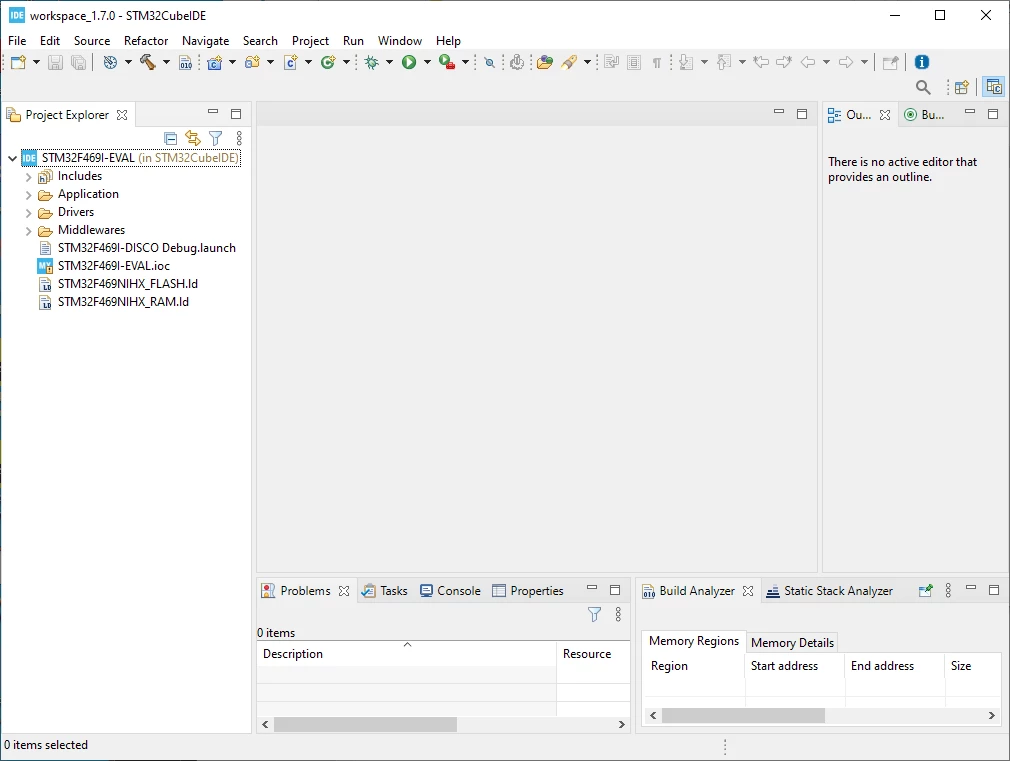

0693W00000GXnaDQAT.png

This topic has been closed for replies.
Best answer by mƎALLEm

Hello,

Just to indicate that the issue was raised internally and it will be fixed in a coming revision of TouchGFX designer.

Internal ticket number: 117858 (PS: This is an internal tracking number and it is not accessible or usable by customers)

9 replies

wired
wiredAuthor
Senior II
November 17, 2021

Tried building a project with 469I-EVAL rather than 469I-DISCO. Project builds with no errors (one warning about tick_start unused variable). It seems the problem is with the 469I-DISCO selection. This is the board I need to use, so are there any suggestions?

mƎALLEm
ST Technical Moderator
November 17, 2021

Hello,

Try to:

1- Generate code with CubeMx using STM32F469I-DISCO.ioc file

2- From TouchGFX designer, generate the GUI code.

3- Build the application with CubeIDE

If it didn't work, restart from step 2.

To give better visibility on the answered topics, please click "Best answer" on the reply which solved your issue or answered your question.
wired
wiredAuthor
Senior II
November 18, 2021

It built, but it doesn't run. I get a lot of ST-link activity like it is programming flash, then it says:

Debug connection lost.

Shutting down.

mandrake
Associate III
November 30, 2021

From TouchGFX, when you select the STM32F469I-DISCO board, before you click Create, change the Versions option from 3.0.5 to 3.0.4.

From CubeIDE, when you click on the Run icon (white arrow on green circle) it will write to flash and exit with the target running. Instead of Run use the Debug button (bug icon) to enter debug mode.

mƎALLEm
ST Technical Moderator
November 19, 2021

Hello,

I don't have this STM32F469I-DISCO board to test.. but please check the flasher configuration in CubeIDE and select this one:

0693W00000GY9HNQA1.png 

To give better visibility on the answered topics, please click "Best answer" on the reply which solved your issue or answered your question.
mƎALLEm
mƎALLEmBest answer
ST Technical Moderator
November 24, 2021

Hello,

Just to indicate that the issue was raised internally and it will be fixed in a coming revision of TouchGFX designer.

Internal ticket number: 117858 (PS: This is an internal tracking number and it is not accessible or usable by customers)

To give better visibility on the answered topics, please click "Best answer" on the reply which solved your issue or answered your question.
wired
wiredAuthor
Senior II
December 15, 2021

I was going to try chin's suggestion of creating a project using v3.0.4 of the Versions option instead of 3.0.5. Now my projects have a different background color when running on the target than when running in the simulator. Bluish color on the simulator becomes greenish on the target (STM32F469I-DISCO). This is with 4.18.0 of the Designer.

mandrake
Associate III
December 16, 2021

I ran into the same problem. I went to another computer and installed the latest versions of STM32CubeIDE 1.8.0 and TouchGFX 4.18.0.

When I tried a simple test I found the color mapping to be messed up. I had to revert back to my original computer where I had a working project. I do not have a solution and may have to wait for ST to resolve these two issues. Luckily for me am I finished with this project for now.

wired
wiredAuthor
Senior II
December 16, 2021

After getting the bad background color from using version 3.0.4, I went back to my original project and repeated what SofLit suggested (at least part of it - the flash configuration that was pointed out did not exist). This time I was able to compile with no errors and run the debugger.