Senior III
April 16, 2025
Solved

sending a callback from a button inside a container (wheel item) to the view

  • April 16, 2025
  • 1 reply
  • 976 views

I have a scroll wheel languageSelectorWheel with several items. Every item is a container languageSelectorItem

On the container I have a toggle button. When I click any toggle button, I want to send a trigger on the view of the scroll wheel to execute a function.
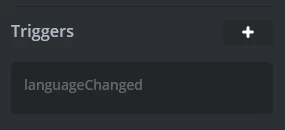
nico23_1-1744798309967.png


On the toggle button I have added an interaction onClick via TouchGFX that emits the trigger languageChanged. The trigger is set on the languageSelectorItem container
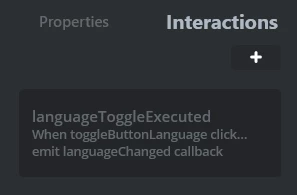
nico23_0-1744798288466.png

On the view where the languageSelectorWheel is added, I have set the callback

void languageSettingsView::languageChanged()
 
Unfortunatly, it seems it is not called when i toggle the button (settings a breakpoint on the line that call 
emitLanguageChangedCallback(); in languageSelectorBase where void languageSelectorBase::buttonCallbackHandler(const touchgfx::AbstractButton& src) is defined enters)
 
My thought is that because the trigger is set on the container, it won't be passed to the view
This topic has been closed for replies.
Best answer by nico23

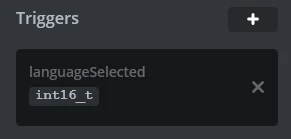
Ok so I figure it out. I set a trigger on the container that returns its index

nico23_0-1744871336082.png

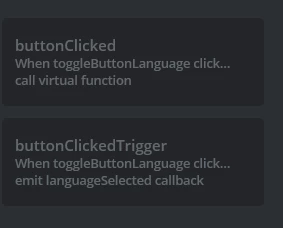
On the interactions I have added a button click that both call a function and executes the trigger

nico23_1-1744871388680.png

languageItem.hpp (container)

Here you must register the trigger

 void setLanguageSelectedCallback(touchgfx::GenericCallback<const int16_t>& callback)
 {
 languageSelectedCallback = &callback;
 }

protected:
 int16_t itemNumber;
 touchgfx::GenericCallback<const int16_t>* languageSelectedCallback;

languageItem.cpp (container)

here you execute the callback

void languageItem::buttonClicked()
{
 // Call the callback when the button is clicked, passing the item number
 if (languageSelectedCallback && languageSelectedCallback->isValid())
 {
 languageSelectedCallback->execute(itemNumber);
 }
}

languageSettingsView.hpp

Here you register the callback from the container

protected:
 /*
 * Callback Declarations
 */
 touchgfx::Callback<languageSettingsView, const int16_t> languageItemLanguageSelectedCallback;

 /*
 * Callback Handler Declarations
 */
 void languageItemLanguageSelectedCallbackHandler(const int16_t itemIndex);


languageSettingsView.cpp (view)

Finally in the view you can initialize all the callback, one for each element of the wheel

languageSettingsView::languageSettingsView():
 languageItemLanguageSelectedCallback(this, &languageSettingsView::languageItemLanguageSelectedCallbackHandler)
{

 for (int i = 0; i < languageSelectorScrollListItems.getNumberOfDrawables(); i++)
 { languageSelectorScrollListItems[i].setLanguageSelectedCallback(languageItemLanguageSelectedCallback);
 }
}

And then you can use the callback on the View to react according to the index

void languageSettingsView::languageItemLanguageSelectedCallbackHandler(const int16_t itemIndex)
{


}

Clearly on the View you need a function that set the itemNumber, something like

void languageSettingsView::languageSelectorScrollUpdateItem(languageItem& item, int16_t itemIndex)
{
 item.setItemNumber(itemIndex);
}

Where the setItemNumber function must be added to the container

1 reply

nico23AuthorBest answer
Senior III
April 17, 2025

Ok so I figure it out. I set a trigger on the container that returns its index

nico23_0-1744871336082.png

On the interactions I have added a button click that both call a function and executes the trigger

nico23_1-1744871388680.png

languageItem.hpp (container)

Here you must register the trigger

 void setLanguageSelectedCallback(touchgfx::GenericCallback<const int16_t>& callback)
 {
 languageSelectedCallback = &callback;
 }

protected:
 int16_t itemNumber;
 touchgfx::GenericCallback<const int16_t>* languageSelectedCallback;

languageItem.cpp (container)

here you execute the callback

void languageItem::buttonClicked()
{
 // Call the callback when the button is clicked, passing the item number
 if (languageSelectedCallback && languageSelectedCallback->isValid())
 {
 languageSelectedCallback->execute(itemNumber);
 }
}

languageSettingsView.hpp

Here you register the callback from the container

protected:
 /*
 * Callback Declarations
 */
 touchgfx::Callback<languageSettingsView, const int16_t> languageItemLanguageSelectedCallback;

 /*
 * Callback Handler Declarations
 */
 void languageItemLanguageSelectedCallbackHandler(const int16_t itemIndex);


languageSettingsView.cpp (view)

Finally in the view you can initialize all the callback, one for each element of the wheel

languageSettingsView::languageSettingsView():
 languageItemLanguageSelectedCallback(this, &languageSettingsView::languageItemLanguageSelectedCallbackHandler)
{

 for (int i = 0; i < languageSelectorScrollListItems.getNumberOfDrawables(); i++)
 { languageSelectorScrollListItems[i].setLanguageSelectedCallback(languageItemLanguageSelectedCallback);
 }
}

And then you can use the callback on the View to react according to the index

void languageSettingsView::languageItemLanguageSelectedCallbackHandler(const int16_t itemIndex)
{


}

Clearly on the View you need a function that set the itemNumber, something like

void languageSettingsView::languageSelectorScrollUpdateItem(languageItem& item, int16_t itemIndex)
{
 item.setItemNumber(itemIndex);
}

Where the setItemNumber function must be added to the container