HI,
I suppose that in your project screen 1 is the startup screen and you want to directly go to the other screen after 2s right ?
You can do it through user code, or within TouchGFX Designer with the Interactions functionality: create a first interaction with as trigger "screen transition ends" (which means once you have finally landed on screen 1 at startup for example), as action "Wait for" and as duration 2000ms. You now have a function which waits for 2s. You then check the "Can trigger another interaction" option to now create an interaction to do a transition to the other screen.
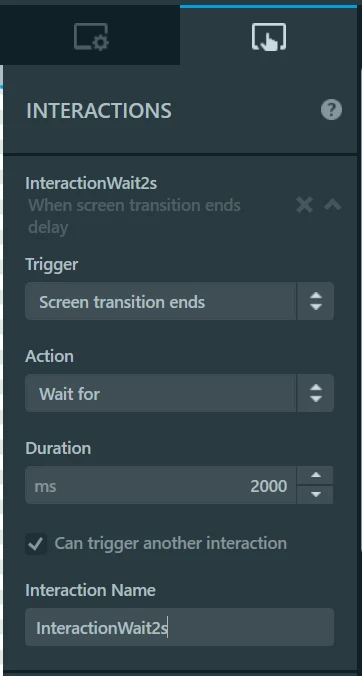
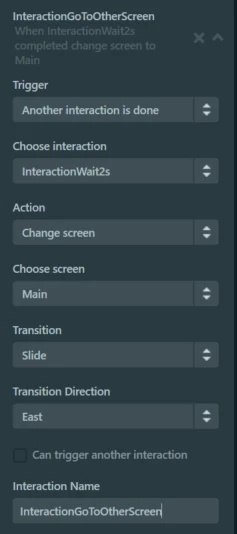
When you check the "Can trigger another interaction" you will see that a new trigger option is available : "another interaction is done". With this you can now use the action "change screen" and set what kind of transition you want to go to screen 2.
 Not sure if useful for your project but you can change the speed of the transitions in their respective .cpp files (so SlideTransition.cpp for slide transitions) and increase/decrease the number of steps (1 step is 1 tick, so 60 steps should be 1s)
/Romain