

ihsanoglu
Senior
September 10, 2019
Question

Screen aspect ratio is not right after changing display

  • September 10, 2019
  • 7 replies
  • 4116 views

I changed the 4.3" 480*272 display on the stm32f746-disco board.

The new display is a 7" 800*480. I modified the resolution from code and also from TouchGFX project.

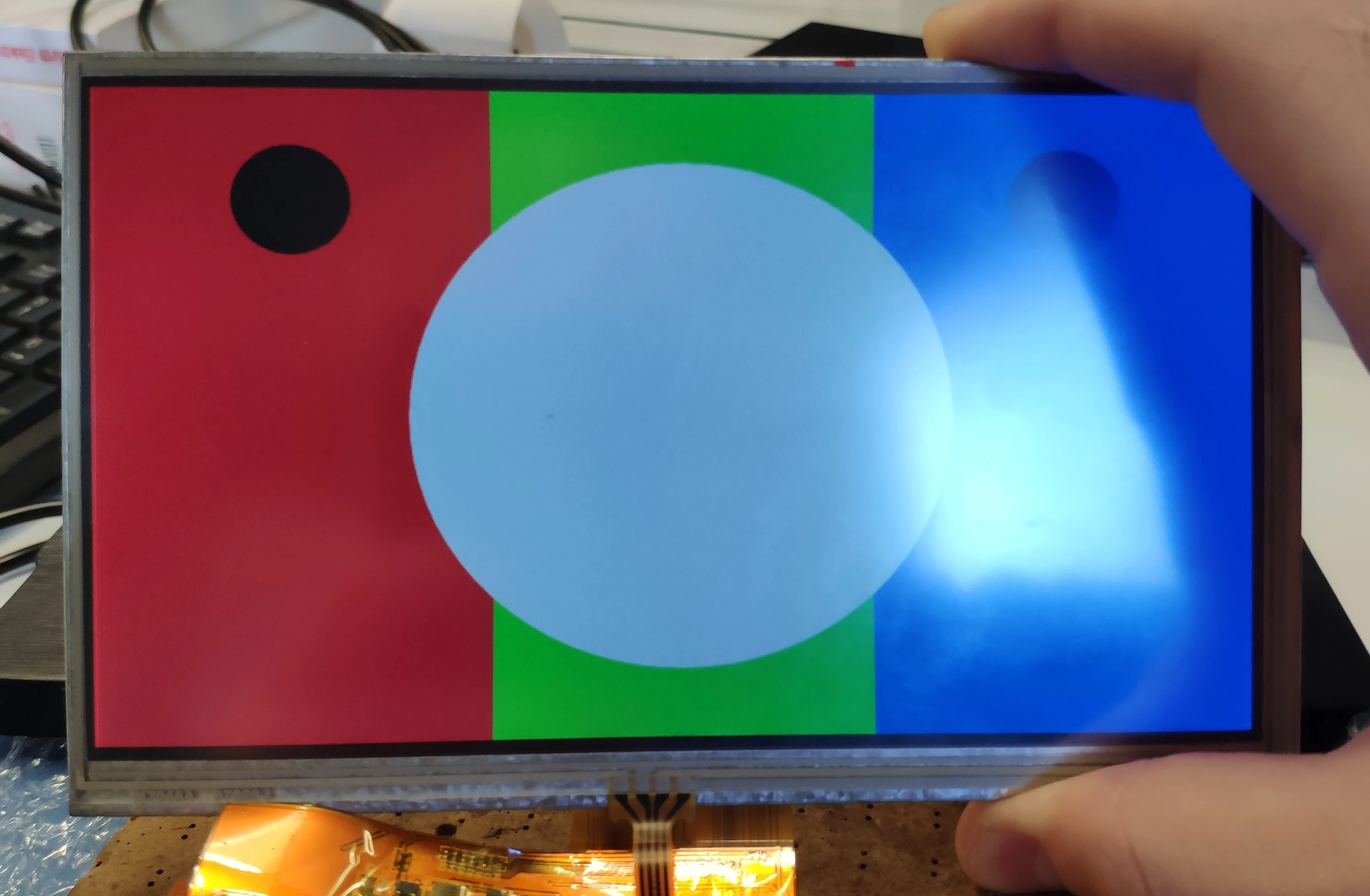
Everything is working fine. However the screens are displayed like if they are pressed from top and bottom.

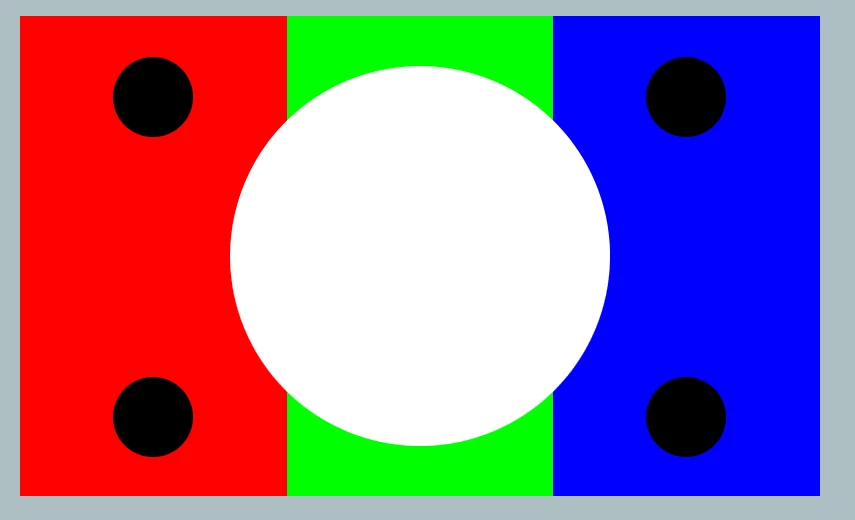
To explain more. A prefect circle on the designer is displayed as an oval shape on the display.

Please see the images attached. Notice how the circle turns into an oval when displayed on the screen.
0690X00000AQxbhQAD.png0690X00000AQxfjQAD.png

I need to solve this issue. Is this addressable by code or its a display problem?

This topic has been closed for replies.

7 replies

ihsanoglu
ihsanogluAuthor
Senior
September 11, 2019

The aspect ratio of the pixels on the display is not 1:1. The pixels are not perfect squares, they are shaped as rectangles. Is there any mechanism in TouchGFX to handle this issue?

ihsanoglu
ihsanogluAuthor
Senior
September 12, 2019

Hello could you please look into this ? @Martin KJELDSEN​ 

Martin KJELDSEN
Principal III
September 13, 2019

Hi @Abdullah İhsanoğlu​,

If your pixels are rectangular, then maybe you do not have the resolution you thought you did? (Along the Y-axis, it seems). Wouldn't this be solved by simply adjusting your Y resolution?

But if your pixels were indeed rectangular on the y axis, then your circles should also be skewed, in my eyes. Are you sure?

/Martin

ihsanoglu
ihsanogluAuthor
Senior
September 13, 2019

Hello martin,

This is the resolution mentioned in the datasheet, and actually wheneever I try to decrease the resolution. The image is not getting stretched , only cropped ( missing pixels going black).

Also when increasing the resolution, The pixels beyond the limit are not being displayed. They are beyond the boundary of the display.

Explorer
September 8, 2023

Hello,

I stumbled upon the same issue as the OP.

I created basic TouchGFX GUI with startup screen that uses image (company logo, PNG) and a round progress bar.

You can see the aspect ration problem just by looking at it, we even measured the actual dimensions of the 'round' progress circle with a scale. The actual dimensions: X=21mm Y=19mm. Then I added another TGFX object, a circle (filled, in the picture) to check whether the issue stays (it does, the circle render behavior is the same as for images)


We use 7" 480x800 RGB888 panel, type WF70GTIAGDNT0 (Link: Datasheet [PDF] ) where they admit the physical pixel (subpixel) size is not 1:1 width vs. height so I assume this is the same issue as the OP had. We use the STM32H735DK board.

Is there anything to do with this issue on the software level? I didn't find any rendering correction methods in TouchGFX