


Riverdi_101STM32H7 text direction not specified problem [solved]
Hello,
I'm discovering the different widgets of Touch GFX. I stumbled upon a problem I do not know how to solve and I haven't found the answer on the internet.
I'm working with the board Riverdi_101STM32H7 (chosen in the list of available boards).
When I create a text area (or a button with text, text progress, digital clock), I encounter this problem when I generate the code.
Generate Code
 Generate
 Done
 Generate Assets
 make -f simulator/gcc/Makefile assets -j8
 Reading ./application.config
 ERROR: Attribute 'Direction' not specified in line 8 for <Text Id="__SingleUse_FCFO">
 An error occurred during text convertion
 Cleaning generated files from generated/texts and generated/fonts.
 generated/simulator/gcc/Makefile:225: recipe for target 'texts' failed
 make[1]: *** [texts] Error 1
 simulator/gcc/Makefile:32: recipe for target 'assets' failed
 make: *** [assets] Error 2
 Failed
 Failed
I checked the direction of the typography is LTR so it is specified in there at least.
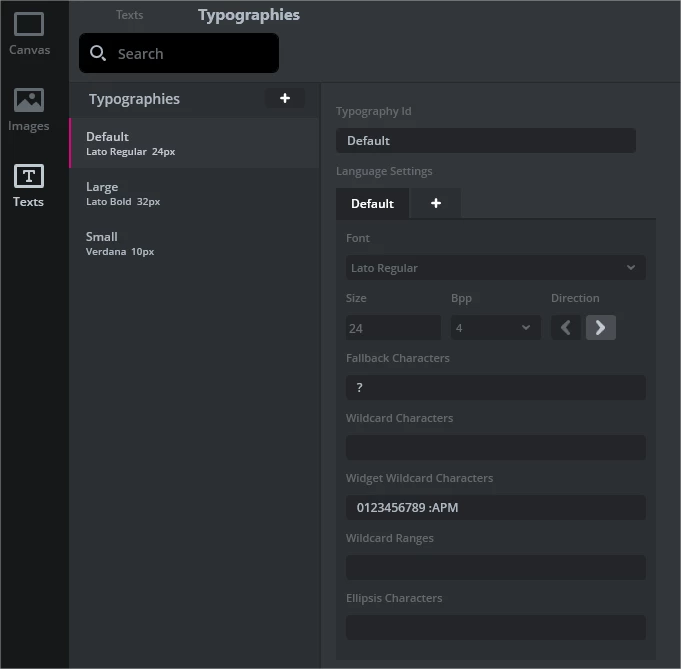
When I'm working with the simulator or an other board I do not encounter the problem (ex:STM32F756G Evaluation kit).
Here's the program versions I'm using.
- TouchGFX Designer 4.19.1
- STM32CubeIDE_1.9.0
- TouchGFX Environment 4.19.1
- STM32CubeProgrammer 2.10.0
I changed the automatic Compile Target Command from version 1.8.0 to 1.9.0 (c:/ST/STM32CubeIDE_1.9.0/STM32CubeIDE/stm32cubeidec.exe --launcher.suppressErrors -nosplash -application org.eclipse.cdt.managedbuilder.core.headlessbuild -import ../../STM32CubeIDE/CM7/ -cleanBuild Riverdi_101STM32H7_CM7)
I have also tried the demo of the board Smart Home but it fails to generate the code because of the text areas, too.
Thanks in advance for your answer,
Eve
