Problem with MJPEG output data (STM32F769)
Hello everyone.
I have a problem with my code. I'm trying to write a program to take picture from camera and save it as motion jpeg video (MJPEG) in to USB, using JPEG encoder. I build already the header and the structure of MJPEG file but it had problem when I try to run that video file. Also by the source code was provided by STM, I finished to create the JPEG file.
This link below simply show some information about MJPEG construction https://blog.goo.ne.jp/sirius506/e/442f430a1531c018a32471f1ecd4ae77
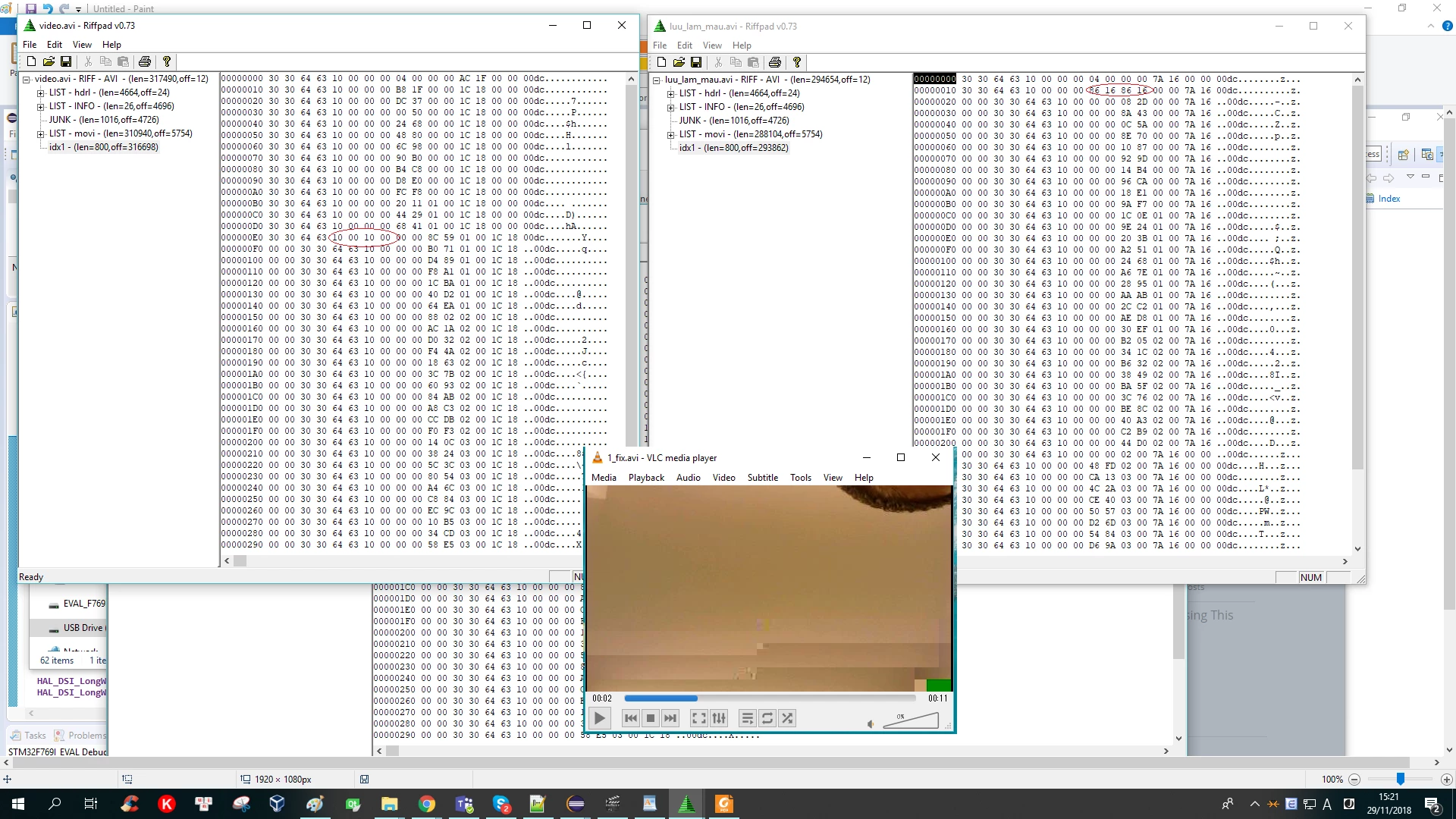
I had checked and found out that the output data of frames and the idx1 is written by f_write was incorrect. Sometime 2 bytes were written again. Has someone told me that problem maybe is "3 bytes were dropped".
The header data I wrote to the begin of file is always right, but the data that I wrote to frame place and idx1 place usually has problem.
Ex: I want to write data like this below
01 02 03 04 05
01 02 03 04 05
01 02 03 04 05
01 02 03 04 05
but the output was like this
01 02 03 04 05
*01 02 01 02* 03
04 05 01 02 03
04 05 01 02 03
I had tried to change many way like make it slow (fps = 1 or 2) or change the parameter of f_write function , but it still error.
This is f_write function
UINT frame_count = 0;
f_write (&JPEG_File, Frame, sizeof(Frame), &frame_count);

FRESULT f_write (
FIL* fp, /* Pointer to the file object */
const void* buff, /* Pointer to the data to be written */
UINT btw, /* Number of bytes to write */
UINT* bw /* Pointer to number of bytes written */
)
Write frames code
uint8_t buf_4[4];
if(f_open(&JPEG_File, "video.avi", FA_CREATE_ALWAYS|FA_WRITE) == FR_OK) // 4
{

 //header
 UINT header_count = 0;
 f_write (&JPEG_File, Header , 5754, &header_count);

 //create avi with 50 frames
 for(int i_loop = 0; i_loop < num_frame_tam; i_loop++){
 /* Suspend the camera capture */
 BSP_CAMERA_Suspend();
 cameraState = CAMERA_STATE_SAVING_PICTURE;
 PicturePrepare1(); //prepare buffer for writer

 uint32_t before_avi_file = f_size(&JPEG_File); //get before size

 //8 connected bytes stand before each frame
 UINT frame_count = 2;
 uint8_t connect_frame[8] = {0x30, 0x30, 0x64, 0x63, 0x00, 0x00, 0x00, 0x00};
 f_write (&JPEG_File, connect_frame , 8, &frame_count);

 //write frame by Jpeg encoder
 /*
 uint32_t JpegEncodeProcessing_End = 0;
 JPEG_Encode_DMA(&JPEG_Handle, CONVERTED_FRAME_BUFFER,
 CameraResX * CameraResY * RGB888_BYTE_PER_PIXEL, &JPEG_File);

 do
 {
 JPEG_EncodeInputHandler(&JPEG_Handle);
 JpegEncodeProcessing_End = JPEG_EncodeOutputHandler(&JPEG_Handle);

 } while(JpegEncodeProcessing_End == 0);
 */

 //write the data was prepared before for test
 f_write (&JPEG_File, frame , sizeof(frame), &frame_count); //

 //calculate frame size and change last 4 bytes of connected 8bytes before each frame
 uint32_t newframe_size = f_size(&JPEG_File) - before_avi_file - 8; // size of frame

 num_to_array_4byte(newframe_size, buf_4);

 f_lseek(&JPEG_File, before_avi_file + 4);
 UINT bytesWritefile = 0;
 f_write (&JPEG_File, buf_4 , 4, &bytesWritefile);// ghi vao gia size of frame
 f_lseek(&JPEG_File, f_size(&JPEG_File));


 ////create dx1
 uint8_t idx1_combi[16] = {0x30, 0x30, 0x64, 0x63, 0x10, 0x00, 0x00, 0x00, 0x00, 0x00, 0x00, 0x00, 0x00, 0x00, 0x00, 0x00};
 change_aray_noptr(idx1_combi, 12, buf_4 , 4); //ghi real size vao byte 12

 num_to_array_4byte(idx1_next_size, buf_4);
 change_aray_noptr(idx1_combi, 8, buf_4 , 4); //ghi tong size vao byte 8

 //increase size of idx1
 change_aray_noptr(idx1,idx1_size, idx1_combi, 16);
 idx1_size +=16;

 idx1_next_size = idx1_next_size + newframe_size + 8; // 8 bit dau moi frame


 BSP_CAMERA_Resume();

 }//for


 //Write idx1
 num_to_array_4byte(idx1_size-8, buf_4);
 change_aray_noptr(idx1, 4, buf_4 , 4);

 UINT after_write = 0;
 f_write (&JPEG_File, idx1, idx1_size, &after_write);

 //fill size of avi in the header
 f_lseek(&JPEG_File, 4);
 num_to_array_4byte(f_size(&JPEG_File) - 8, buf_4);
 f_write (&JPEG_File, buf_4 , 4, &after_write);

 //fill total frame size
 f_lseek(&JPEG_File, 5742+4);
 num_to_array_4byte(idx1_next_size, buf_4);
 f_write (&JPEG_File, buf_4 , 4, &after_write);

 //Close the JPEG file
 f_close(&JPEG_File);
}
USB init
USBH_StatusTypeDef USBH_LL_Init(USBH_HandleTypeDef *phost)
{
#ifdef USE_USB_HS
 /* Set the LL driver parameters */
 hhcd.Instance = USB_OTG_HS;
 hhcd.Init.Host_channels = 11;
 hhcd.Init.dma_enable = 1;
 hhcd.Init.low_power_enable = 0;
#ifdef USE_USB_HS_IN_FS
 hhcd.Init.phy_itface = HCD_PHY_EMBEDDED; //This is not
#else
 hhcd.Init.phy_itface = HCD_PHY_ULPI; //This ok
#endif
 hhcd.Init.Sof_enable = 0;
 hhcd.Init.speed = HCD_SPEED_HIGH;
 hhcd.Init.use_external_vbus = 1;
 /* Link the driver to the stack */
 hhcd.pData = phost;
 phost->pData = &hhcd;
 /* Initialize the LL driver */
 HAL_HCD_Init(&hhcd);

#endif /*USE_USB_HS*/
 USBH_LL_SetTimer(phost, HAL_HCD_GetCurrentFrame(&hhcd));

 return USBH_OK;
}
Anybody have experience about this? I am very appreciate with any advise.
Sorry for my English. Thank so much.
I opened my MJPEG (avi) file by RIFF pad and it show me that the header was written into this output file is completely okay.