Kpodu.1
Associate III
April 30, 2020
Solved

Problem with bitmap caching touchGFX

  • April 30, 2020
  • 15 replies
  • 4751 views

Hi All,

I have a problem with bitmap caching. Below is the context

Processor and Peripheral’s details:-

  1. STM32F429ZITX micro
  2. 8 Mega bytes external SD RAM
  3. 16 Megabytes SPI flash(not quad)

Our use case:- We have GUI application with several screens(setup , functionality, presets …etc). The total assets size is of 11 Mega bytes which are stored in the SPI Flash. As our SD Ram is only 8 Mega bytes size we just want to dynamically copy the assets from SPI Flash screen by screen on demand to SD ram and try to display them.

In order to achieve the above I followed below two links

https://support.touchgfx.com/docs/development/ui-development/scenarios/using-non-memory-mapped-flash/

https://support.touchgfx.com/docs/development/ui-development/touchgfx-engine-features/caching-bitmaps/

Steps I followed:-

  1. In the linker script I used below snippet and segregated all the assets

SRAM (xrw)     : ORIGIN = 0xd0061c8c, LENGTH = 7450K

ExtFlashSection :

{

*(ExtFlashSection ExtFlashSection.*)

} >SDRAM

  1. Then using python script I have split the assets binary starting from that memory location and separated the application binary and assests binary
  2. I have made a custom bootloader which takes these binaries and place them accordingly(application binary in user space and assets binary in SPI flash)

  1. Then I have kept below two lines of code for enabling the caching

  uint16_t* cacheStartAddr = (uint16_t*)0xd0061a80;

  uint32_t cacheSize = 0x300000; //3 MB, as example

  HAL& hal = touchgfx_generic_init<STM32F4HAL>(dma, display, tc, dispWidth, dispHeight,cacheStartAddr, cacheSize);

  1. Then I have created the block copy function in STM32F4HAL.cpp

bool STM32F4HAL::blockCopy(void* RESTRICT dest, const void* RESTRICT src, uint32_t numBytes)

{

       if(serialFlashread((uint8_t*)dest , (uint32_t)src - (uint32_t)0xd0061c8c, numBytes) != HAL_OKreturn false;

       return true;

}

I created a smaller application for this experiment. Total assets size is only 3 MB. When I use Bitmap::cacheAll() at begining and keep a breakpoint at blockCopy function I can clearly see the src , destination as described in the linker script and cacheStartAddr. And my serialFlashread api is properly returning the images. I was able to get picture on screen without any problem.

My problem is:-

When I do the below step as described in document instead of cache all( because my sd ram wont be sufficient for full application assets)  https://support.touchgfx.com/docs/development/ui-development/touchgfx-engine-features/caching-bitmaps/

void Screen1View::setupScreen()

{

//ensure background is cached

Bitmap::cache(BITMAP_SCREEN2_ID);

//cache some icons

Bitmap::cache(BITMAP_ICON10_ID);

Bitmap::cache(BITMAP_ICON11_ID);

Bitmap::cache(BITMAP_ICON12_ID);

}

void Screen1View::tearDownScreen()

{

//Remove all bitmaps from the cache

Bitmap::clearCache();

}

I see that the block copy is invoking and src address is properly as per the bitmap database….so my spi flash is returning the right image. But the destination address is (cacheStartAddr + 524 bytes). It makes sense because it is taking image from assests binary and putting at start of the cache address, so toucchGFX can use it.

But the problem is this image is not getting displayed on the screen and some random noise is getting shown( I can understand this because the bitmap database is not readjusted and touchGFX is still using the same old database so it is showing noise).

How can I solve this problem and what am I missing. I am literally blocked.

I have seen the dynamic bitmaps but I felt my application didn’t fit into that case. Am I wrong?

Any help is highly appreciated.

Thanks,

Krishna 

This topic has been closed for replies.
Best answer by Romain DIELEMAN

Hi,

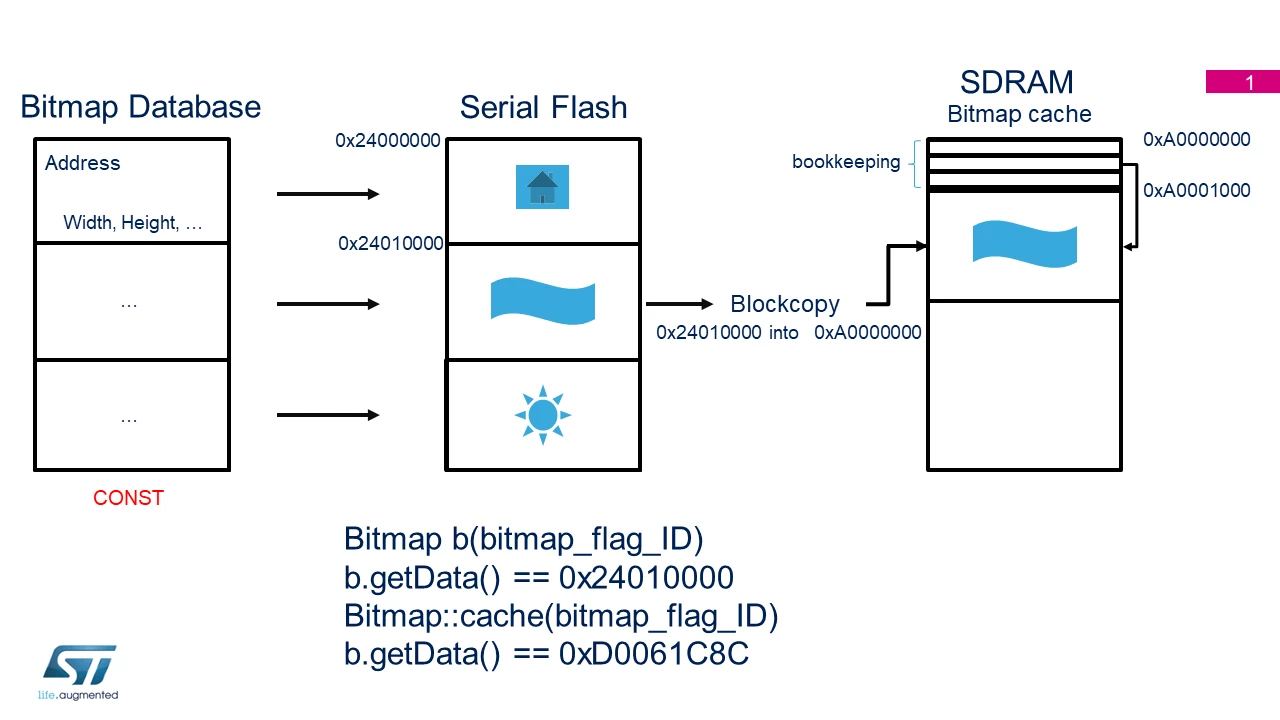
The bitmap database is "constant", the cache functions do not interact directly with it. When the programmer requests a bitmap to be cached, TouchGFX finds the address of the bitmap in the flash and copies data from here. I've made a very very poorly done schematic of the process. 

0693W000000XIGXQA4.png

("getData" returns a pointer to the Bitmap data, this is just to show you that when you cache a bitmap, TouchGFX copies the pixels from the original location to the bitmap cache using the BlockCopy  function you wrote.)

Could you maybe share your custom code? I'd like to help and understand where the tearing comes from.

The 524 bytes in your case are actually a table of arrays used for bookeeping/know which bitmap is cached. I will also try to deliver a simple demo using the F429I disco board and bitmap caching if I can (and a better drawn explanation).

15 replies

Martin KJELDSEN
Principal III
May 1, 2020

Hi @Kpodu.1​,

I'll have some time monday to look into this a bit. You're the second person now to have had problems with caching lately (although the other case was slightly different). - I'll try to dive into the difference between cacheAll and caching singular images.

/Martin

Kpodu.1
Kpodu.1Author
Associate III
May 4, 2020

Thanks Martin. This is very important for our application to roll out to production.

Krishna

Romain DIELEMAN
ST Employee
May 11, 2020

Hi I am sorry it might be a dumb question from me, but why did you set up the SRAM in the linker at 0xd0061c8c to then set the start address at 0xd0061a80? That explains the 524 bytes difference you talked about. I am not that familiar with caching bitmaps I know this is not the issue but this confuses me a little.

Kpodu.1
Kpodu.1Author
Associate III
May 11, 2020

Hi Romain,

may be I confused you. I initially kept the SRAM linker at 0xd0061a80 and even start address as 0xd0061a8. Then I have observed that the Bitmap::cache() is copying at location (0xd0061a80 + 524 = 0xd0061c8c ). So later I changed the linker file to keep at address 0xd0061c8c so that the bitmap database is inline with the asset(other wise I am getting cut images because assets are drifted by 524 bytes wrt bitmap database).

My problem here is not actually 524 bytes. It is why the bitmap::cache() or bitmap::cacheall() function is not altering the bitmap database(as per my understanding correct me if I am wrong)

For example consider this scenario:

There are 10 assets(each of size 100 bytes). starting from adress(as per linker) 0x2000(fictional location of my spi flash)....So all the assets are placed consecutively(0x2000,0x2064....0x23E8).

And my cache start address is 0x1000. If I do cache all() it copies the assets from (0x2000--0x23E8) to (0x1000--0x13E8) with the help of my spi flash driver function. And this part is happening succesfully with 524 bytes deviation. Thats fine as long as the database is readjusted.

But the touchGFX bit map database is still pointing to address 0x2000 which screens are trying to access the assets from and does not exist(because its not memory mapped)

But my question is the cache all() or cache() function must also readjust the bitmap data base to 0x1000 right because the assets are now at location 0x1000 ?

Thanks,

krishna

Romain DIELEMAN
Romain DIELEMANBest answer
ST Employee
May 12, 2020

Hi,

The bitmap database is "constant", the cache functions do not interact directly with it. When the programmer requests a bitmap to be cached, TouchGFX finds the address of the bitmap in the flash and copies data from here. I've made a very very poorly done schematic of the process. 

0693W000000XIGXQA4.png

("getData" returns a pointer to the Bitmap data, this is just to show you that when you cache a bitmap, TouchGFX copies the pixels from the original location to the bitmap cache using the BlockCopy  function you wrote.)

Could you maybe share your custom code? I'd like to help and understand where the tearing comes from.

The 524 bytes in your case are actually a table of arrays used for bookeeping/know which bitmap is cached. I will also try to deliver a simple demo using the F429I disco board and bitmap caching if I can (and a better drawn explanation).

Kpodu.1
Kpodu.1Author
Associate III
May 12, 2020

Hi Romain,

First of all I just want to thank you very much for helping me.

Your graphic is good. It cleared my understanding.

I understand the bitmap_database is constant. but when I meant bitmap database I mean some fictional internal array which touch gfx uses.

After I did cache all. when I do the b.getData(). I am getting the new cached address. But still the image dont appear on the screen. I strong feeling is still it is looking in the old location.

I cannot give complete code because it is our development code and I am not sure if I can post it here. But I can put some common snippets.

Linker:

ASSETS_START_ADDRESS (xrw) : ORIGIN = 0x90000000 , LENGTH = 7550K

. = ALIGN(4);

ExtFlashSection :

{

 KEEP(*(ExtFlashSection))

} >ASSETS_START_ADDRESS

BoardConfiguration.cpp

 uint16_t dispWidth = 218;

 uint16_t dispHeight = 480;

 uint16_t* cacheStartAddr = (uint16_t*)0xd0061a80;

 uint32_t cacheSize = 0x500000; //3 MB, as example

 HAL& hal = touchgfx_generic_init<STM32F4HAL>(dma, display, tc, dispWidth, dispHeight,cacheStartAddr, cacheSize);

   hal.setFrameBufferStartAddress((uint16_t*)frameBuf0, bitdepth ,true , true);

touchgfx_generic_init() function:

HAL& touchgfx_generic_init(DMA_Interface& dma, LCD& display, TouchController& tc, int16_t width, int16_t height,

                          uint16_t* bitmapCache, uint32_t bitmapCacheSize, uint32_t numberOfDynamicBitmaps = 0)

{

   HAL& hal = getHAL<HALType>(dma, display, tc, width, height);

   hal.initialize();

   Bitmap::registerBitmapDatabase(BitmapDatabase::getInstance(),

                                  BitmapDatabase::getInstanceSize(),

                                  bitmapCache,

                                  bitmapCacheSize,

                                  numberOfDynamicBitmaps);

  if(Bitmap::cacheAll()!= true) debug_print("cache all failed \r\n");

STM32F4HAL.cpp

bool STM32F4HAL::blockCopy(void* RESTRICT dest, const void* RESTRICT src, uint32_t numBytes)

{

   if(serialFlashread((uint8_t*)dest , (uint32_t)src - (uint32_t)0x90000000, numBytes) != HAL_OK) return false;

   return true;

}

above is the total code involved in caching.

Why I am saying that I still feel the screens are taking from old mem location is because....

If I change the linker script address to match the dynamic cache location(0xd0061a80 + 524 = 0xd0061c8c )....image is appearing.

Like for example if my new linker script is

Linker:

ASSETS_START_ADDRESS (xrw) : ORIGIN = 0xd0061c8c , LENGTH = 7550K

. = ALIGN(4);

ExtFlashSection :

{

 KEEP(*(ExtFlashSection))

} >ASSETS_START_ADDRESS

Then image appears with out any problem. because the Bitmap_database aligns with the assets location in ram.

What am I missing here? And it would be awesome if you could give us a basic example code.

Thanks,

krishna

MBely.1
Visitor II
September 13, 2021

Exactly the same problem with TouchGFX 4.17 on STM32F407 MCU. Caching individual bitmaps does not work as expected - "garbage" is displayed on the screen. In this case, copying bitmaps from the SPI flash to the cache is performed correctly, but the TouchGFX does not refer to the cache area further.

I wonder if this will ever be fixed? Or will removed from the technical documentation? The cache feature is declared but not implemented correctly.

Max

Romain DIELEMAN
ST Employee
September 14, 2021

Hi,

Bitmap caching does work. The Board Specific Demo on the STM32H7B3-eval uses it for example. It is not the same board but the implementation is the same. Try to check your memory management.

/Romain

MBely.1
Visitor II
September 14, 2021

Hi!

Romain, could you point out which specific demo of the  STM32H7B3-eva uses caching of individual bitmaps? (not Bitmap::cacheall() ).

I want to see that code.

I have a custom board with a STM32F407ZGT6 MCU and 512kb SRAM. 150kb are used for a video buffer (one full video buffer configuration), the remaining 362 KB I try to use as the bitmap cache. The memory works fine. The video buffer works fine. Everything works fine! Until I enable caching... :(

I have tried placing the cache in the internal MCU RAM - the same result: does not work correctly.

Max.

Romain DIELEMAN
ST Employee
September 15, 2021

Hi,

When you create a project in TouchGFX Designer go to the "Demos" tab. In this view click on the "Board Specific Demo" tab in the top. There you will find demos made for specific ST development kit, but the code can still be analyzed/used as source of inspiration. Select the one called "STM32H7B3I Evaluation Board" which uses caching.

/Romain