


MNapi
Senior II
August 4, 2020
Question

please fix the compatibility bug in new Touch GFX 4.14 and CubeMX 6.0 and Cube IDE1.4

  • August 4, 2020
  • 19 replies
  • 5283 views

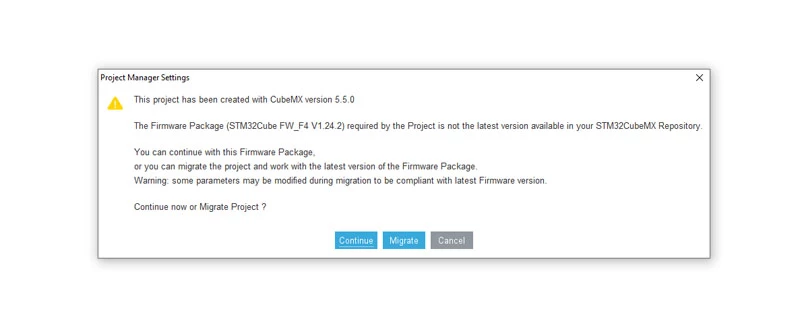
this is the error I am getting once I migrate or click continue when I open project in CubeMX 6.0 or CubeIDE 1.4 created in TouchGFX 4.14

then screen created in TouchGFX will not longer display, it just dark.

those 3, the newest were supposed to be compatible. 0693W000003C5lwQAC.jpg
This topic has been closed for replies.

19 replies

Alexandre RENOUX
Visitor II
August 5, 2020

Hello,

What board are you using ? Did you correctly change the TouchGFX Generator version to 4.14 in CubeMX 6.0.0 ?

Also, CubeMX 6.0.0 generates a second layer even though you do not set it. It's a CubeMX bug that will hopefully be fixed soon.

In the meantime, to change it, enable the second layer and set everything to 0 (it should already be the case but verify when enabling)

0693W000003BhYFQA0.png

The Application Templates in the Designer are being updated to the new versions of CubeMX, CubeIDE and TouchGFX. We hope this will be available soon enough.

/Alexandre

MNapi
MNapiAuthor
Senior II
August 5, 2020

I did as you suggested and it did not work the same problem as soon as I open project in CubeIDE 1.4 the screen goes dark and this is the error I got when I changed to 2 layers I am using STM32F469 Discovery. And I have changed in Cube IDE and Cube MX to version TouchGFX 4.14

0693W000003CCRyQAO.jpg

Romain DIELEMAN
ST Employee
August 6, 2020

Hi,

The issue in your screenshot is a consequence of the 2 layer issue. It is a warning rather than an issue, you can still generate code from CubeMX.

/Romain

ARago.1
Visitor II
August 10, 2020

When i'm using touchgfx designer 4.14, i create a project , choose disco-769 template, the ioc created setup only touchgfx related mcu pin, i dont have all other peripherals setup like with cubeide project creation

/Anton

Alexandre RENOUX
Visitor II
August 10, 2020

It's normal you do not have all the peripherals set up because they are not necessary for running TouchGFX.

If you want to have more peripherals, you can set them in the CubeMX configuration and regenerate code.

/Alexandre

Alexandre RENOUX
Visitor II
August 11, 2020

Hello @MNapi​ ,

After some investigation, your problem might be due to NVIC priorities being reset.

Indeed, when updating to CubeMX 6.0.0, the NVIC priorities are reset because the CubeMX team made some changes regarding the priorities linked to FreeRTOS. This is a bug that is only noticeable when using FreeRTOS. If the priorities are at 0 the interrupts won't be triggered. So set the priorities of interrupts that are enabled such as LTDC or DMA to 5.

Tell me if it solves your issue.

/Alexandre

MNapi
MNapiAuthor
Senior II
August 18, 2020

I spent some time trying to do what you suggested and I still cannot get it working 32F469 in CubeIDE 1.4

For now use CubeMX 6 to intialiaze the baord and I finish the code in Keil using BSP files to do graphics. It always worked fine.

I see that you are working on graph widget in TouchGFX, what about if you simplify the code to pass data from main.c ( the for(;;){} loop ) to the display.

you have to get first to model.cpp then to modellistener.cpp, to screenview.cpp etc. create the wildcard, it is really hard to get it working and I cannot.

I wrote the code in Keil using BSP to display graph coming from ADC, it is so simple and streight forward

But on other hand TouchGFX it is so easy to to graphics but you want to display some incoming data and you cannot get it working.

Alexandre RENOUX
Visitor II
August 19, 2020

Could you enclose the project that does not work ? So that I can try and see what's the problem using a F469-DISCO board.

/Alexandre

ARago.1
Visitor II
August 11, 2020

Funny , its not related to my previous question, but i was trying to setup quadrature encoder this morning , and couldnt hit some interrupt handler, i found out priority=0 was the problem