

ksale.1
Senior II
July 27, 2022
Solved

Please advise on using TextArea Set text interaction to dynamically set text.

  • July 27, 2022
  • 2 replies
  • 1576 views

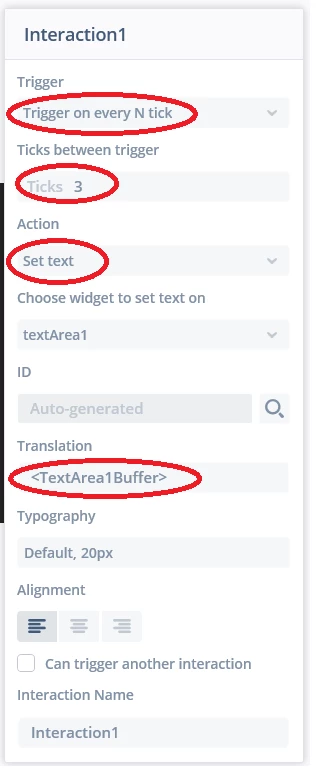
Please note the interaction below trying to update text using the value in the buffer (not working)

0693W00000QMIcuQAH.png

This topic has been closed for replies.
Best answer by Yoann KLEIN

Hello @ksale.1​ ,

Why not simply use Wildcards for displaying your value in the TextArea ?

That could be way more easy and you would be able to still use the Unicode::snprintf() method to achieve it.

/Yoann

2 replies

ksale.1
ksale.1Author
Senior II
July 27, 2022

I've achieved it programmatically in handleTickEvent()

void Screen1View::handleTickEvent()
{
	boxProgress1.setValue(flow);
	
	Unicode::snprintf(textArea1Buffer, TEXTAREA1_SIZE,"%u", flow);
	textArea1.invalidate();
}

can set text do the same?

Yoann KLEIN
Yoann KLEINBest answer
ST Employee
July 28, 2022

Hello @ksale.1​ ,

Why not simply use Wildcards for displaying your value in the TextArea ?

That could be way more easy and you would be able to still use the Unicode::snprintf() method to achieve it.

/Yoann

Yoann KLEINST Software Developer | TouchGFX
