MMoha.3
Associate III
August 22, 2021
Solved

Play/Pause Button - Change Icon When Pressed in Button With Icon - TouchGFX

  • August 22, 2021
  • 1 reply
  • 2981 views

Hello,

I have a button with a pause icon on it in TouchGFX, and I want to know how I can change the pause icon into a play icon after it is pressed. TouchGFX only gives me an option to change the icon while the icon is being pressed.

0693W00000Dq1neQAB.png

This topic has been closed for replies.
Best answer by MMoha.3

Thank you, so I was able to do the task by using the setBitmaps function. Here's the code I came up with:

if (OSC_Status.Running_Stat == Stopped) { //from pause to play:
 	OSC_Status.Running_Stat = Running;
		RunButton.setBitmaps(touchgfx::Bitmap(BITMAP_DARK_BUTTONS_SQUARE_ICON_BUTTON_ID),
				touchgfx::Bitmap(BITMAP_DARK_BUTTONS_SQUARE_ICON_BUTTON_ID),
				touchgfx::Bitmap(BITMAP_BLUE_ICONS_PAUSE_32_ID),
				touchgfx::Bitmap(BITMAP_BLUE_ICONS_PAUSE_32_ID));
 // don't forget to invalidate
} else {					//from play to pause
 	OSC_Status.Running_Stat = Stopped;
		RunButton.setBitmaps(touchgfx::Bitmap(BITMAP_DARK_BUTTONS_SQUARE_ICON_BUTTON_ID),
				touchgfx::Bitmap(BITMAP_DARK_BUTTONS_SQUARE_ICON_BUTTON_ID),
				touchgfx::Bitmap(BITMAP_PLAY_32_ID),
				touchgfx::Bitmap(BITMAP_PLAY_32_ID));
 // don't forget to invalidate
}

also include "BitmapDatabase.hpp".

the bitmap id can be found in the images section of TouchGFX:
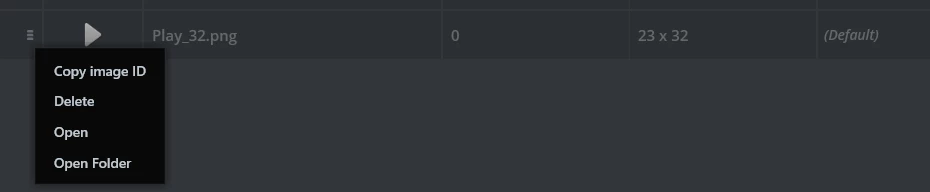
0693W00000DqG5XQAV.png

1 reply

Xzhiy.1
Associate II
August 23, 2021

TouchGFX Designer can't do this for you, you must make code by yourself, fortunately, there is many demo can help us, for example demo "audio_player_screen", my board is STM32H747i-DSCO. the demo can download from github.

following code extact from "audio_player_screen":

ClickListener<Button> playButton;//in header of view Class, you should use ClickListener other than use Button directly

playButton.setAction(playCallback);//in Constructor

playButton.setClickAction(playTouchedCallback);//in Constructor

void AudioPlayerView::playButtonTouched(const Button&, const ClickEvent& evt)

{

    coverImage.setTouched(evt.getType() == ClickEvent::PRESSED);

}

void AudioPlayerView::playButtonClicked(const AbstractButton& btn)

{

    presenter->playPauseClicked();

    playerState = presenter->isAudioPlaying() ? PLAYING : PAUSED;

    if (playerState == PLAYING)

    {

        playButton.setBitmaps(Bitmap(BITMAP_PAUSE_BUTTON_ID), Bitmap(BITMAP_PAUSE_BUTTON_ID));

    }

    else

    {

        playButton.setBitmaps(Bitmap(BITMAP_PLAY_BUTTON_ID), Bitmap(BITMAP_PLAY_BUTTON_ID));

    }

    playButton.invalidate();

...

}​

MMoha.3
MMoha.3AuthorBest answer
Associate III
August 24, 2021

Thank you, so I was able to do the task by using the setBitmaps function. Here's the code I came up with:

if (OSC_Status.Running_Stat == Stopped) { //from pause to play:
 	OSC_Status.Running_Stat = Running;
		RunButton.setBitmaps(touchgfx::Bitmap(BITMAP_DARK_BUTTONS_SQUARE_ICON_BUTTON_ID),
				touchgfx::Bitmap(BITMAP_DARK_BUTTONS_SQUARE_ICON_BUTTON_ID),
				touchgfx::Bitmap(BITMAP_BLUE_ICONS_PAUSE_32_ID),
				touchgfx::Bitmap(BITMAP_BLUE_ICONS_PAUSE_32_ID));
 // don't forget to invalidate
} else {					//from play to pause
 	OSC_Status.Running_Stat = Stopped;
		RunButton.setBitmaps(touchgfx::Bitmap(BITMAP_DARK_BUTTONS_SQUARE_ICON_BUTTON_ID),
				touchgfx::Bitmap(BITMAP_DARK_BUTTONS_SQUARE_ICON_BUTTON_ID),
				touchgfx::Bitmap(BITMAP_PLAY_32_ID),
				touchgfx::Bitmap(BITMAP_PLAY_32_ID));
 // don't forget to invalidate
}

also include "BitmapDatabase.hpp".

the bitmap id can be found in the images section of TouchGFX:

0693W00000DqG5XQAV.png