


A.Qasim
Associate II
July 2, 2022
Question

One TextArea has the ability to change fonts from a list on RUNTIME
  • July 2, 2022
  • 2 replies
  • 2874 views

0693W00000QKJi6QAH.jpgHi,

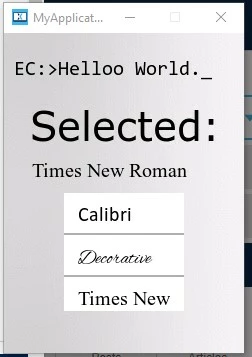
I am trying to achieve the functionality of a dropdown list having multiple fonts listed and upon selecting the desired font the textArea font gets changed at runtime.

As shown in Image the Selected font is "Times New Roman" and I want to make the textArea "EC:\> Hello World" written in that font and able to change it vice versa.

This topic has been closed for replies.

2 replies

Osman SOYKURT
Technical Moderator
July 4, 2022

Hello A.Qasim,

There's multiple way to do it, but the easiest would be to create multiple languages where you'll have the same translation but a different typography. Then you can call the setLanguage() function to switch between your fonts.

0693W00000QKOe9QAH.png 

0693W00000QKOexQAH.png0693W00000QKOf2QAH.png 

void Screen1View::ChangeFontCourrier()
{
 Texts::setLanguage(COURRIER);
 textArea1.invalidate();
 textArea1.resizeToCurrentText();
 textArea1.invalidate();
 
}

Don't forget this include this :

#include <texts/TextKeysAndLanguages.hpp>

I attached a project, you can use that for reference for your own project. Tell me if you succeed on it, that's an interesting project =)

/Osman

Osman SOYKURTST Software Developer | TouchGFX
Osman SOYKURT
Technical Moderator
July 4, 2022

Attached : Example.zip

Osman SOYKURTST Software Developer | TouchGFX
A.Qasim
A.QasimAuthor
Associate II
July 5, 2022

Hi Osman,

Thanks a lot for your help. One thing I am facing is that I want to keep the original text and want that text to be available in every font and that text is dynamic i.e., can be changed by the user.

I am thinking of using wildcard can that be possible? Is there any way to deal with this complexity? also if possible kindly point toward other methods to change the font.

Regards

-Arslan

Osman SOYKURT
Technical Moderator
July 5, 2022

Hi Arslan,

Yes you can totally use wildcard to do that. But remember to add the wildcard range to allow the letters you want, and this for each of your language/font.

0693W00000QKSG1QAP.png 

Then a simple strncpy would be enough.

 Unicode::strncpy(textArea1Buffer, "Hello Vivaldi", TEXTAREA1_SIZE);

0693W00000QKSH9QAP.png 

The other method I have in mind is to use binary fonts. We have an article about how to use it, I invite you to have a look at it :)

/Osman

Osman SOYKURTST Software Developer | TouchGFX