

heyo
Associate III
October 3, 2022
Question

Numkeypad

  • October 3, 2022
  • 5 replies
  • 2382 views

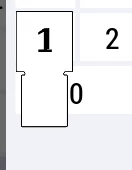
Im doing numbers keyboard and do not know how to change bitmap position then i press the button0693W00000UnCt2QAF.pngIm using this struct :0693W00000UnCweQAF.png
This topic has been closed for replies.

5 replies

Osman SOYKURT
Technical Moderator
October 3, 2022

Hello heyo,

Not sure what you're trying to do here. Why do use this struct ?

By the way, we recently shared here a number keypad widget that you can import and use (or get inspiration from). If it doesn't help you, please elaborate your issue.

/Osman

Osman SOYKURTST Software Developer | TouchGFX
heyo
heyoAuthor
Associate III
October 3, 2022

Hello @Osman SOYKURT​ ,

I'm using example which is in touchgfx examples . This struct is used to declare unicode char id, area occupied by key and bitmap shows then button is pressed. So I want to change highlighted bitmap position but there is no opportunity to do that. How I can do that?

Osman SOYKURT
Technical Moderator
October 4, 2022

Hello heyo,

Ok, so I guess you have a keyArray or something like that right ? When you'll instantiate your keys, you can specify the x and y value of the keyArea rect. I don't know which example you're using but I invite you to have a look on the Keyboard example that we provide. Check the KeyboardLayout.hpp file especially, it will be a big help I think.

/**
 * Array specifying the keys used in the CustomKeyboard.
 */
static const Keyboard::Key keyArray[30] =
{
 { 1, Rect(7, 61, 26, 40), BITMAP_KEYBOARD_KEY_HIGHLIGHTED_ID},
 { 2, Rect(7 + 28, 61, 26, 40), BITMAP_KEYBOARD_KEY_HIGHLIGHTED_ID},
 { 3, Rect(7 + 28 * 2, 61, 26, 40), BITMAP_KEYBOARD_KEY_HIGHLIGHTED_ID},
 ....
 ....
}

/Osman

Osman SOYKURTST Software Developer | TouchGFX
heyo
heyoAuthor
Associate III
October 4, 2022

Yes, its looks like that. When i change keyarea rect, changes pressed area position, not a highlighted bitmap position. I need to change bitmap position because now it looks like that:0693W00000UnImfQAF.pngIf i can edit keyarea rect and highlighted bitmap rect it would be nice.

Osman SOYKURT
Technical Moderator
October 4, 2022

Ok then maybe you'll need to have another keyboard then because the Layout struct doesn't differentiate the coordinate of your key unpressed and pressed.

 struct Layout
 {
 BitmapId bitmap; ///< The bitmap used for the keyboard layout
 const Key* keyArray; ///< The keys on the keyboard layout
 uint8_t numberOfKeys; ///< The number of keys on this keyboard layout
 CallbackArea* callbackAreaArray; ///< The array of areas and corresponding callbacks
 uint8_t numberOfCallbackAreas; ///< The number of areas and corresponding callbacks
 Rect textAreaPosition; ///< The area where text is written
 TypedText textAreaFont; ///< The font used for typing text
 colortype textAreaFontColor; ///< The color used for the typing text
 FontId keyFont; ///< The font used for the keys
 colortype keyFontColor; ///< The color used for the keys
 };

/Osman

Osman SOYKURTST Software Developer | TouchGFX
heyo
heyoAuthor
Associate III
October 4, 2022

@Osman SOYKURT​ :sad_but_relieved_face:

