RReta.1
Associate II
January 20, 2021
Solved

Memory/Flash usage analysis

  • January 20, 2021
  • 1 reply
  • 2946 views

Hello,

I am looking to perform a similar resource usage as explained here https://support.touchgfx.com/docs/basic-concepts/memory-usage/

However, I am wondering if there is a guide that is available using freely available tools to do

the memory analysis on the deployed code.

My environment is TouchGFX-Designer-4.16.0 and I am able to generate & deploy code to

an STM32F769I-DISCO board. I don't have dedicated IDEs installed yet.

I found C:/TouchGFXProjects/MyProjectName/gcc/Makefile

and I see the lines linker_options that eventually leads me to

TouchGFX\build\bin\application.map - Is this the correct file?

Its contents is not summarized as shown in the examples, so I am wondering if

 there are post processing steps that can be done to that file.

Or is there a better option?

Is the expectation to be able to just open the .cproject file in STM32CubeIDE and do a build?

An updated guide on the analysis based on STM32CubeIDE or VisualStudioCode maybe more accessible for more people that are just getting started.

Thanks for everyone's time!

This topic has been closed for replies.
Best answer by N. SANTINI

Hi,

This is indeed the map file generated when building from the Designer, using a Makefile-gcc toolchain, unfortunately ST does no provide some easy ways to analyze this file which can be quite huge.

However if you install STM32CubeIDE and open the .cproject you will be able to build, flash and debug your application without further effort as it is the default IDE.

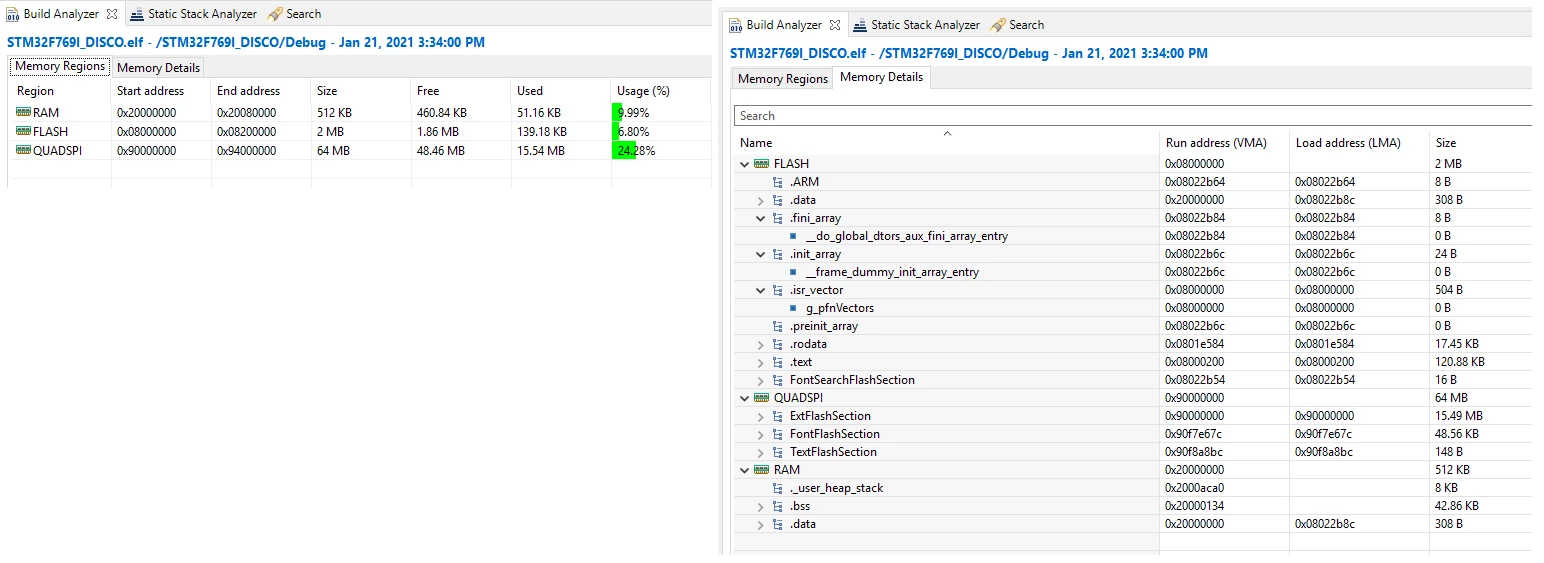
Moreover STM32CubeIDE provides some high level memory usage view, once your project is built through the "Build Analyzer" window, and in the same window but in the "Memory Details" tab you get a deeper view, region per region (as defined in the .ld scatter file) :

0693W000007CBr0QAG.png 

I hope this will help,

Best regards,

Nicolas

1 reply

N. SANTINI
N. SANTINIBest answer
ST Employee
January 21, 2021

Hi,

This is indeed the map file generated when building from the Designer, using a Makefile-gcc toolchain, unfortunately ST does no provide some easy ways to analyze this file which can be quite huge.

However if you install STM32CubeIDE and open the .cproject you will be able to build, flash and debug your application without further effort as it is the default IDE.

Moreover STM32CubeIDE provides some high level memory usage view, once your project is built through the "Build Analyzer" window, and in the same window but in the "Memory Details" tab you get a deeper view, region per region (as defined in the .ld scatter file) :

0693W000007CBr0QAG.png 

I hope this will help,

Best regards,

Nicolas

Tesla DeLorean
Guru
January 21, 2021

Back in ye-olde days, when programmers could program, and women could do math that put men on the moon and bring them safely back again we'd just write a script to process the .MAP and generate the statistics we were interested in...

Tips, Buy me a coffee, or three.. PayPal VenmoUp vote any posts that you find helpful, it shows what's working..