


Looking for resource or steps to get started LCD project using STM32H753 board?
I am working on a custom LCD project using STM32h753 Eval 2. Currently i dont have a tremendous knowledge in LCD. I tried to follow the example codes and some tutorial but not able to make it work. can you suggest any resource or steps to get started?
i am using a custom 1024*768 LCD. This LCD receives signals through LCDT. the config given by the manufacturer is
#define PanelHSyncWidth 43
#define PanelHSyncBackPorch 29
#define PanelVSyncWidth 6
#define PanelVSyncBackPorch 34
#define PanelHStart (PanelHSyncWidth+PanelHSyncBackPorch)
#define PanelVStart (PanelVSyncWidth+PanelVSyncBackPorch)
#define PanelWidth 1024
#define PanelHeight 768
#define PanelHTotal 1344
#define PanelVTotal 806
#define PanelMaxHTotal 2048
#define PanelMinHTotal 1120
#define PanelMaxVTotal 1024
#define PanelMinVTotal 776
#define PanelDCLK 65
#define PanelMaxDCLK 71
#define PanelMinDCLK 52
when i try to modify the example code with these data, i was able to get the LCD ON but did not get the expected result. 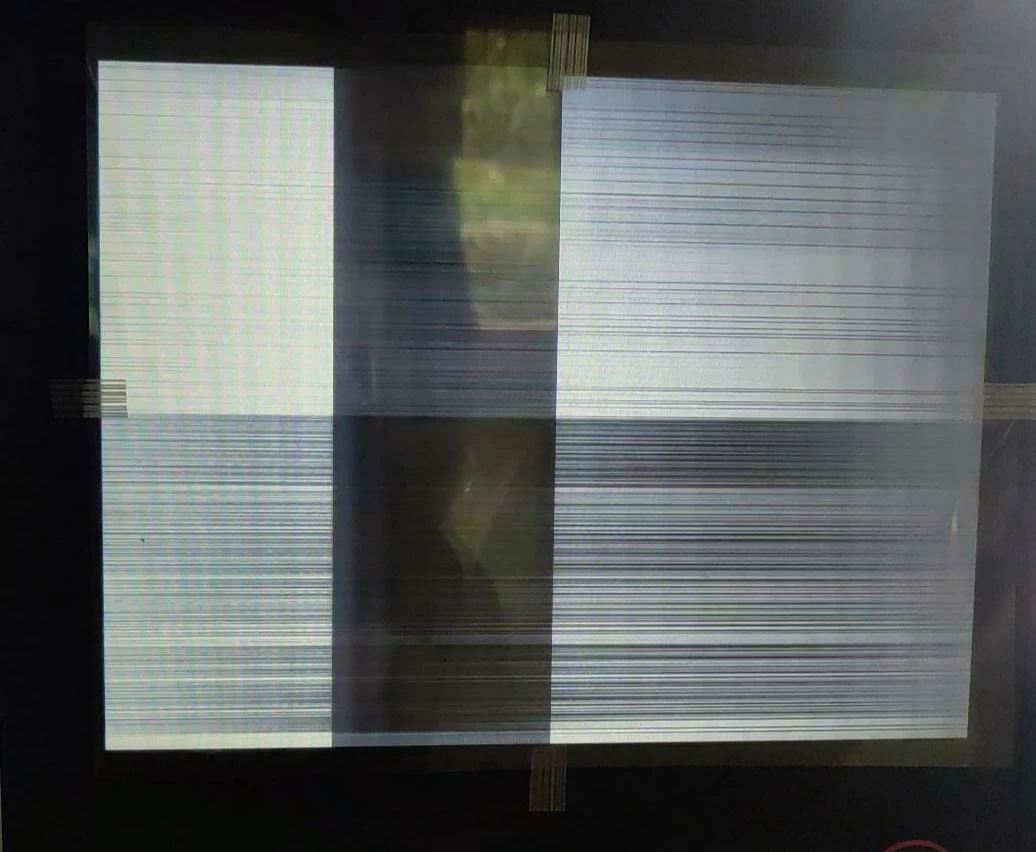
this is what i get when i change the sync config and clock. what are all the possible reasons where i am messing things up?
thanks in advance for providing your valuable time.:beaming_face_with_smiling_eyes: