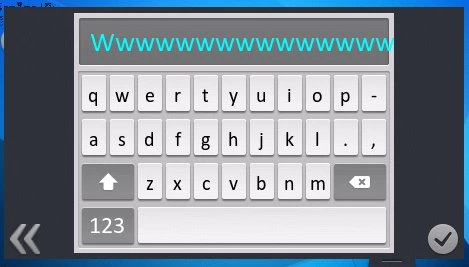
Keyboard widget and Custom Keyboard example - how to get scrollable text in the display field?
Hello.
I am in need of inputting large strings of text (larger than the width of the screen) using keyboard. I have managed to get a working keyboard, but after increasing the buffer size, the text is being cut off after it leaves the widget area.
I want to be able to scroll the written text left and right, or maybe even up and down. This would require me to somehow get a Scrollable Container as a parent for the text area, or rather the Rect textAreaPosition (which is part of Layout structure), which the text is being drawn on.
I have managed to increase the size of drawn text dynamically by calling setLayout(&layout) after changing the size of textAreaPosition, which means that Scrollable Container could work (although I wonder how will calling this method so fast impact the performance). The question is how to add Scrollable Container as a parent of Rect textAreaPosition, without changing the provided Keyboard widget code? Is it doable? Maybe there is an easy way of doing what I want? Any help appreciated.