manto.1
Associate III
December 9, 2022
Solved

Issue with importing translations into TouchGFX!!!

  • December 9, 2022
  • 8 replies
  • 3024 views

I sucessfuly exported texts.xml with translations.rb

but when I try to import .xlsx back to .xml. I get the error sheet Typography not found!?

> translations.rb import texts.xlsx texts.xml
 
sheet 'Typography' not found
 
An error occurred during translations import!

Bellow are the files used

This topic has been closed for replies.
Best answer by ferro

Hi,

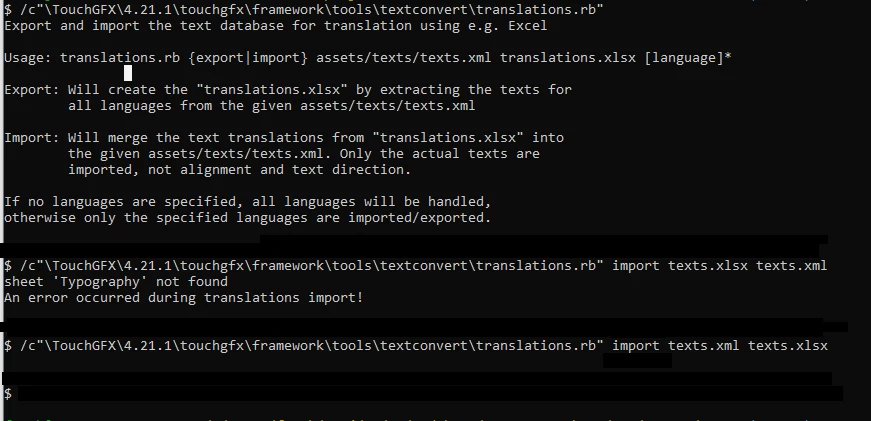
Could not be the problem in swapped .xml and .xlsx extentions in your command ?

Here is what my system shows:

0693W00000YA557QAD.pngAlso, my conversions run without .xsd file present.

8 replies

Romain DIELEMAN
ST Employee
December 9, 2022

Hi,

Could you share which TouchGFX version you are working with ? Are you sure you are working in the correct folder/path ? (since the error message says that it cannot find Typography tool)

/Romain

manto.1
manto.1Author
Associate III
December 9, 2022

I copied the texts.xml and texts.xlsx to the folder where TouchGFX is installed where the translations.rb file is:

(..\TouchGFX\4.20.0\touchgfx\framework\tools\textconvert)

Then I run the command:

ruby translations.rb import texts.xlsx texts.xml 

manto.1
manto.1Author
Associate III
December 9, 2022

I am working with TouchGFX 4.20.0

manto.1
manto.1Author
Associate III
December 9, 2022

I copied the texts.xml and texts.xlsx to the folder where TouchGFX is installed where the translations.rb file is:

(..\TouchGFX\4.20.0\touchgfx\framework\tools\textconvert)

Then I run the command:

ruby translations.rb import texts.xlsx texts.xml 

manto.1
manto.1Author
Associate III
December 9, 2022

0693W00000WKd9kQAD.png

manto.1
manto.1Author
Associate III
December 12, 2022

Found the solution.

It is necesary to copy also the texts.xsd file to the path. This was not clearly specified in the documentation.

https://support.touchgfx.com/4.20/docs/development/ui-development/touchgfx-engine-features/texts-and-fonts

ferro
ferroBest answer
Lead
February 6, 2023

Hi,

Could not be the problem in swapped .xml and .xlsx extentions in your command ?

Here is what my system shows:

0693W00000YA557QAD.pngAlso, my conversions run without .xsd file present.