

JJIAN.21
Associate II
February 20, 2021
Solved

Is there a demo that generates QRCode

  • February 20, 2021
  • 17 replies
  • 9194 views

The chip is:STM32F429

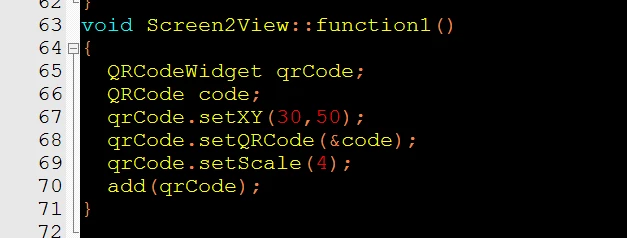
When I was using the downloaded QRcode program, I found that the program crashed. The use method is as follows:0693W000007YzIvQAK.png
This topic has been closed for replies.
Best answer by Alexandre RENOUX

Hello JJIAN.2,

I've done a UI example to use the QRCode, you can refer to it.

The example was done for F746-DISCO so the resolution is 480x272. You can adapt accordingly.

Since it's only the UI part, to make it run on a board you need to open your Application Template .touchgfx project in Designer. Click on Edit-> Import GUI -> Browse -> Select the .touchgfx file enclosed.

Hope this will help,

When your question is answered, please close this topic by choosing Select as Best.

/Alexandre

17 replies

Alexandre RENOUX
Alexandre RENOUXBest answer
Visitor II
February 22, 2021

Hello JJIAN.2,

I've done a UI example to use the QRCode, you can refer to it.

The example was done for F746-DISCO so the resolution is 480x272. You can adapt accordingly.

Since it's only the UI part, to make it run on a board you need to open your Application Template .touchgfx project in Designer. Click on Edit-> Import GUI -> Browse -> Select the .touchgfx file enclosed.

Hope this will help,

When your question is answered, please close this topic by choosing Select as Best.

/Alexandre

JJIAN.21
JJIAN.21Author
Associate II
February 22, 2021

Thank you very much,I run the code as you said,it worked.

Agran.1
Associate III
April 9, 2021

Hello,

I wanted to put your example on the STM32H7B3I-DK.

"On a board you need to open your Application Template .touchgfx project in Designer. Click on Edit-> Import GUI -> Browse -> Select the .touchgfx file enclosed."

but it doesn't work in Run simulator and in Run Target. (picture attached)

Thanks in advanced to all your replies

JJIAN.21
JJIAN.21Author
Associate II
April 10, 2021

Hi

Agran.1

Maybe there's something wrong with your steps,I've done a UI example,You can try this one first。The TouchGFX version is :TouchGFX 4.16.0 Designer

Agran.1
Associate III
April 13, 2021

Thank you,

I also use the TouchGFX 4.16.0 Designer. but it doesn't work on the STM32H7B3I-DK and I don't understand why.

Hello Alexandre RENOUX (ST Employee),

Do you know why this doesn't work not on the STM32H7B3I-DK even in Run simulator of TouchGFX 4.16.0 Designer

Best regards,

