


scottSD
Senior III
April 29, 2020
Question

Is the Application Template for the Stm32F69i-Discovery correct?

  • April 29, 2020
  • 19 replies
  • 5273 views

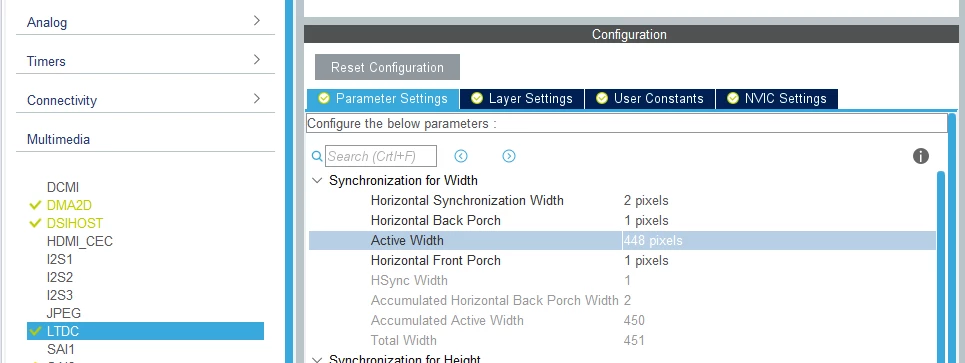
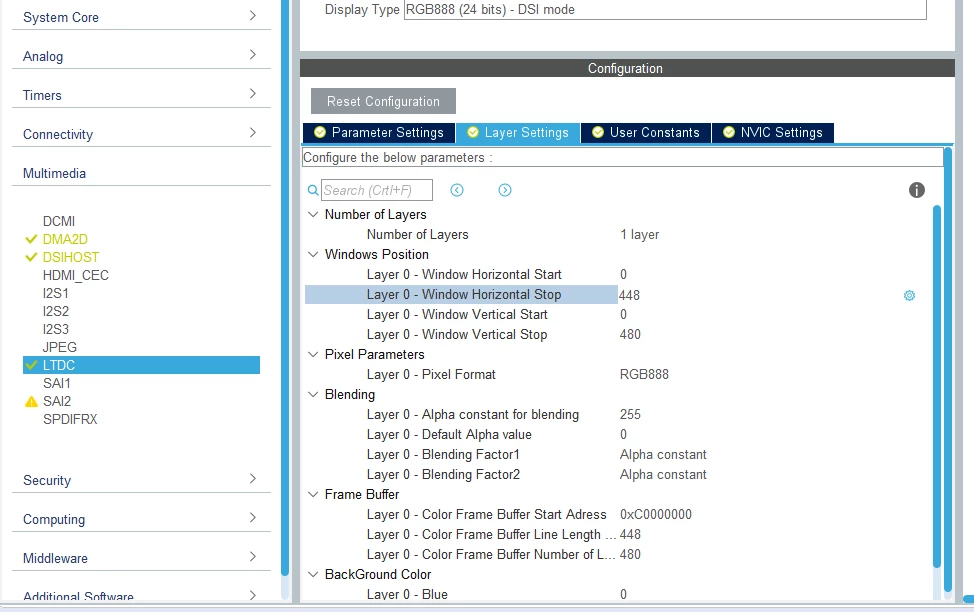
I recently tried the Application Template for the Stm32F769i-Discovery board and noticed that the horizontal sizes in the CubeMX file are 448 instead of 800:
0693W000000WfxmQAC.png

0693W000000WfxOQAS.png

This appears to be incorrect.

This topic has been closed for replies.

19 replies

Martin KJELDSEN
Principal III
April 29, 2020

It's correct, but confusing - I agree =) It has to do with the "chunks" of the framebuffer we transfer to the DSI display for 16 and 24 bits respectively, to avoid tearing. And 448*2=896 also has special significance. If you check the HAL code you'll find that we split the framebuffer into these areas and transfer one at a time until done. (TE and EndOfRefresh interrupt handlers)

You can't represent this intention in CubeMX in a clear way, though :)

scottSD
scottSDAuthor
Senior III
April 29, 2020

@Martin KJELDSEN​  thanks for your quick reply.

That does explain it a bit. I also see that the following function is being called in MX_LTDC_Init():

 HAL_LTDC_SetPitch(&hltdc, 800, 0);

scottSD
scottSDAuthor
Senior III
April 29, 2020

The reason I ran into this is that I am comparing animation performance between this board and my custom board and trying to figure out why the Discovery board has better performance (with the same TouchGFX project). I was surprised it performs better because it is using DSI and my board is RGB--but it might make sense because with DSI, TouchGFX is Single Buffer strategy and because my display is RGB, I had to set TouchGFX to Double Buffer strategy.

Of course there are many other differences with one BIG one being my board has an STM32H743.

Martin KJELDSEN
Principal III
April 29, 2020

You do not necessarily need to use double FB with Parallel RGB, but ultimately a good idea if you have the RAM for it and a performance heavy GUI (animations, etc). The H7 does make a difference :)

scottSD
scottSDAuthor
Senior III
April 29, 2020

@Martin KJELDSEN​ 

Just checking, to verify your statement. Would you expect the H7 to have poorer performance than the F769?

I noticed that the F769 Disco board has a 32 bit bus to the SDRAM, but I set it up as 16 bit and than did not reduce it's performance.

FYI, I am using a cacheable container (which you told me about weeks ago) which made a SIGNIFICANT improvement.

scottSD
scottSDAuthor
Senior III
May 1, 2020

@Martin KJELDSEN​ 

According to CacheableContainer's comment header for setCacheBitmap, it looks to me as if items inside the container are placed in a dynamic bitmap, so I am surprised you say this doesn't pertain to images in QUADSPI:

 /**
 * @fn void CacheableContainer::setCacheBitmap(BitmapId bitmapId);
 *
 * @brief Set the dynamic bitmap into which the container content will be rendered.
 *
 * Set the dynamic bitmap into which the container content will be rendered.
 *
 * @param bitmapId Id of the dynamic bitmap to serve as a render target.
 */
 void setCacheBitmap(BitmapId bitmapId);

But I found what was causing my major issue. It improves my performance when I actually ENABLE it:

 containerBackground.setCacheBitmap(bmpIdGaugeBackground);
 containerBackground.enableCachedMode(true);
 containerBackground.updateCache();

I had forgotten to do this. I had done it in an earlier project but missed it in my latest project (insert banging head on wall smiley here.....).

A couple of things that would be very useful is that when the Cacheable option is checked in the Designer, it would call enableCachedMode() within the generated gui base screen code. I have a feeling other people think that when this option is clicked, the container is actually cached. It appears that it is not until enableCacheMode() is called. People need to know that updateCache() needs to be called also.

Of course, if one doesn't setup a dynamic bitmap cache, it wouldn't be cached anyway. I suggested in another thread that you add the setting up of dynamic bitmap cache in the TouchGFX Generator because it needs to be done when calling registerBitmapDatabase() which is in a generated file and is overwritten by a CubeMX.

That thread:

https://community.st.com/s/question/0D53W000004k3sdSAA/is-there-a-way-to-add-user-code-areas-to-touchgfx-generator-files-so-user-code-is-not-over-written-by-a-cubemx-generation

Even so, it does not answer why my performance was worse in they H7 compared to the F769-Disco when caching was disabled in both. However, now when I have the cacheableContainer enabled in both, the H7 does slightly out-perform it.

scottSD
scottSDAuthor
Senior III
May 5, 2020

Below is ST's article explaining the Cacheable Container for anyone who may run into this:

https://support.touchgfx.com/docs/development/ui-development/scenarios/achieving-better-performance-with-cacheable-container/