


Solved
Is it possible to display continuous data on scroll wheel container?
I have been trying to display continuous data on Scroll wheel container for the past 2 months but have been very unsuccessful. Could someone help or tell me if it's even possible to do that?? The example in the documentation does not help in that regard.
I would like to display a counter that goes from 0 to 255 on a scroll wheel but what I get is the exact same value on each row of the scroll updating in real time. What I want is each counter value displayed on each row, e.g
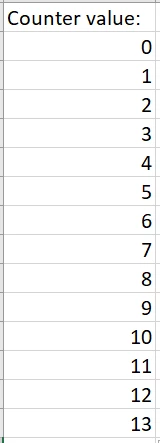
This is my customContainer setup:
void CustomContainer2::RX_UART(char* data)
{
	TX_BufferArea.setWideTextAction(touchgfx::WIDE_TEXT_WORDWRAP);
	sprintf(USART_Array, "%d", data);
	Unicode::strncpy(TX_BufferAreaBuffer, USART_Array, TX_BUFFERAREA_SIZE);
	TX_BufferArea.invalidate();
}
This is displayed via the View:
void Screen2View::scrollWheel2UpdateItem(CustomContainer2& item, int16_t itemIndex)
{
	item.RX_UART((char*)CounterTimer); //I feel itemIndex should be somehow added to this line here but I don't know how to do that codewise...Please help!!

	int indexOfitemAtTopOfTheList = scrollWheel2.getSelectedItem();
	scrollWheel2.animateToItem(indexOfitemAtTopOfTheList + 1);
}
In the main:
volatile uint8_t CounterTimer = 0;

void HAL_TIM_PeriodElapsedCallback(TIM_HandleTypeDef *htim)
{
	if(htim->Instance == TIM2)
	{
		CounterTimer++; //Incremented every 1 second
 }
}
