


Juliusz Hoffman
Visitor II
Sep 4, 2020 2:02 PM UTC
Question

Invalid font displayed on canvas in TouchGFX Designer

Hi,

I've came across a weird bug, where Designer displays a completely different font in the design window than is selected in the Typography . On compilation (emulator or on device) appropriate font is displayed. Example:0693W000003QoEgQAK.jpg
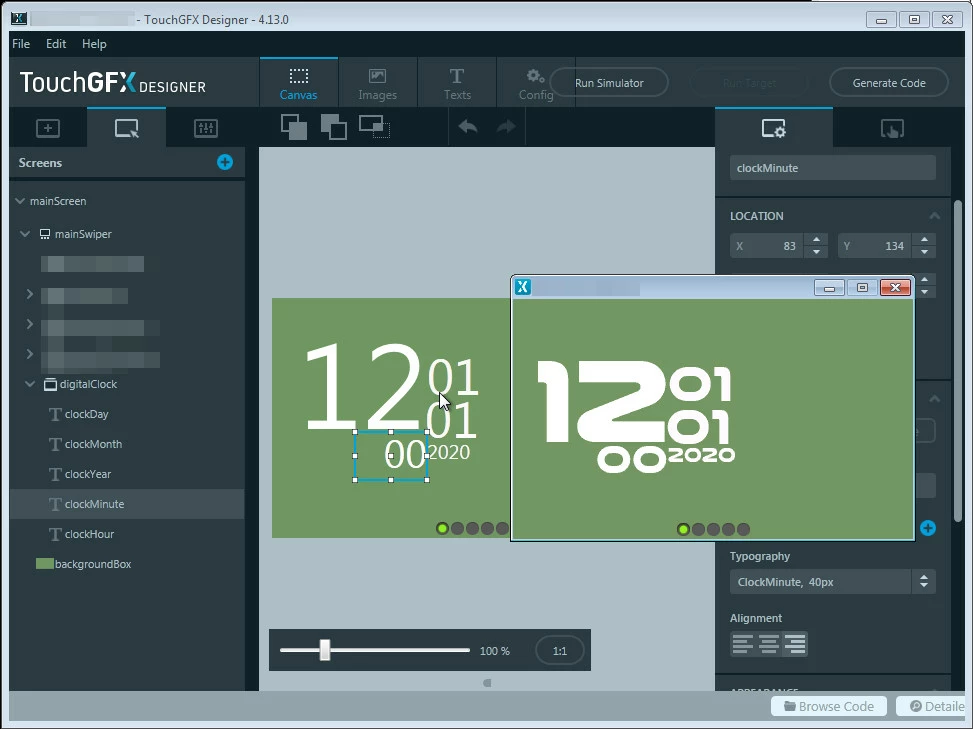
As you can imagine, sizing and placing of text elements is extremely annoying.

I'm specifically talking about the Nullshock Bold font, which you can find here: https://www.dafont.com/nulshock.font

Any hints on how to solve this would be appreciated.

This topic has been closed for replies.

11 replies

Romain DIELEMAN
ST Employee
Sep 7, 2020 8:49 AM UTC

Just tested it, you apparently found a font file that we cant handle within Designer :grinning_face_with_sweat: I also tried to download it and see if it was recognize as a font installed in Windows but still could not find it. I talked to a colleague who will have a look, but it is mainly bad luck for now, I guess you could try to work wihtin Designer with a look alike font to do the settings but this might be complicated for nothing. Good luck :|

/Romain

scottSD
Senior III
Jul 14, 2022 7:35 PM UTC

Any updates on this? We just ran into a similar problem.

Any idea what it is about a font that the Designer cannot handle?

Yoann KLEIN
ST Employee
Jul 15, 2022 9:38 AM UTC

Hello @scottSD​ ,

Unfortunately this issue hasn't be resolved yet.

I will get in touch with my colleagues regarding that.

Thanks for your report,

/Yoann

Yoann KLEINST Software Developer | TouchGFX
scottSD
Senior III
Jul 15, 2022 1:11 PM UTC

@Yoann KLEIN​ 

Thanks for your quick reply.

We are making our own custom fonts. If we knew what issue(s) the Designer had with the font file, we might be able to avoid this issue. So any info you can provide on that would be appreciated.

In addition to this, there is another frustrating issue with the Designer. The Designer doesn't place the text in the same location that the generated and/or simulated code does. Having to constantly simulate to verify exact location of the text is quite cumbersome.

I have asked about this in the past and at that time, it was stated that ST is aware of it so it is likely on a list somewhere to be investigated.

SWilh.1
Visitor II
Aug 1, 2022 8:26 AM UTC

I am having the same issue. As @scottSD​ stated, constant simulation is necessary to check if the fonts have the correct location on the screen. Without any observation of screen shown by the simulator this makes it nearly impossible to place the texts correctly.

Would be great if this gets fixed. Thanks.

scottSD
Senior III
Aug 4, 2022 7:17 PM UTC

@Yoann KLEIN​ 

Any updates on my (now 20 days old) question ?????

We ran into another problem. We would like to use a custom font we are making, but now the TouchGFX Designer will not even list the font in it's list of available fonts, whether we copy it to the assets directory or install it in Windows. It is an OTF font.

So, we cannot even use the font in our design regardless if we can see it correctly in the Designer or not.

Any help in understanding why the Designer doesn't recognize a font would be appreciated.

Tesla DeLorean
Guru
Aug 4, 2022 7:26 PM UTC

Yeah anything specific that tickles this issue from the size, dimension, parsing, would a) help identify problematic files, and b) allow people to resize or adjust to accommodate the down-stream failings..

Two years in and not having any insight doesn't seem reasonable. So if you're not going to fix it, at least give people something to swing at.

Tips, Buy me a coffee, or three.. PayPal Venmo (See Profile) Up vote any posts that you find helpful, it shows what's working..
scottSD
Senior III
Aug 4, 2022 7:29 PM UTC

For anyone who runs into this....

I did find out what was wrong with the Designer not seeing the font. Font file names (and likely any other file) cannot have spaces in them.

When I changed the file name so that no spaces were in the name, the Designer does see it and puts it in the list.

derek2399
Associate III
Dec 29, 2022 5:37 PM UTC

Thanks so much for this reply. I had included the font in Windows as well and it still was not recognised. Saved me another day (or two) guessing!:grinning_face: