


HR M.1
Associate
February 18, 2021
Question

Interface Hardware button to highlight menu in screen

  • February 18, 2021
  • 2 replies
  • 1481 views

Hi Team, 

I'm working on Touchgfx(TFT LCD - 240x320) for STM32H743BIT6 microcontroller.

I need to design a screen which contains list of menu options and need to highlight the respective menu with cursor pointing to it. 

Can anyone suggest how to interface a hardware button to highlight menus with cursor as shown in the below image 
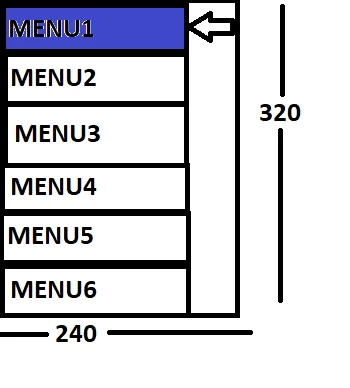
0693W000008GVcoQAG.pngProvide some reference sample code or video links or document to work on it. 

Thank you

Harsha

This topic has been closed for replies.

2 replies

Romain DIELEMAN
ST Employee
February 18, 2021

Hi,

To understand how to communicate between a hardware button and your UI you can look at the Backend communication article in the documentation and the provided examples. If you have the time I would advise following the official TouchGFX workshop from STmicroelectronics, the 11th section seems to be what you are looking for.

Karl did a couple of good videos a while back where he would fetch data from a sensor and use it in his UI, you can follow it and replace it with the inputs from a button. He uses an old version of TouchGFX but the backend communication process is the same.

I would also advise to look at Hans' youtube channel when you will integrate TouchGFX on your custom hardware.

/Romain

MM..1
Super User
February 18, 2021

Menu isnt simple , i make it over more screens, but some sample code here

void Screen2View::curdown()
{
	scrollList1ListItems[cursorpos].selit(0);
	if (cursorpos < scrollList1.getNumberOfItems()-1)
		{
		cursorpos++;
		}
	else cursorpos=0;
	scrollList1ListItems[cursorpos].selit(1);
	scrollList1.animateToItem(cursorpos,14);
scrollList1.invalidate();
}
 
void Screen2View::curup()
{
	scrollList1ListItems[cursorpos].selit(0);
	if (cursorpos > 0)
		{
		cursorpos--;
		}
	else cursorpos=scrollList1.getNumberOfItems()-1;
	scrollList1ListItems[cursorpos].selit(1);
	scrollList1.animateToItem(cursorpos,14);
scrollList1.invalidate();
}

method selit(bool) is for custom container update...